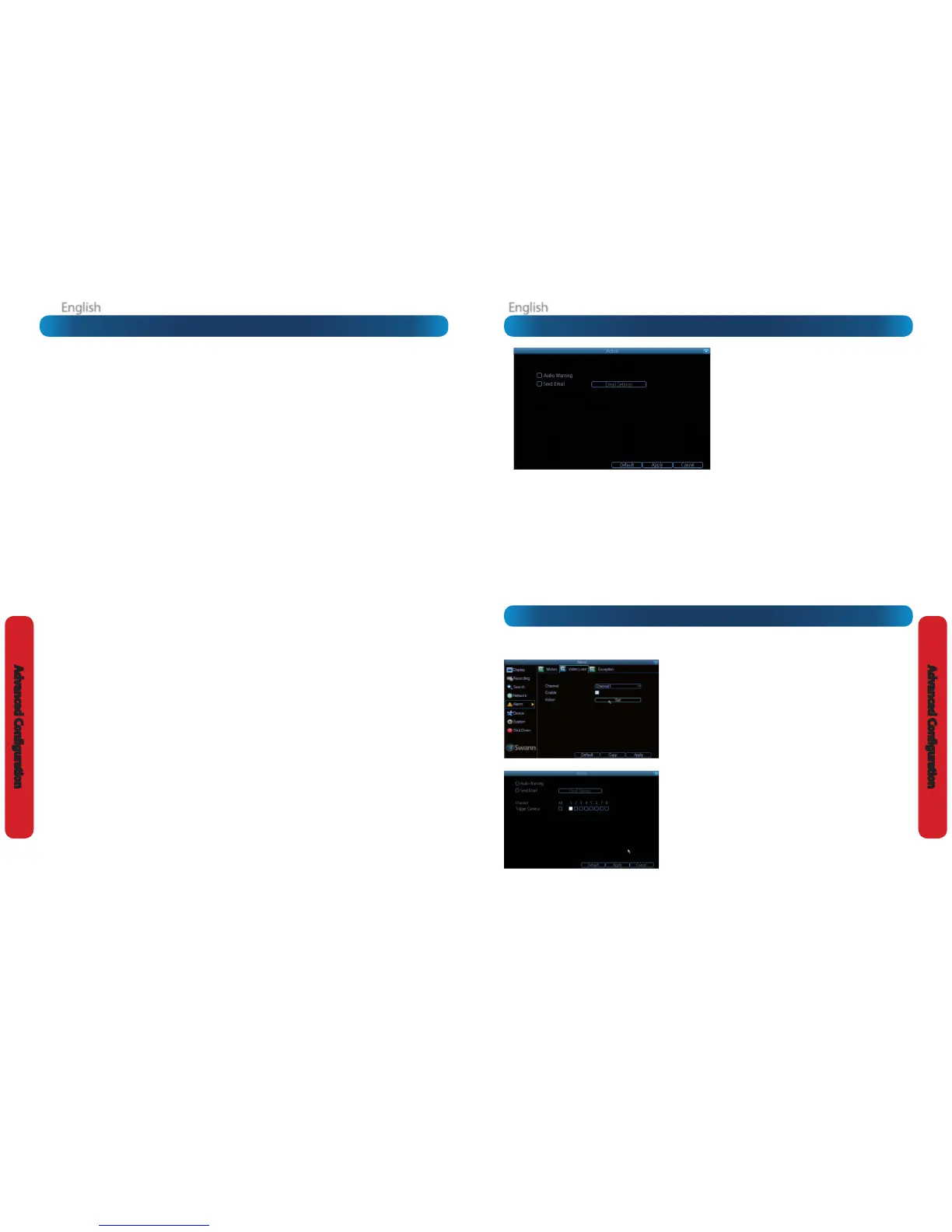
Alarm: Video Loss
Alarm: Video Loss
Video Loss is regarded as a potential alarm event, and is considered to occur
any time that the DVR doesn’t receive an active video signal on any of its
inputs.
The default behaviour of the DVR, when a channel has no incoming video
signal, is simply to display “Video Loss” in white text on a black background
over the associated channel. If you’re not using all the inputs on your DVR,
then some channels will be in “permanent” Video Loss state. Just be sure that
you don’t enable a video loss action for these channels.
Channel: Which channel/camera you’d like to set the Video Loss behaviour
for.
Enable: Whether the selected channel has video loss monitoring active or
not.
Schedule: Alters when the current Video Loss Action will be active.
Action: The action you’d like the DVR to take when this event occurs. It’s set
in the same way as the Action for any other event.
Alarm: Video Loss - Action
Audio Warning: The DVR will use its internal buzzer to emit an alarm tone. It
sounds like an old computer indicating an error, or a large truck backing up.
Send Email: The DVR will send an auto-email alert when the event type
you’ve selected occurs. The Email Settings button will take you to the same
email conguration screen accessible from the Network menu - see “Network:
Advanced: Email Settings” on page 41 for details.
Alarm: Motion Detection - Action
Audio Warning: The DVR will use its internal buzzer
to emit an alarm tone. It sounds like an old computer
indicating an error, or a large truck backing up.
Send Email: The DVR will send an auto-email alert when
the event type you’ve selected occurs. The Email Settings
button will take you to the same email conguration
screen accessible from the Network menu - see “Network:
Advanced: Email Settings” on page 41 for details.
Trigger Camera: You can dene one camera’s motion
detection to trigger recording on one or more other
cameras.
This can be useful in a number of situations. For example:
• If you have two cameras overlooking a yard, one with a wide view from well overhead and one with a much narrower view
of a corner or path. You may nd that using the camera with the narrow view for motion detection gives fewer false triggers
and doesn’t miss an event as often as the really wide view might, so triggering the wide view to record as well ensures you
know where the subject went after they left the narrow view.
• One camera might face a public area, while another camera looks down a private corridor which exits into the public area.
Having the camera in the private area trigger the one in the public area to record can give you a record of where a subject
went after they left the private area, without lling your hard drive with recordings triggered by random passersby.
Alarm: Motion Detection Notes
Motion Detection Compatibility
You’ll be able to use the DVR’s motion detection with almost all
static, wired cameras.
PTZ systems are fundamentally incompatible with motion
detection. Avoid enabling motion detection on a channel which
has a PTZ system attached to it - especially when the PTZ system is
set to Cruise Mode.
Wireless cameras are not recommended for use with the motion
detection - the visual distortion and dropped frames caused by
wireless transmission of video data give numerous false triggers.
False Triggers
Setting the motion detection at high sensitivity levels (4
or lower) increases the frequency of false alarms. On the
other hand, low sensitivity levels (20 or higher) increase
the risk that a signicant motion event (such as an
intruder) will not trigger the motion detection to record.
Check the Motion Detection settings both during the day
and at night. In low-light conditions (or when your cameras
are using infrared night vision) the DVR may be more or less
sensitive to motion, depending on your unique circumstances.
The dierence might be very dramatic!
Image Sensors: CMOS and CCD
There are two kinds of CCTV cameras out there: CMOS and
CCD. Neither technology is inherently “better” but they’re quite
dierent and you may need to adjust your motion detection
sensitivity to suit the kind of cameras you have.
CCD: A Charged-Coupled Device outputs a clear, stable image. It’s
the best kind of sensor to use with motion detection, and typically
requires lower settings (that is: lower number, more sensitive).
CMOS: A Complementary Metal–Oxide–Semiconductor is a
dierent kind of image sensor, producing bold, vibrant images.
It tends to have more noise than CCD, and typically requires a
higher setting (that is, a higher number, which is less sensitive).
Weather
The weather conditions are going to aect your motion detection.
Dramatic weather phenomenon such as heavy rain, strong
winds, lightning and so on, may trigger the motion detection
with surprising frequency.
On the other hand, things like fog, mist and other obscuring
kinds of weather might mask or obscure something moving to
the point that the DVR fails to detect them.
Here are a few steps you can take to minimize the amount of
noise in your images.
• Try adjusting the Image Settings (see “Display: Camera”
on page 28 for details) to ne-tune the brightness and
contrast to get a more stable image.
• Limit the motion sensitive area to only the areas in view
that a target could be. In particular, large featureless areas
in the camera’s view are the ones most likely to give false
triggers - turning o the motion sensitivity to any area
a target cannot move in front of will help reduce false
triggers.
Note: The motion detection feature will seem more sensitive
at night, particularly when using low-light or active infrared
cameras. We recommend that you test your motion detection
sensitivity both during the day and at night to ensure your
sensitivity setting is suitable for either lighting condition.
Some tips to customizing your motion detection
sensitivity and actions:
• Consider how important it is to be notied of motion
events as they happen.
Using the email alerts is a great way to be kept up-to-speed
on what’s happening, but may quickly become annoying if
something occurs which will generate a number of false triggers.
As a rule, we suggest employing the email alert only on interior
cameras during times that no one should be moving about in
front of them.
• It can be important to have a complete record of a
subject’s movements and actions for legal reasons.
If your cameras capture an illegal event (typically an intruder,
but we’re continually surprised by stories from our users) it is
important to have as much information as possible.
For example, images of someone in your home may not actually
prove that they broke in - but footage of them breaking a window
does. If you use a camera inside the home to trigger all exterior
cameras with pre-record enabled, then you will have a record of
how they entered in addition to what they did.
• Always consider what’s really important.
Which is the bigger problem - a dozen false triggers per day, or
missing one critical event?
There’s no magic setting which will make motion detection work
perfectly. There will always be some events that it’s not sensitive
enough to catch, or minor happenings that will trigger an overly
sensitive camera to record. Typically, the best motion detection
settings are one’s that give few false triggers but don’t miss
anything.
Even motion detection which false triggers a few times per hour
will still save a signicant amount of hard drive space compared
with a constant recording schedule for the same duration.












 To Next Page