Connecting Additional DevicesConnection Diagram
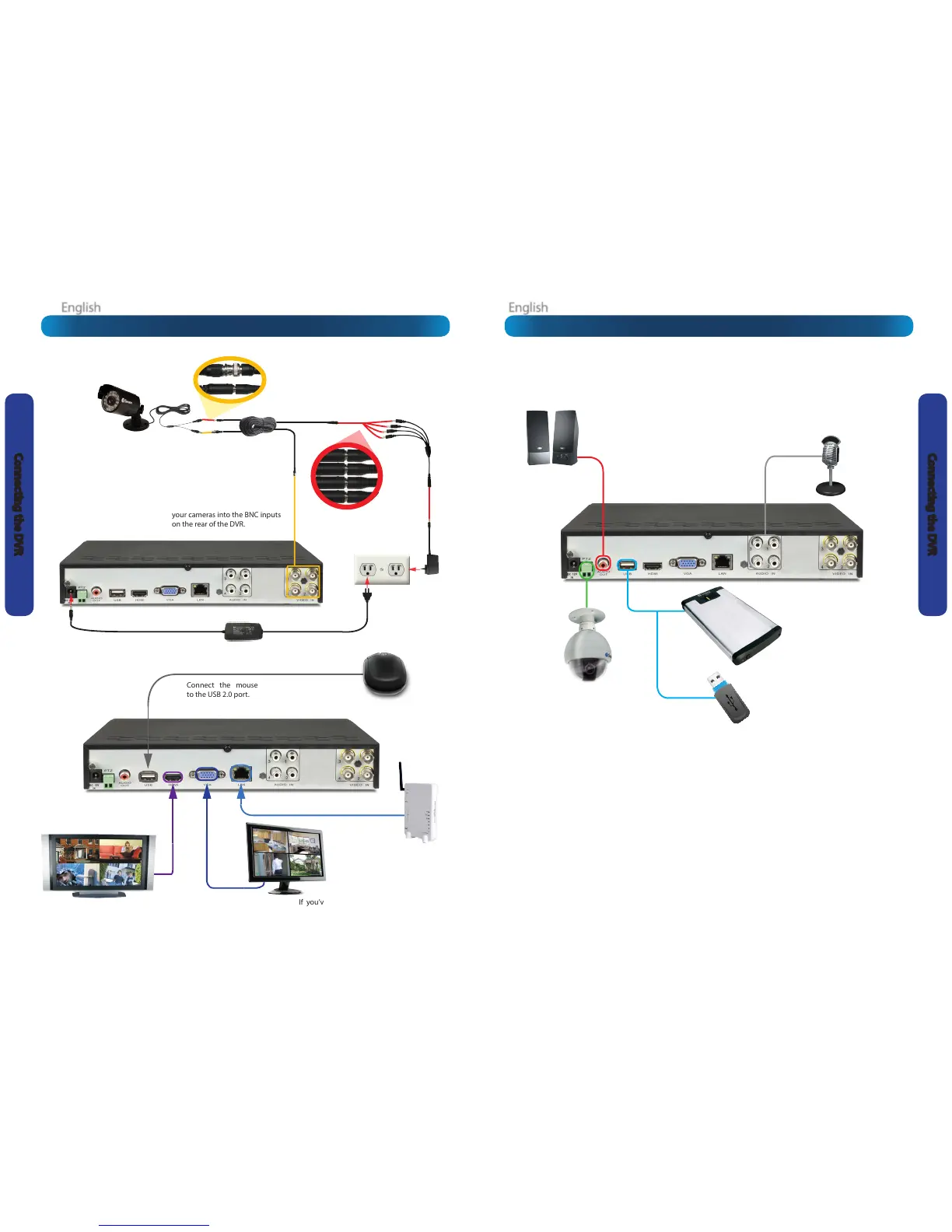
Connect the BNC outputs from
your cameras into the BNC inputs
on the rear of the DVR.
Connect your cameras to
power, using the power-
splitter (if included).
Connect the DC12V
Output from the
power supply to
the power input.
Connect the power
supply to a wall
outlet.
Connect the mouse
to the USB 2.0 port.
If you’ve got a monitor with
VGA but not HDMI, connect it
to the VGA output on the DVR.
If you’ve got a TV or monitor
with HDMI in, connect to
the HDMI port on the DVR.
Connect an Ethernet
cable from the LAN port
on the DVR to a spare
port on your router.
The Audio Out port can be
used to connect a stereo,
speakers, headphones
or other external sound
device.
The Audio In ports can
be used to connect
audio devices to the
DVR. Obviously, your
microphone probably
won’t look like that one
- they’re often built into
cameras.
An external hard drive with
a USB-compatible interface
(USB 2.0 recommended)
can be connected to the
USB port of the DVR.
The USB port also supports
USB solid-state storage,
such as ash drives.
The PTZ port (RS485)
can be used to connect
compatible PTZ devices,
such as this Swann PTZ
dome.












 To Next Page