* Availability of this port is dependent on the model of your DVR.
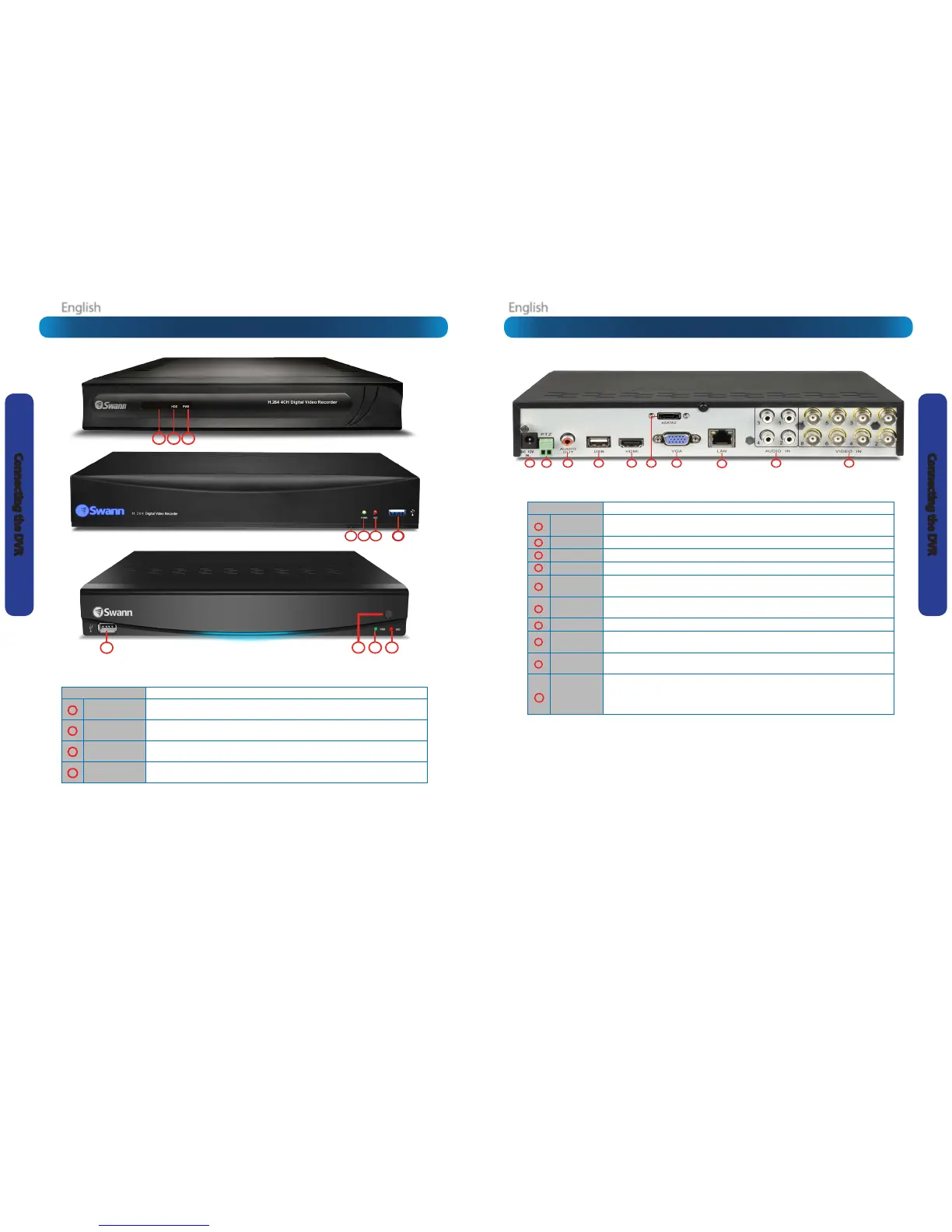
Name Funcon
DC 12V IN
Where you connect the included DC 12V power adapter. Use only the supplied power
adapter with the DVR, and use the power adapter only with the DVR.
PTZ (RS485)
To connect the RS485 cables to control a PTZ (pan, tilt, zoom) device on the DVR.
AUDIO OUT
RCA port for audio output. Used to connect your speaker or headphone.
USB
For connecting a USB mouse or a USB storage device.
HDMI
The primary video output of the DVR. For the highest possible video output quality, we
suggest using this output.
eSATA2*
To connect an external hard drive which acts as a live recording drive in the same
manner as the installed HDD.
VGA
For connecting a television or PC monitor with a VGA input.
LAN
Where you can connect the DVR to a network, typically directly into the router or
network switch.
AUDIO IN
RCA port for audio input. Used to connect audio source such as the camera’s built-in
microphone.
VIDEO IN
These are your video inputs. The number of video inputs on your DVR varies depending
on the DVR model you have. Each accepts a standard composite video signal and
connects via a BNC connector. The channels are labelled by numbers in the same order
as they appear on your DVR’s interface.
1
4
5
6
7
8
9
10
2
3
Name Funcon
Infrared Sensor
Monitors signals coming from the infrared remote control. If this sensor is blocked or
obstructed, then the funconality of the remote will be impaired.
HDD
Hard Drive Indicator. Lights up when the hard drive is acve. Flashes rapidly when
recording or searching (in me with the read/write cycles).
POWER/PWR
Power indicator. This LED is illuminated when the DVR is connected to power and
switched on.
USB Port
For connecng USB external storage to the DVR for backup, or for applying new rmware.
1
4
2
3












 To Next Page