36
SwannEye IP Camera
Administrator
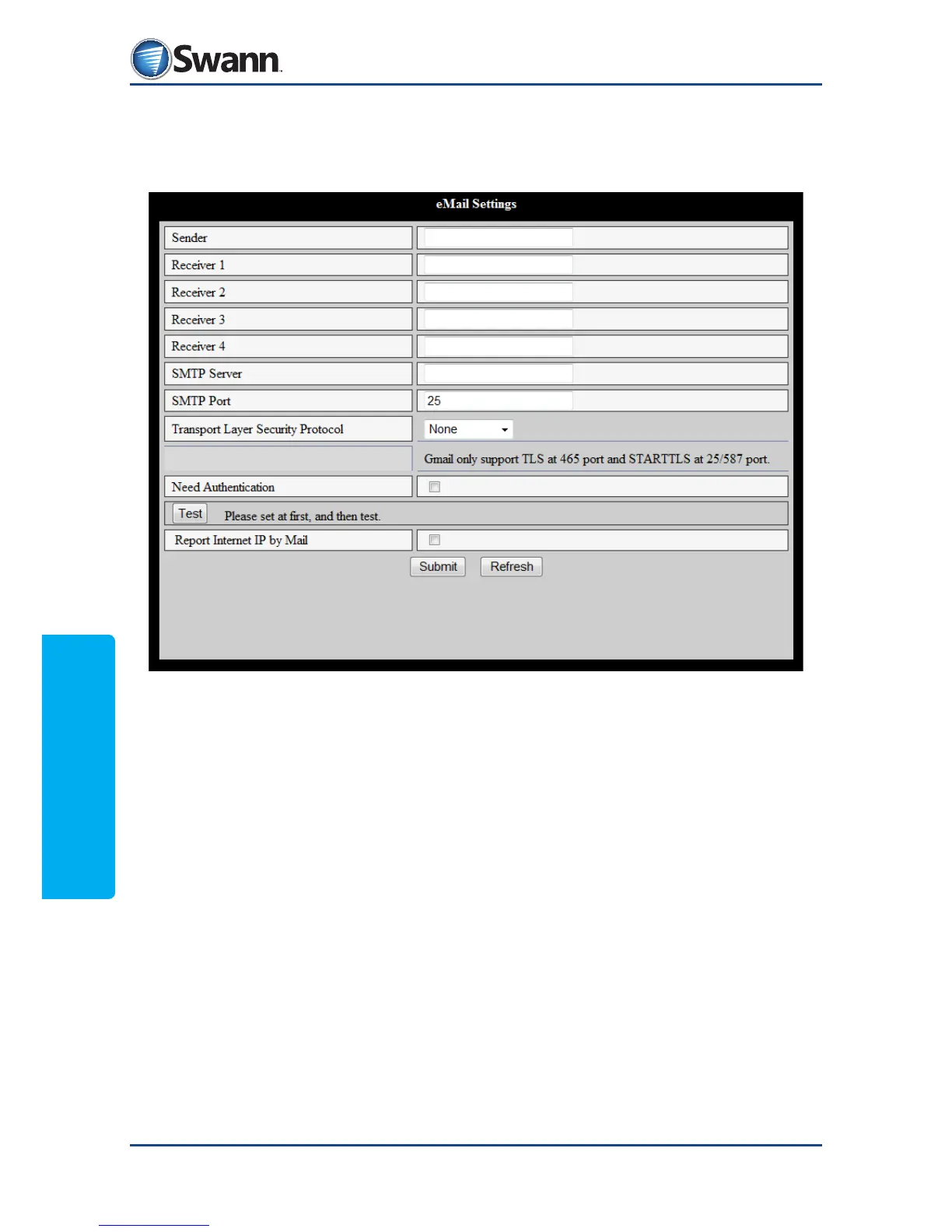
8.4.12. Alarm: eMail Settings
Set up email credentials so that the camera can send warnings and captured
images to your email inbox.
Sender: The sender of the email warnings.
Receiver 1 - 4: The recipients of the e-mail warnings. You can dene up to four.
SMTP Server: The SMTP server (the sending server) for the senders email account.
You might need to ask your ISP if you don’t know this.
Need Authentication: Check this box if authentication is required in order to
send email through the sender’s email. Some email providers only allow email
from users they recognise to send email through their sending servers.
SMTP User: The username of the sender’s email account.
SMTP Password: The password of the sender’s email account.
TEST (mail): Click the TEST button to send a test email to check your conguration.



 To Next Page