45
SwannEye IP Camera
Administrator
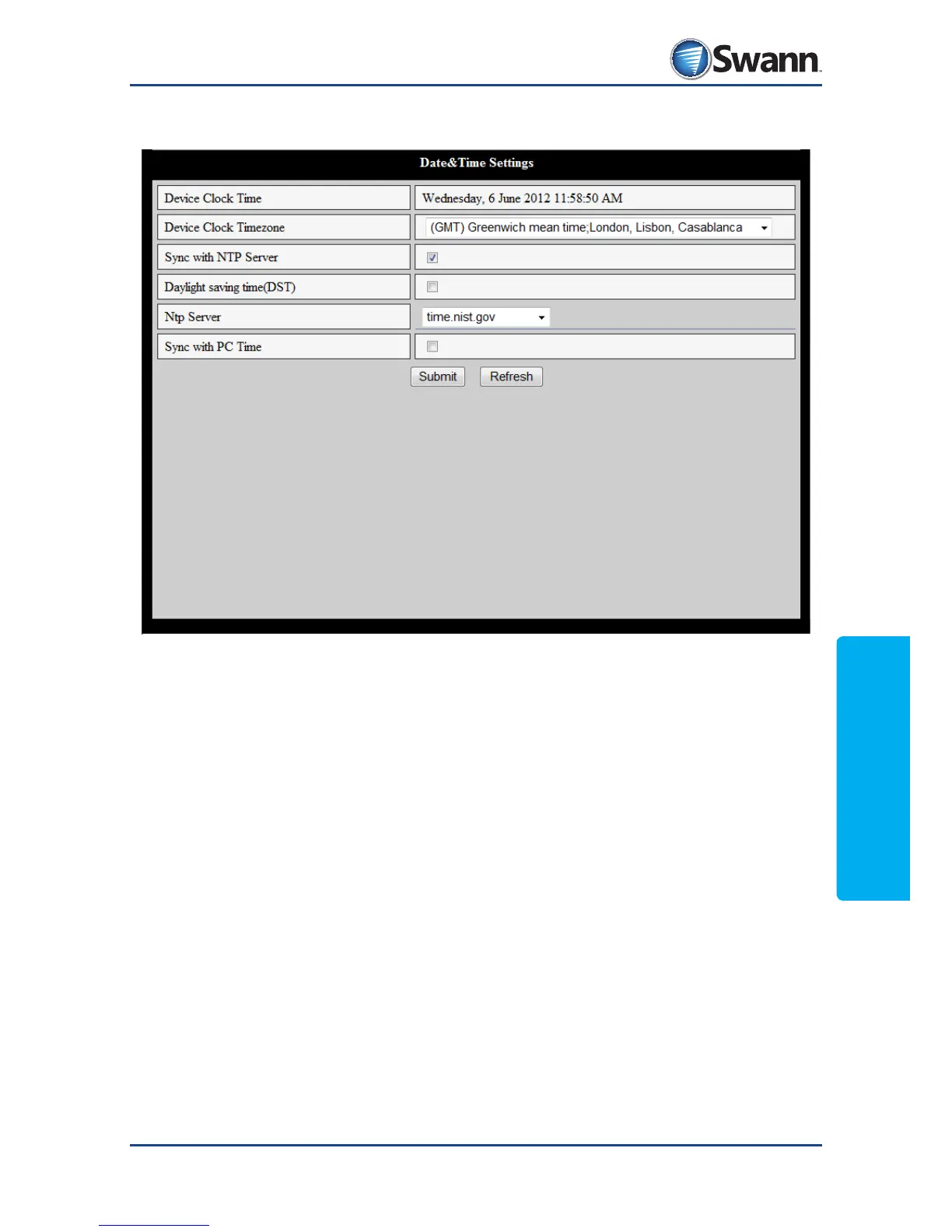
8.4.18. Maintain: Date & Time Settings
Device Clock Time: The current time as measured by the camera.
Device Clock Timezone: Where the camera is located in the world, relative to
GMT (Greenwich Mean Time). For example, the Eastern Standard Time in the USA
is GMT-05:00, whereas the time on the east coast of Australia is GMT+10:00.
Sync with NTP Server: When selected, the camera will automatically check the
time periodically and update its internal clock. This is enabled by default.
Daylight saving time(DST): For enabling daylight savings time (the adjustment
of the time by one hour during a certain time of the year).
NTP Server: The online source you’re using to update the time. There are a few
presets, or you can choose “...” from the drop-down menu to dene your own.
Sync with PC Time: If you choose Submit while this option is enabled, the camera
will automatically update its internal clock to match the time on the PC you’re
using to access the camera.



 To Next Page