EasyManua.ls Logo

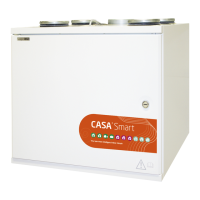
Swegon CASA W3 Smart - User Manual

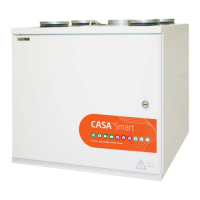
Swegon CASA W3 Smart
76 pages
Go to English
Print Icon
To Next Page IconTo Next Page
Loading...
FI
Smart_W_e-u1/211117
Käyttöohje
Bruksanvisning
Instructions for use
FI
SE
EN
Swegon CASA
®
Smart
W3 | W4 | W5 | W9

Table of Contents

Other manuals for Swegon CASA W3 Smart

Questions and Answers

  • M
    Maria HammondAug 12, 2025
    What to do if there is freeze risk in Swegon CASA W3 Smart water-heated air heater?
    • M
      Megan HaynesAug 12, 2025
      If the outdoor temperature is below 0 °C and the water temperature has dropped below the alarm limit, ensure that the circulation pump in the waterborne heating system is running and that the water supply to the ventilation unit’s air heater is hot enough.
  • A
    Andrea NielsenAug 16, 2025
    What to do if Swegon CASA W3 Smart Fan shows service reminder?
    • V
      Valerie KellerAug 16, 2025
      Service the ventilation unit and acknowledge the service reminder.
  • J
    Jared PatrickAug 19, 2025
    What to do if Swegon Fan shows contact fault?
    • B
      Brianna FisherAug 19, 2025
      If the control panel does not communicate with the ventilation unit, contact the service company if the error persists.
  • P
    Paige NguyenAug 23, 2025
    What to do if Swegon Fan shows faulty extract air fan?
    • P
      Patricia WhiteAug 23, 2025
      If there is a faulty extract air fan, restart the ventilation unit.
  • A
    Adam JonesAug 27, 2025
    What to do if Swegon CASA W3 Smart shows faulty supply air fan?
    • D
      David RamirezAug 27, 2025
      Contact a service company.
  • R
    Randy EvansAug 31, 2025
    What to do if Swegon CASA W3 Smart shows sensor fault?
    • M
      Michelle CampbellAug 31, 2025
      Contact a service company.
  • C
    Christian BrownSep 4, 2025
    How to fix alarm when Swegon CASA W3 Smart Fan cooker hood malfunctions?
    • A
      Ashley LewisSep 4, 2025
      Contact an authorised service company.
  • C
    Calvin MedinaSep 7, 2025
    What to do if there are disruptions to the function of the Swegon CASA W3 Smart ventilation unit?
    • S
      sarahreedSep 7, 2025
      If you experience any disruptions to the function of your Swegon Fan ventilation unit, several actions can be taken. First, check the function of the air heater for both reheating and preheating. Next, make sure the circulation pump in the waterborne heating system is running and that the water supply to the ventilation unit’s heating coil is sufficiently hot. Service the ventilation unit and acknowledge the service reminder. If the error persists, it's recommended to contact a service company.

Summary

Important Information

Safety and Operational Guidelines

Covers qualified personnel, standards, electrical safety, unit access, and specific operational notes.

Specialized Unit Features

Details on separate extract air, water-heated air heaters, and bypass functions.

General Operation

Commissioning Procedures

Steps for setting air flows by qualified personnel as per installation instructions.

Ventilation System Control Modes

Overview of control modes via Smart panel and cooker hood.

Smart Control Panel Usage

Control Panel Overview and Description

Detailed explanation of the panel's screen, buttons, and indicators.

Menu Navigation and Structure

How to navigate menus, including the main menu and smart functions layout.

Smart Functions and Menu Overview

Smart Functions Explained

Introduction to various smart functions like fireplace, humidity, and air quality control.

Main Menu Sections Detailed

Description of key sections like Alarms, Temperature, Display, and Diagnostics.

Panel Commissioning and Smart Functions

Initial Panel Setup

Step-by-step guide for language, time, and basic settings during first use.

Detailed Smart Function Descriptions

Explains Boost Time, Travelling mode, and Fireplace function.

Advanced Smart Functions

Specific Functionality Details

Covers Cooker Hood, Central Vacuum, Home/Away/Boost, and Humidity controls.

Additional Smart Functions

Specialized Modes and Controls

Details Summer Mode, Air Quality, Temperature Boost, and Shut Off options.

Main Menu Features

Alarm and Temperature Management

How to view alarms and set supply air temperatures.

Display and Diagnostics Access

Customizing screen settings and accessing diagnostic data.

System Diagnostics and Monitoring

Service Reminders and Temperature Readings

Managing service alerts and checking various temperature readings.

Air Quality and Fan Speed Data

Monitoring CO2, RH, VOC levels and current fan speeds.

System Configuration and Scheduling

Heating, Cooling, and External Controls

Managing heating/cooling functions and external input status.

Weekly Program Settings

Setting up timed ventilation schedules for different modes.

Specific Model Features

Econo Model Heating Setup

Configuring the water-heated air heater on Econo models.

Manual Bypass Damper Operation

Using the bypass for summer cooling and freeze protection.

Alarms and Troubleshooting

Cooker Hood and Control Panel Alarms

Identifying and understanding alarm indicators for unit malfunctions.

Troubleshooting and Service

General Troubleshooting Guidance

Addressing common system issues and seeking service.

Service Reminders and Unit Access

Managing service notifications and safely opening the unit.

Filter Replacement and Internal Cleaning

Procedures for filter replacement and cleaning internal surfaces.

Routine Maintenance Tasks

Condensate Drain and Heat Exchanger Checks

Checking condensate drain and inspecting heat exchanger and fans.

Protective Safety Functions

Freeze Protection and Air Heater Safety

Mechanisms protecting the heat exchanger and electric air heater from faults.

Fan Overload and Sensor Safety

Fan thermal protection and unit response to temperature sensor failures.

Components and Accessories

W3;W4 Model Parts List

Comprehensive listing of components and optional accessories for W3/W4 units.

Components and Accessories

W5 Model Parts List

Comprehensive listing of components and optional accessories for W5 units.

Components and Accessories

W9 Model Parts List

Comprehensive listing of components and optional accessories for W9 units.

Accessory Options

Control Technology Accessories

Smart control panels, humidity, CO2, and other control system accessories.

Accessory Options

Air Cooling and Heating Accessories

Details on air coolers, heaters, and ground source heat pump integration.

Warranty Conditions

Warranty Scope and Limitations

Defines what the warranty covers, its duration, and general exclusions.

Defect Reporting and Claims

Procedures for reporting defects and requirements for warranty validity.

Swegon CASA W3 Smart Specifications

General IconGeneral
BrandSwegon
ModelCASA W3 Smart
CategoryFan
LanguageEnglish

Related product manuals