©2018 SwellPro All Rights Reserved
13
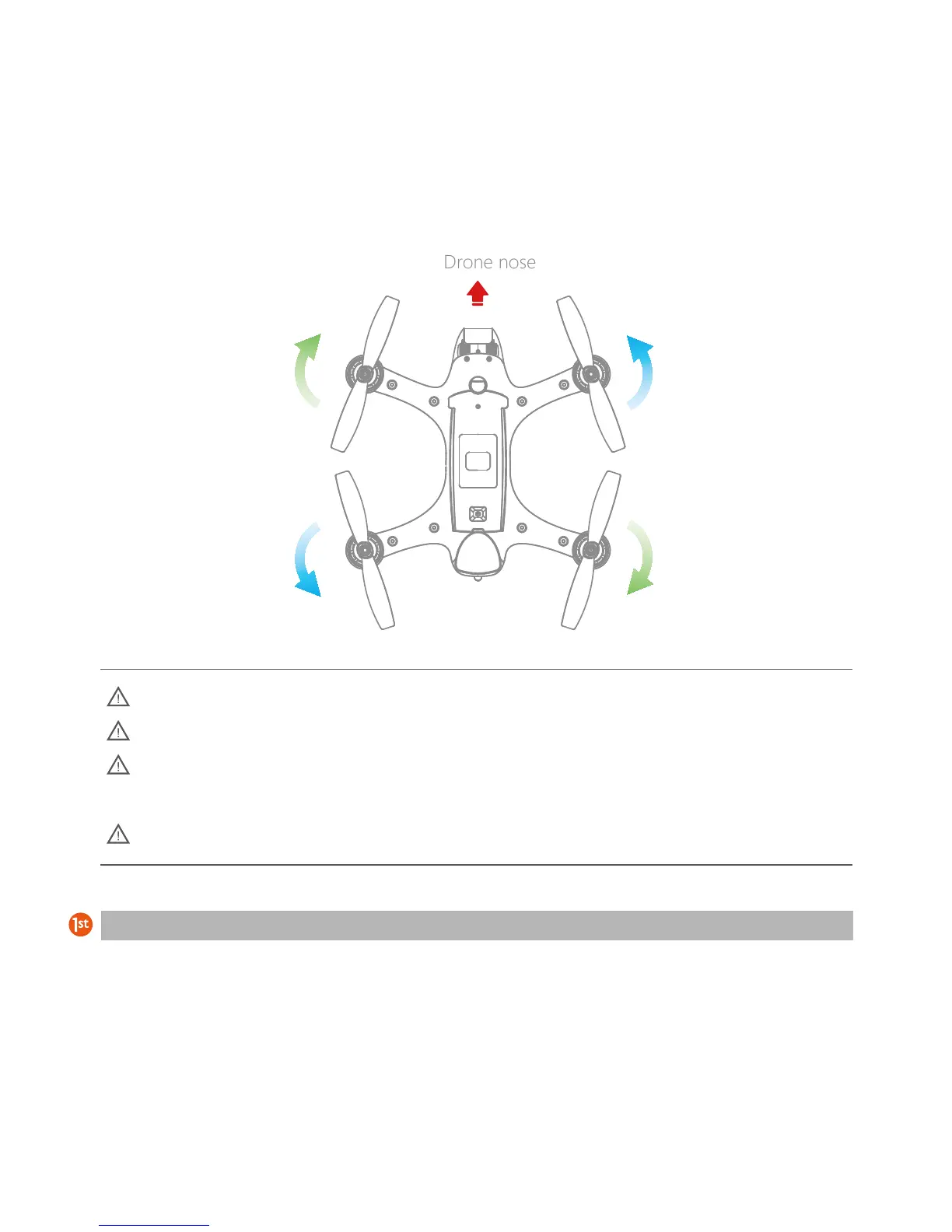
Installing and removing the propellers:
When selecting a microSD card for use with your camera, for best results always ensure that the card is rated
for 4K video throughput.
To insert the card, place the microSD card face-up in the recess inside the battery compartment. Carefully
slide the card towards the nose of the Spry until it clicks and locks into place.
To remove the card, push the card gently towards the nose of the Spry until it clicks and then ejects. Take care
to prevent the card from ejecting too fast out of the slot.
Micro SD Card Installation
The blades are sharp. Be careful to avoid personal injury.
Before each fight, check that the propellers are in good condition and securely fastened
If a propeller becomes damaged, or broken, replace it before further flights. Propellers can be
purchased separately.
Please do not get too close to the rotating propellers and motors, to avoid cuts or injury
CW propeller 6045R
CCW propeller 6045 CW propeller 6045R
CCW propeller 6045
1. To facilitate the installation and removal of the propellers, use the included tools. (The large
wrench holds the motor and the small wrench is used for the propeller lock nuts.)
2. The arrows indicates the mounting direction of the propellers. Note, that the locking nuts
for each propeller are tightened in the opposite direction to the direction of the propeller.













 To Next Page