©2018 SwellPro All Rights Reserved
20
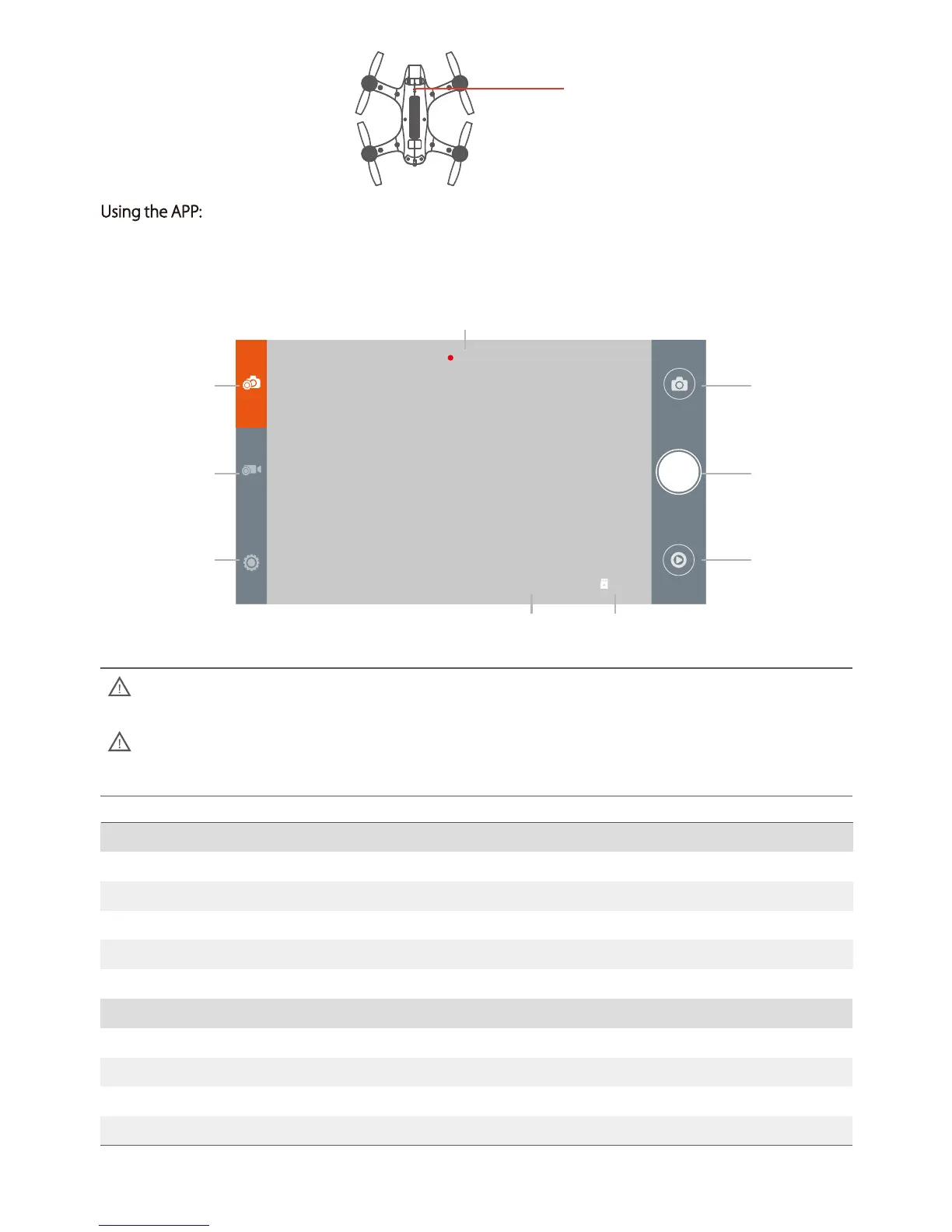
00:05:20
8.5G2016/05/03 17:08
Photo Settings
Picture Size
Burst Speed
Interval Shooting
Selfie-Timer
12M 16: 9 12M 4: 3
OFF 3P/S 5P/S 10P/S
OFF 3s 5s 10s 30s 60s
OFF 2s 10s
Video Settings
Resolution
Electronic Stabilization
Record Format
Video Format
3840x2160 30P 2704x1524 30P 1920x1080 120P/60P/30P 1280x720 240P
ON OFF
MP4 MOV
PAL NTSC
Picture Settings
Video Settings
Camera Settings
Picture Button
Record Button
Playback Button
Record Time
Time Stamp Memory card capacity
Using the APP: Open the camera APP, the screen will show the camera preview. With the APP, you can set the
parameters for photos and video, you can also control the camera on the ground and take photos or videos.
WiFi switch
Turn off the camera's WIFI before flight by pressing the WiFi button.
When the camera is recording video, turning off the drone without first stopping the video will cuase
corruption of the video file. Always stop video recording before powering off the drone.













 To Next Page