OUTER STATION | OUTER DOOR 34
APR/2017 TECHNICAL OPERATIONS AND MAINTENANCE GUIDE | NEXUS STATION
Outer station
Getting to the mechanical portions of the station requires removing the locked main door and sometimes
the storage panel to the right.
Outer door
The outer station door is attached to the station with upper and lower door brackets. The door can be
attached only when the storage panel is in place, with its front frame flush inside the station housing, and it
must be removed before the storage panel can be removed.
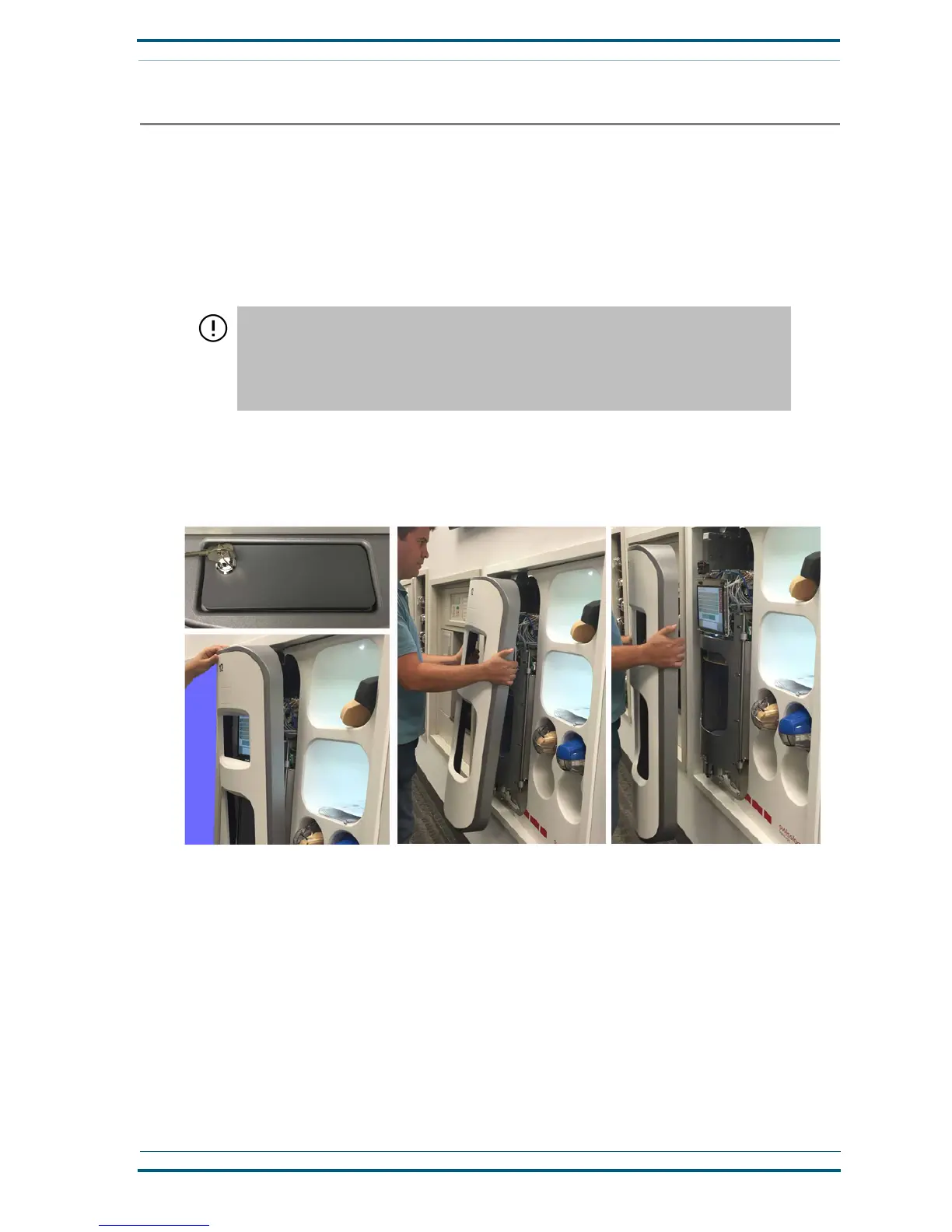
Follow these steps to remove the outer door from the front of the station.
1 Insert and turn the key to unlock the latch at the top of the door.
2 Tilt the top of the door toward you. Then lift it upward to remove it from the lower bracket.
Follow these steps to attach the outer door to the station.
1
Align the outer door against the left side of the station, hooking the lower inside attachment rails
onto the lower bracket, as shown.
IMPORTANT! Because a locked door is essential for maintaining carrier security, Swisslog
recommends that Nexus Station door keys be kept in a secure location to which only
authorized and trained maintenance personnel have access.
Never leave the key in a latch or make them available to persons who are not trained in the
maintenance and administration of pneumatic tube systems and stations.


 To Next Page