NEXUS STATION | TECHNICAL OPERATIONS AND MAINTENANCE GUIDE APR/2017
65 TURNSTILE MAINTENANCE AND OPERATION | COMMISSION THE STATION AT THE NEXUS PANEL
Commission the station at the Nexus panel
With the turnstile in place and the pin actuator engaged, you can begin running the commissioning / index-
ing process on the turnstile. A super-user station login is required to complete this process.
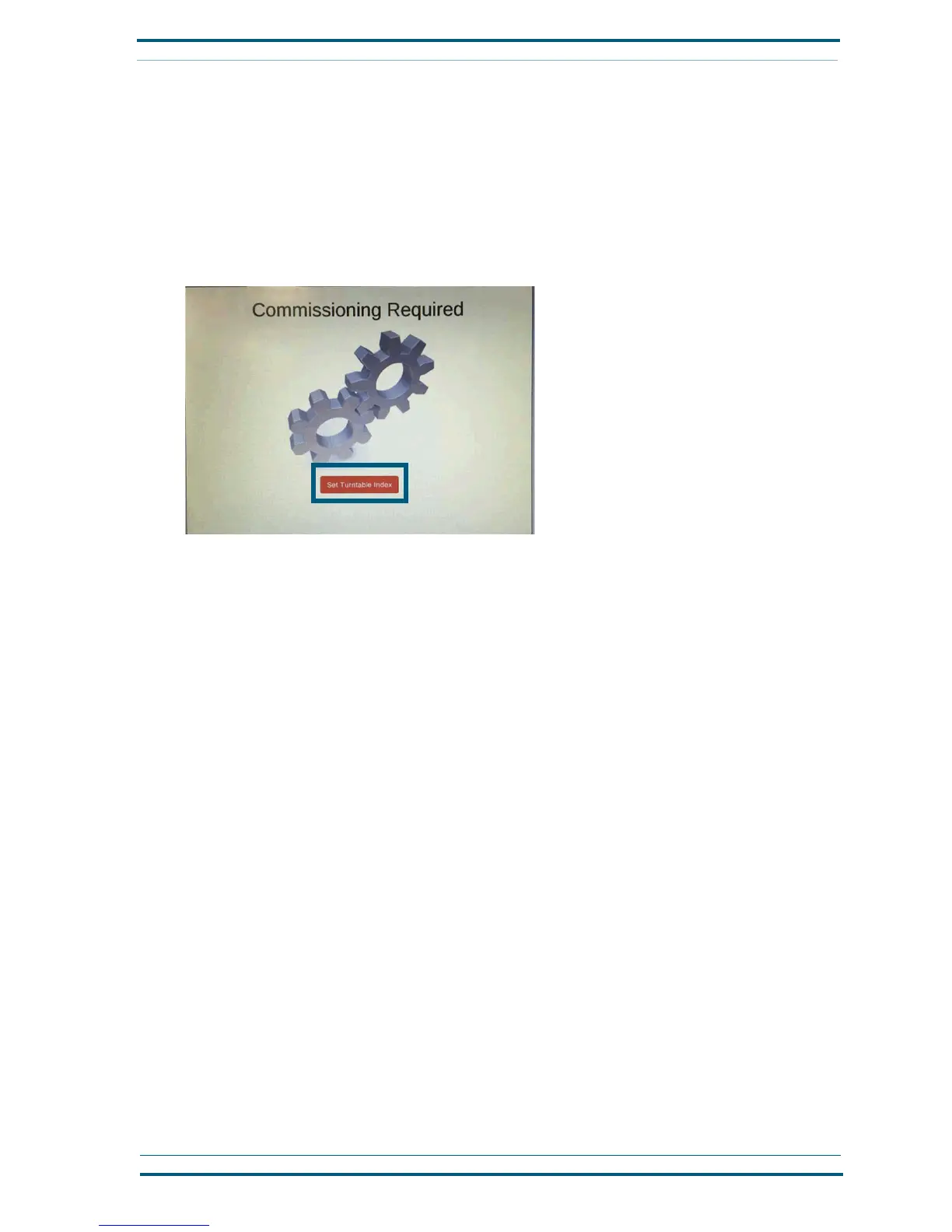
The station displays a message if commissioning is required. It is not always required after the station
has been shut down or repaired.
Follow these steps to commission a Nexus station.
1 On the Commissioning Required screen, press Set Turntable Index.
2 On the Turntable Index Management screen, tap Super User Login. Then enter the default super-
user password, 98765.
If for some reason the super-user login has changed before you get to this step, get the correct login
from the system administrator.
3 After the super-user login has been successful, tap Discover Index to begin the commissioning pro-
cess. Wait for the process to complete.
4 When the process is complete, a message on the panel indicates that the station must be restarted.
Restart the station by turning it off and then on again at the outlet box.


 To Next Page