NEXUS STATION | TECHNICAL OPERATIONS AND MAINTENANCE GUIDE APR/2017
35 OUTER STATION | UPPER-DOOR BRACKET
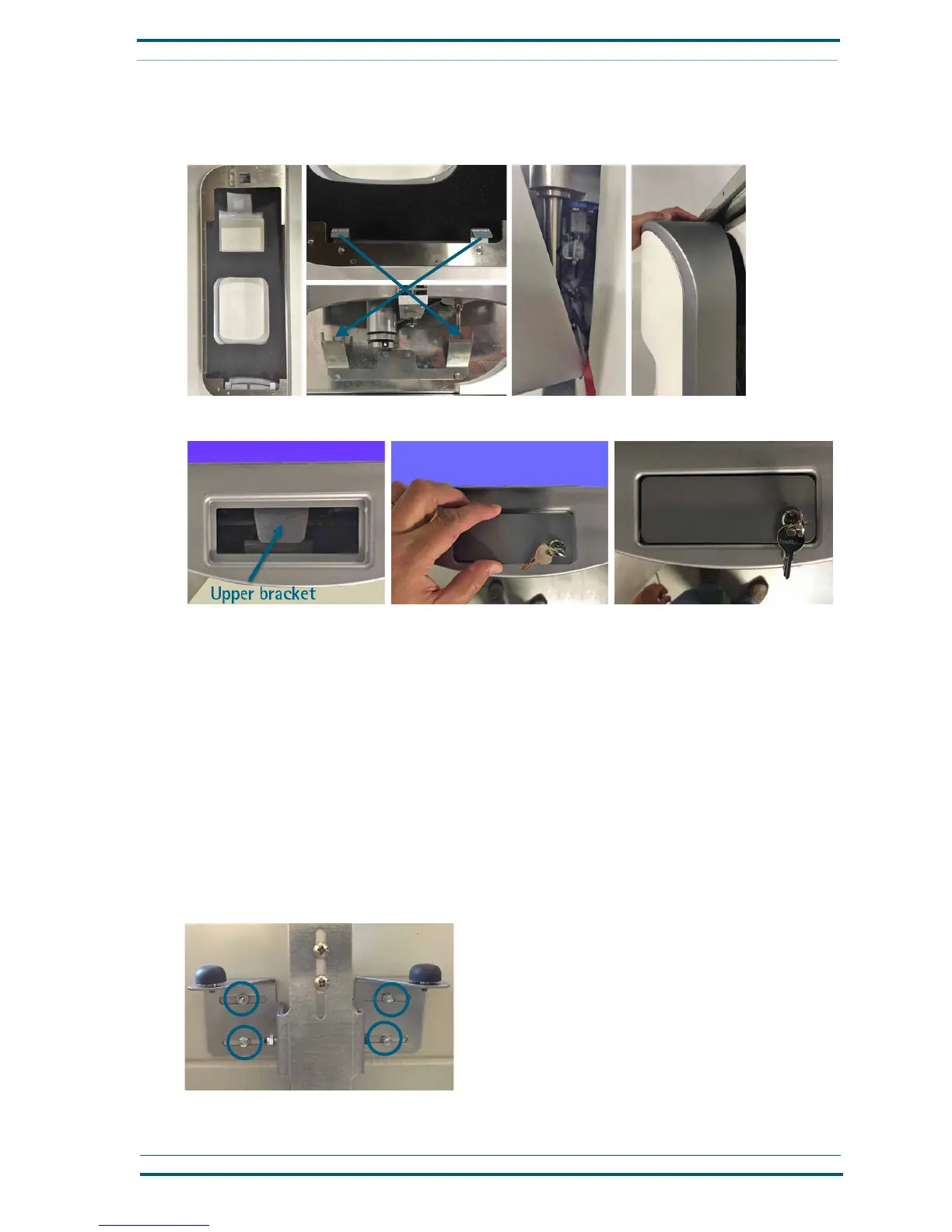
2 Tilt the door toward the station so the opening in the frame at the top of the door meets with the
hooked portion of he upper bracket that is attached to the top of the station. Gently push the door
toward the station until the inner frame is flush with the station front.
3 Attach the key latch at the top opening, as shown. Then turn the key to lock the door in place.
Upper-door bracket
The upper-door bracket is designed so that its position can be adjusted to the left and right to allow for vari-
ations in housing installation and help you align the outer door correctly when it is installed. It must be
removed before the core-turnstile assembly can be removed from the station, and it may require removal to
remove or repair the coupler-motor (brake actuator) assembly.
Depending on whether the station was installed as a retrofit into an existing standard, recessed station
or as a new installation into galvanized steel station housing specifically designed for a Nexus Station, the
upper bracket is attached either with a combination of a bolted PEM stud and three self-drilling screws or
with four PEM studs secured by
8
/
32
-inch nuts.
To remove, adjust, or reattach the upper-door bracket:
Loosen and remove the nuts and/or screws to remove the bracket; reattach and tighten the screws
and/or nuts to reattach the bracket to station.


 To Next Page