NEXUS STATION | TECHNICAL OPERATIONS AND MAINTENANCE GUIDE APR/2017
81 INSTRUCTIONS FOR TROUBLESHOOTING COMMON COMPONENT ERRORS | AIR VALVE AND SLIDE PLATE ERRORS
Slide-gate unable to close / open
The same troubleshooting procedures work for both slide-plate alarms. Slide-plate troubleshooting is also
similar to air-valve troubleshooting, with both components using the same sensors and motors. You may
need to remove the brake and coupler tube and use a mirror or camera to inspect inside the slide plate cover.
See Coupler tube and brake motor (brake actuator assembly)
Before you begin, remove the outer door, and turn off the station at the power switch. See Outer
door..
TABLE 3. Troubleshoot Nexus Station slide-plate errors
Action | component Details | expected condition | next steps
1 Inspect power harness PCB connection. Harness–P28; PCB connection–J28
2 Observe signal LEDs. D26 and D27
3 Open and close the Slide Plate from the
Diagnostics menu while observing its
movement using a mirror or camera.
Slide plate moves to the expected position (open or close).
If the slide plate does not move, check the motor.
4 Slide-plate sensors and sensor magnet
With a mirror or camera placed inside
the air valve to view the slide plate,
observe the status of the slide plate as
you tap Open and then Close on the
Diagnostics menu.
Observe LED indicators marked D24 and D25 as the valve is
rotated and the sensor magnet moves between the sensors.
When the position of the small, round magnet is between the two
sensors, the status on the Diagnostics menu is “moving.” When
the position of the magnet is beneath either sensor, the status
appropriately moves to either “open” or “closed.”
If the sensors are not correctly conveying the status to the
Diagnostics read-out, replace the sensors.
If the end-of-travel LEDs appropriately light as the sensor
magnet approaches the associated sensor, go to the next step.
If either LED does not light, replace the associated sensor.
5 Observe the motor assembly while tap-
ping Open and then Close on the Diag-
nostics menu.
Turning mechanism moves and rotates or attempts to rotate the
gear below it.
If the motor appears not to be working, replace it.
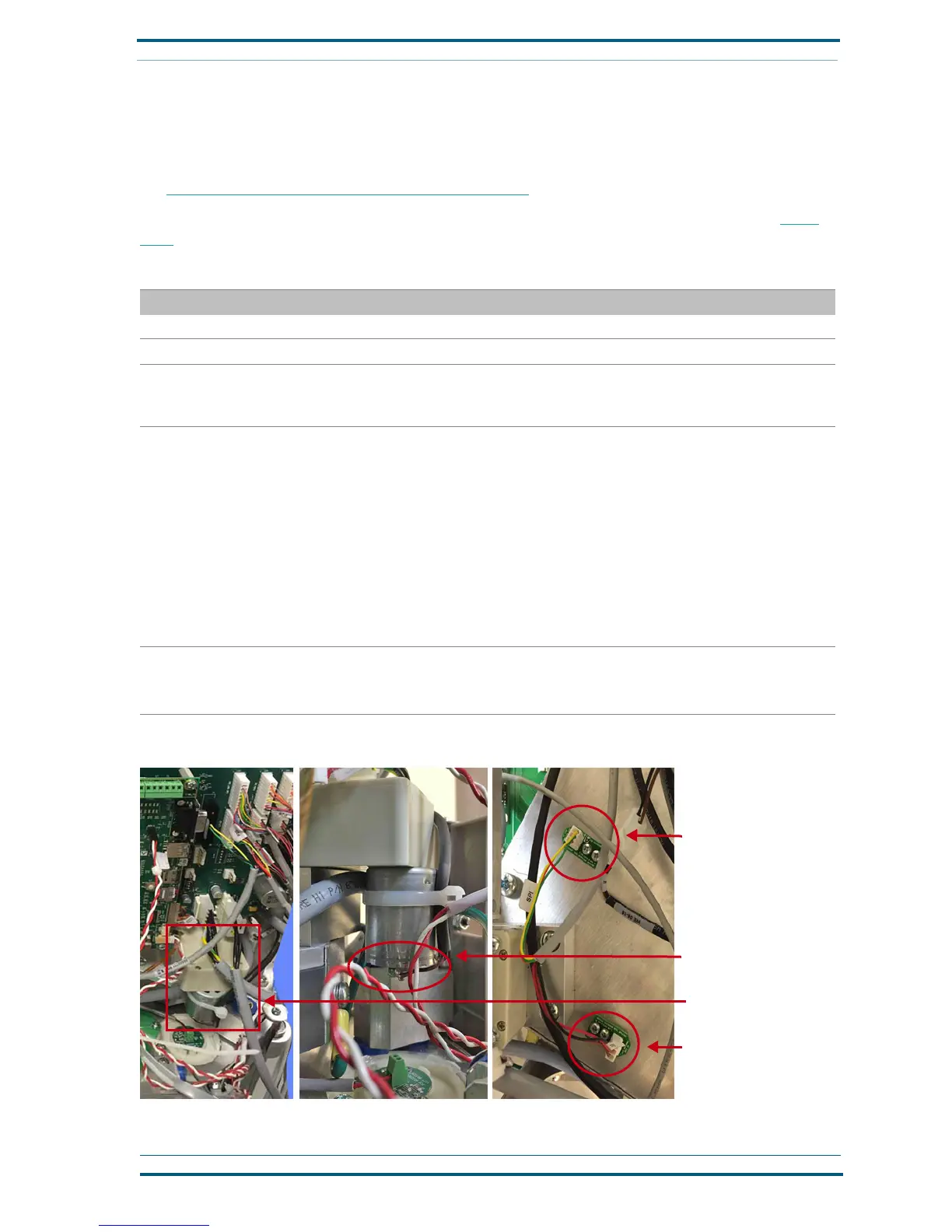
Slide-plate motor location
(SPI) Slide-plate in (closed)
position sensor
(SPI) Slide-plate out (open)
position sensor
Soldered wires at air-valve
motor
FIGURE 2. Troubleshoot Nexus Station slide-plate errors


 To Next Page