INSTRUCTIONS FOR TROUBLESHOOTING COMMON COMPONENT ERRORS | SECURITY DOOR ERRORS 86
APR/2017 TECHNICAL OPERATIONS AND MAINTENANCE GUIDE | NEXUS STATION
5 Inspect the lead screw that controls the move-
ment of the plate.
Lead screw is in place and properly lubricated.
Lubricate the lead screw if necessary. See the Mainte-
nance chapter of this Guide for instructions.
6 Turn on power, and open the Station Diagnos-
tics menu at the control panel.
Tap Open and then Close for the security door
while observing its movement.
Door moves up and down as expected. D22 and D23 indica-
tors alternate flashing as the door moves up and down.
D20 and D21 are lighted to indicate that the signal is being
received at the I/O board.
If the door moves as expected, cycle the station power,
and send a carrier to verify that the station is opera-
tional.
If the door does not move as expected, check the indi-
cators as you attempt to manipulate the door.
If the motor indicators do not light, the motor may
require replacement.
If the signal indicators either fail to light or if they
remain lighted while movement is not being attempted,
the signal driver may have failed. In case of a driver
failure, replace the I/O board
TABLE 6. Troubleshoot Nexus Station security door errors
Action | component Details | expected condition | next steps
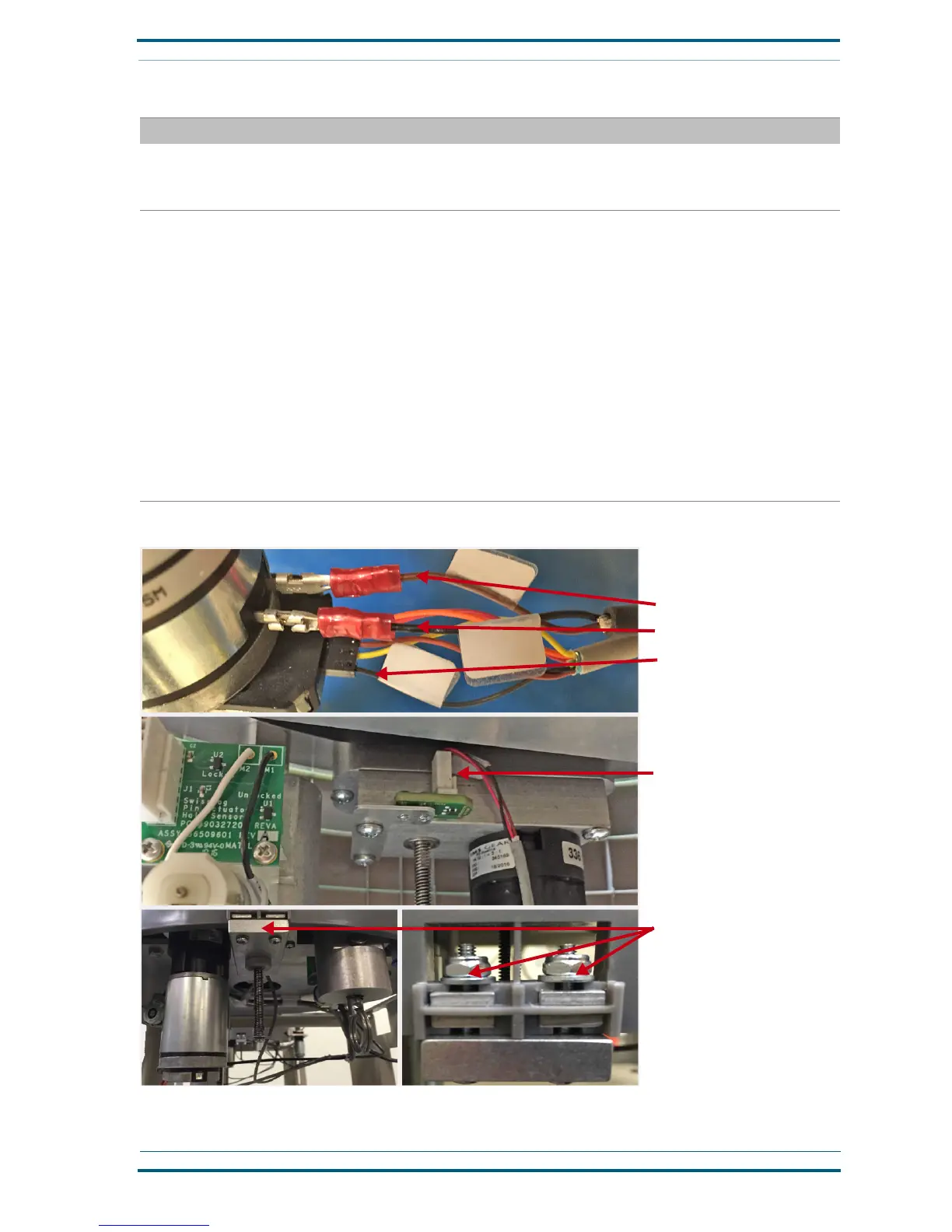
FIGURE 5. Troubleshoot security door errors
Check harness connections
Brown wire
Black wire
Black wire
Check harness connection
Back
Verify that screws are securely con-
nected to the metal plate that moves
the door


 To Next Page