NEXUS STATION | TECHNICAL OPERATIONS AND MAINTENANCE GUIDE APR/2017
89 INSTRUCTIONS FOR TROUBLESHOOTING COMMON COMPONENT ERRORS | CARRIER AND SENSOR ERRORS
Carrier sensor clear / retry failure
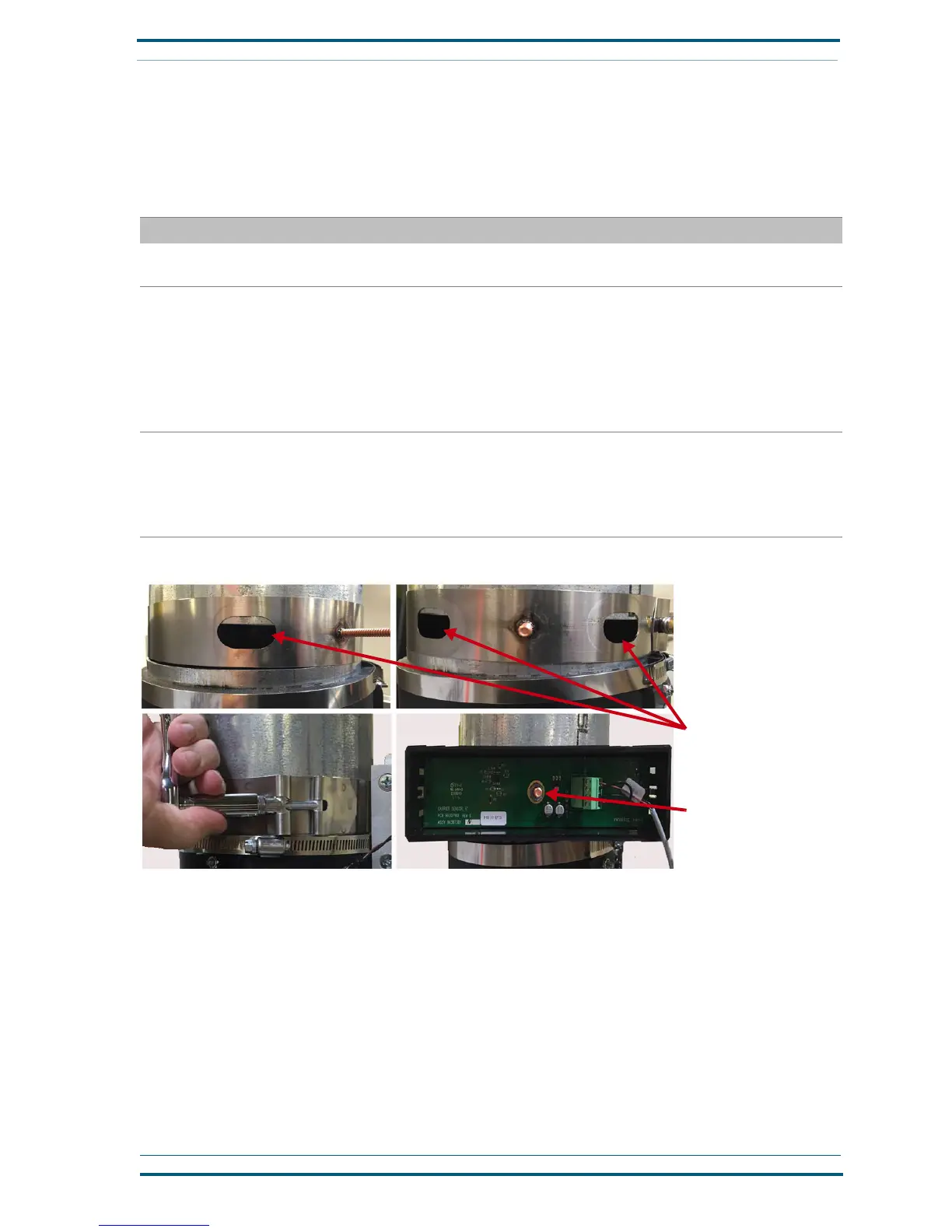
The carrier sensor, located where the upper system pipe attaches to the Nexus Station upper-turnstile
assembly, can fail if the it is incorrectly attached between the system pipe and the Nexus Station valve
where it connects.
TABLE 8. Troubleshoot Nexus Station carrier sensor clear / retry errors
Action | component Details | expected condition | next steps
1 Inspect the sensor harness connection at the
PCB assembly.
J35
2 Verify that the sensor is operational.
Turn on power to the station, and disconnect the
Ethernet cable to remove the station from the
PTS network. If the turnstile contains any carri-
ers, remove them.
Open the Diagnostics menu, and go to page 2.
Check the status of the Carrier Sensor.
With no carriers loaded in the turnstile, the status of the
Carrier Sensor is “clear.”
If the status does not clear, open the slide plate from
the Diagnostics menu to verify that no carriers are
stuck above it.
If the status value remains “set” when no carriers are
above the slide plate, go to the next step.
3 Verify that the sensor is properly attached
between the incoming pipe and the station
valve.
The sensor is attached in the gap between the pipe and
valve (as shown) so it can detect carriers as they enter or
leave the station.
If the sensor is not properly attached at the gap, reposi-
tion it, and reattach it to the station pipes.
FIGURE 7. Troubleshoot the Nexus Station upper sensor
Verify that the space between
the upper pipe and brake / cou-
pler-tube assembly is sufficient
for the sensor to detect carri-
ers.
Mount the sensor on the large
bolt.


 To Next Page