58
Formatting a disc
Recording
Choosing the recording format of a blank disc
When inserting a blank disc, the
unit will initialize the blank disc.
After initialization, you can record
to the disc with the recording for-
mat selected in SETUP menu.
You can select at what length the
recorder will create chapter mark
on the DVD disc recording.
1
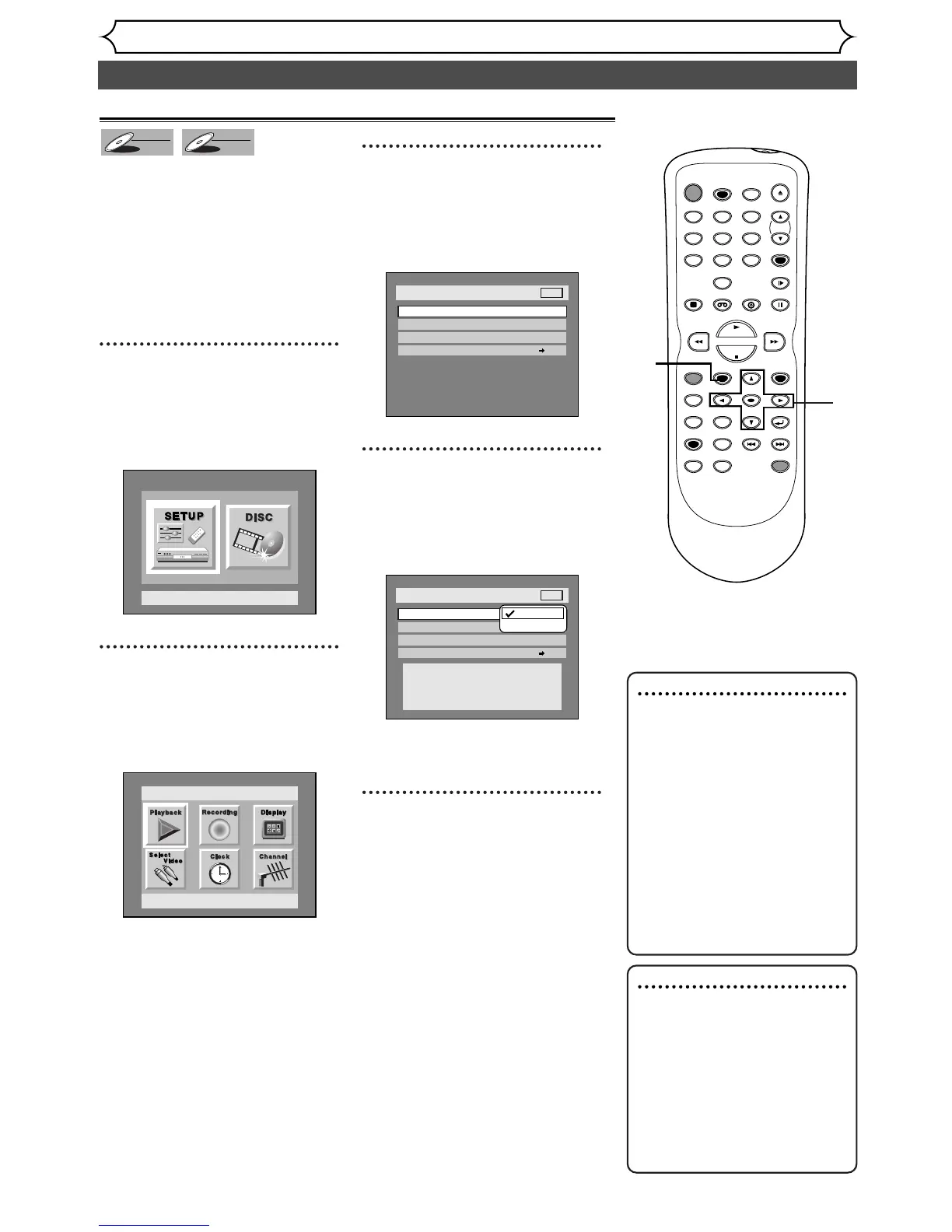
Press SETUP button to dis-
play SETUP/DISC menu.
SETUP/DISC menu will appear.
Screen:
2
Select “SETUP” using { / B
buttons, then press ENTER
button.
SETUP menu will appear.
3
Select “Recording” using K /
L / { / B buttons, then press
ENTER button.
Recording menu will appear.
4
Select “DVD-RW Recording
Format” using
K / L buttons,
then press ENTER button.
Option window will appear.
Video mode has been selected as
the default.
5
Select “Video mode” or “VR
mode” using
K / L buttons,
then press ENTER button.
The recording mode will be set.
Note :
Disc Error Massage
• When inserting a blank
DVD+R or DVD+RW disc,
the error message ("Disc
Error") will appear.This unit is
not compatible with a
DVD+R/RW disc.
• PLAYLIST will be created
automatically when recording
on DVD-RW in VR mode.
1
2
3
4
5
Note : Disc Formatting
• The recording format setting
is effective only for DVD-RW
discs.You cannot change the
recording format on a DVD-R
disc. DVD-R discs will always
be in Video mode.
•You can not mix disc record-
ing formats on a single DVD
discs.
When you load a disc
once recorded before, the
recording format cannot be
changed even if you change it in
SETUP menu.


 To Next Page