85
Editing DVD-RW discs in VR mode (Original) (cont’d)
Editing
Changing the SETUP menu
Playing discs VCR functions
Before you start
Connections Getting started
Recording Editing Others
Español
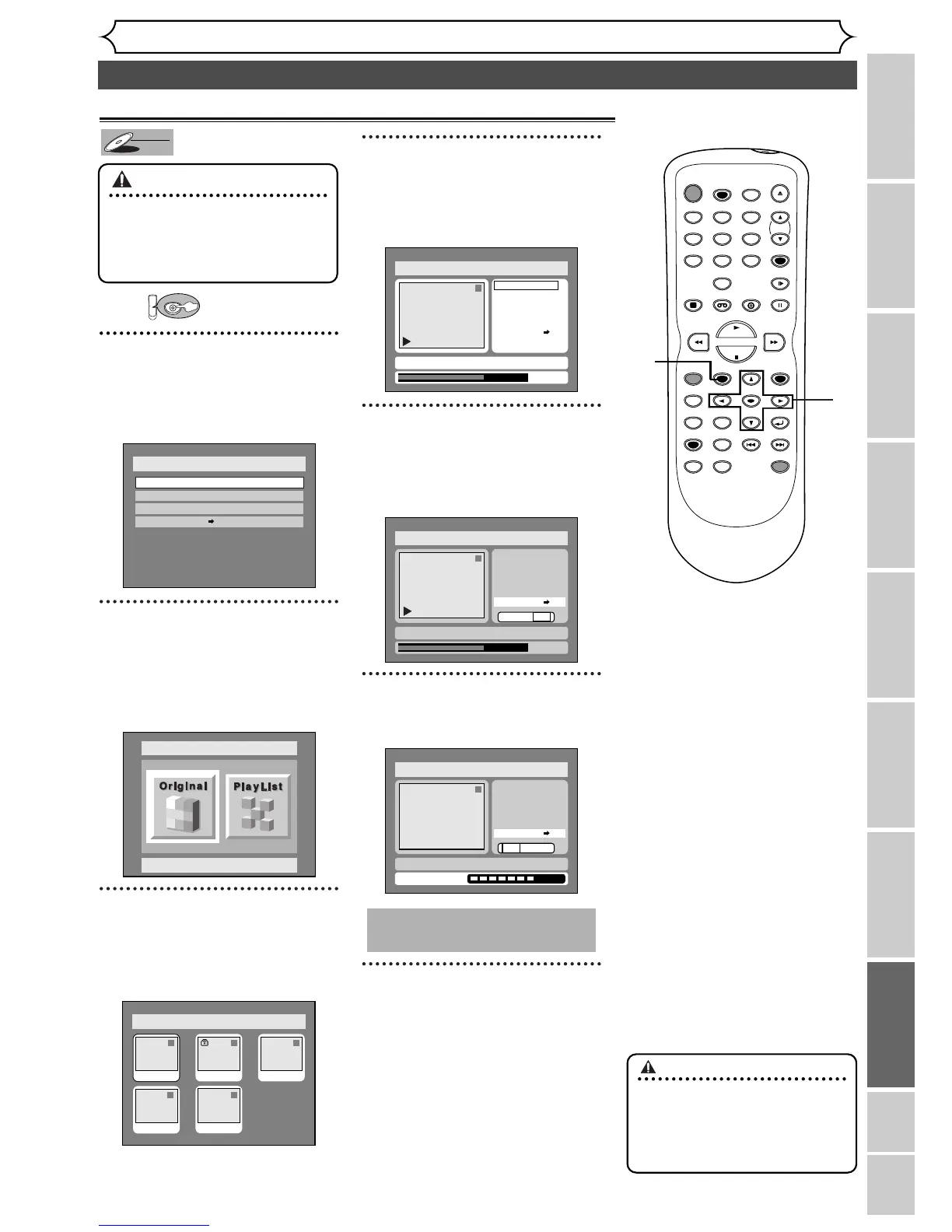
First:
1
Press SETUP button. Select
“DISC” using { / B buttons,
then press ENTER button.
DISC menu will appear.
2
Select “Edit” using K / L but-
tons, then press ENTER but-
ton.
Original/PlayList menu will appear.
Screen:
3
Select “Original” using { / B
buttons, then press ENTER
button.
Original list will appear.
4
Select a desired title using K /
L / { / B buttons, then press
ENTER button.
Original menu will appear.
5
Select “Protect OFF ➔ ON”
using K / L buttons, then
press ENTER button.
Option window will appear.
6
Select “Yes” using { / B but-
tons, then press ENTER button.
7
After writing to disc is com-
pleted, press SETUP button
to exit DISC menu.
This operation may take a
few minutes to complete.
1
1
2
3
4
7
5
6
Important
•
To prevent accidental editing or
erasing the titles, you can pro-
tect them from the original
menu.
Protect Disc
To protect a whole disc
(DVD-RW VR mode Only):
Select “Disc Protect” from
Disc menu, then select “Yes”.


 To Next Page