89
Editing DVD-RW discs in VR mode (Playlist) (cont’d)
Editing
Changing the SETUP menu
Playing discs VCR functions
Before you start
Connections Getting started
Recording Editing Others
Español
7
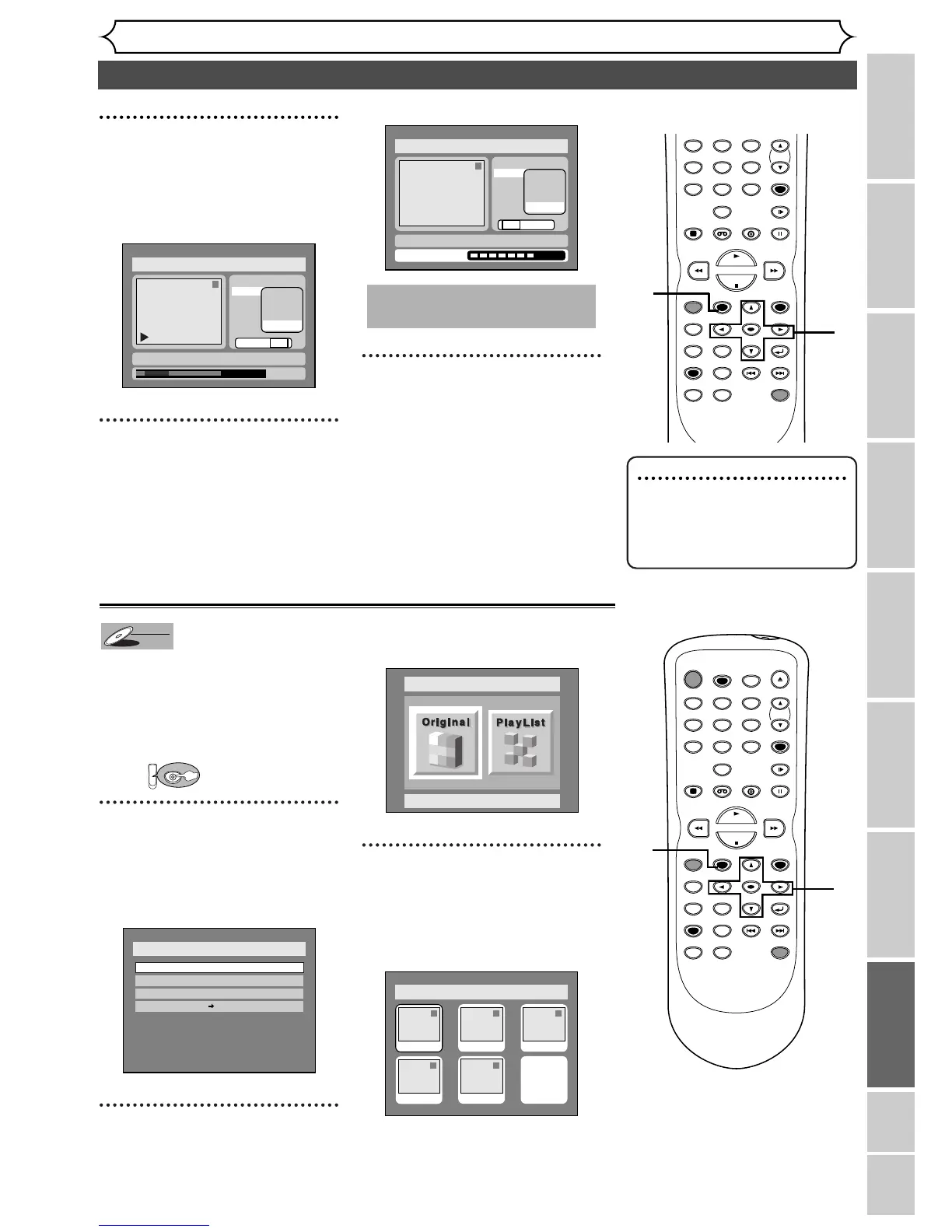
Select “Delete” using K / L
buttons, then press ENTER
button.
Option window will appear.
8
Select “Yes” using { / B but-
tons, then press ENTER but-
ton.
Part of a title will be deleted.
9
After writing to disc is com-
pleted, press SETUP button
to exit DISC menu.
This operation may take a
few minutes to complete.
Disc > Edit > Playlist
1
Title Delete
Scene Delete
Edit Title Name
Chapter Mark
Index Picture
Start
End
Preview
Delete
Yes No
Writing to Disc
JAN/ 1 1:00AM CH12 XP
1
0:01:25
Title Delete
Scene Delete
Edit Title Name
Chapter Mark
Index Picture
Start
End
Preview
Delete
Yes No
JAN/ 1 1:00AM CH12 XP
Disc > Edit > Playlist
ZOOM SKIP SKIP
TOP MENU
SPACE
VCR
SETUP
CM SKIP
TIMER PROG.
RETURN
123
456
78
0
9
STOP
PLAY
CH
VIDEO/TV
SLOW
PAUSE
.@/:
ABC DEF
GHI JKL MNO
PQRS
REC/OTR
REC MONITOR
MENU/LIST
CLEAR/C.RESET
SEARCH
MODE
ENTER
DISPLAY
TUV WXYZ
DVD
ONE TOUCH
DUBBING
POWER
REC SPEED
AUDIO
ZOOM SKIP SKIP
OPEN/CLOSE
TOP MENU
SPACE
VCR
SETUP
CM SKIP
TIMER PROG.
RETURN
123
456
78
0
9
STOP
PLAY
CH
VIDEO/TV
SLOW
PAUSE
.@/:
ABC DEF
GHI JKL MNO
PQRS
REC/OTR
REC MONITOR
MENU/LIST
CLEAR/C.RESET
SEARCH
MODE
ENTER
DISPLAY
TUV WXYZ
DVD
ONE TOUCH
DUBBING
1
1
2
3
Note : Chapter Markers
•You cannot select “Scene
Delete” when the number of
chapter markers in the original
or playlist is more than 900.
Yo u can title names on the titles
and change the names from this
menu.
The names of the titles will be
displayed on a titlelist.
First:
1
Press SETUP button. Select
“DISC” using
{ / B buttons,
then press ENTER button.
DISC menu will appear.
2
Select “Edit” using K / L but-
tons, then press ENTER button.
Original/PlayList menu will appear.
Screen:
3
Select “PlayList” using { / B
buttons, then press ENTER
button.
Playlist will appear.
Disc > Edit > Playlist
1 1 32
54
Add New
Title
Delete
Playlist
JAN/1 1:00AM
JAN/1 4:00AM
JAN/1 2:00AM JAN/1 3:00AM
JAN/1 5:00AM
Disc > Edit
Original
Disc
Edit
Format
Finalize
Disc Protect OFF ON
DVD
DVD-RW
DVD-RW
VR
Instructions continue on page 90.


 To Next Page