A - 6 The Tait Orca 5000 series of portable radios June 2003 IPN: M5000-00-105
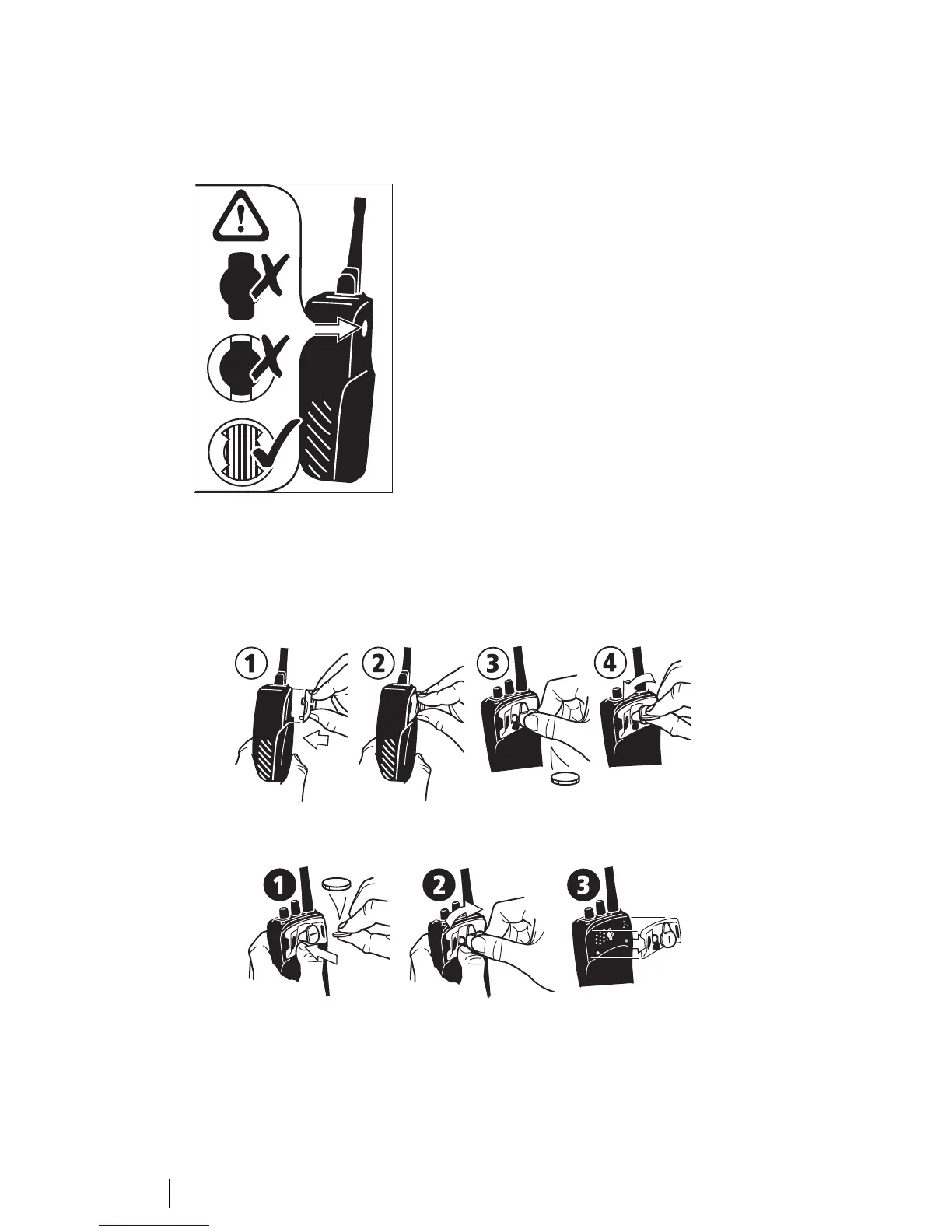
seal behind. Figure A-2 illustrates the differ-
ence. Radios factory fitted with the new chassis
also have a product code with the format
TOP-xxxxx-Bx.
Figure A-2: Changed chassis hole
Fitting an accessory
To fit some accessories to the radio, you will
need to remove the rear accessory cover.
Remove the battery, then insert the end of a
key underneath the bottom edge of the acces-
sory cover. Lift to remove the cover.
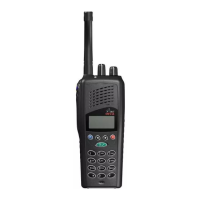
When attaching or removing an accessory,
ensure that the lever is in the upright position.
Keeping the accessory connector parallel to the
radio, engage the two posts at the base of the
connector with the rear panel. Once the acces-
sory is in position, rotate the lever 90 degrees
counterclockwise to lock it in place. See Figure
A-3.
Removing an accessory
When removing an accessory, press the lock
spring tab before rotating the clip clockwise.
See Figure A-4.
Fitting a non-Tait accessory
See Part F: Accessories for information on using
non-Tait accessories with Tait Orca 5000
portable radios.
Figure A-3: Fitting an accessory with a D-Clip
Figure A-4: Removing an accessory with a D-Clip


 To Next Page