E - 10 Desktop fast charger June 2003 IPN: M5000-00-105
To short condition the battery
Turn off the radio and insert the battery/radio
into the fast charger. When the charger LED
glows red, press the conditioning button until
the indicator flashes amber. Release the condi-
tioning button. The LED will flash amber while
the battery is being discharged. Once the
battery is discharged, it will charge normally.
The battery is ready to be used again when the
charger LED glows green.
To long condition the battery
Long conditioning the battery with the fast
charger will put the battery through a number
of conditioning cycles and will check the
battery’s capacity on the last cycle.
To long condition the battery, turn off the
radio. Press and hold the conditioning button
while inserting the battery/radio. Continue
holding the conditioning button until the
indicator flashes amber. When the indicator
flashes amber, release the conditioning
button.
The long condition cycle will take approxi-
mately 24 hours.
Once charged, the charger’s indicator will glow
green if the battery is in good condition. The
indicator will flash red if the battery is well
below optimum capacity; consult your Tait
dealer.
Repairing the fast charger
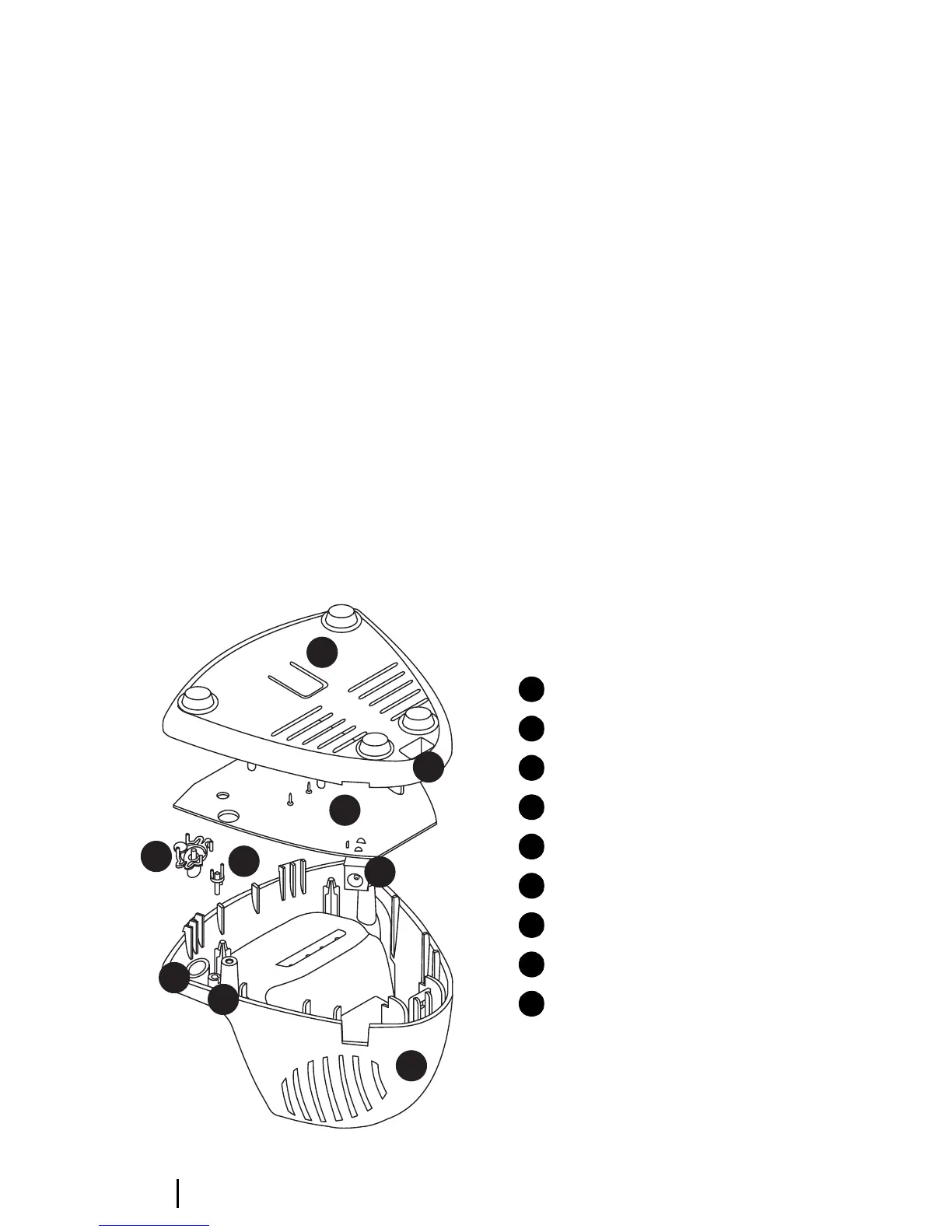
The assembly of the fast charger is shown in
Figure E-3.
Depress the release tab in the base of the charg-
er using the end of a flat-bladed screwdriver.
Holding the lever in, gently pull the body away
from the base. Lift out the PCB.
Replace the battery contacts, the tact switch
and the DC jack, if necessary.
Figure E-3: Assembly of the desktop fast charger
1
2
3
4
5
6
8
7
9
charger base
access to the release tab
PCB
DC jack
charger top
conditioning button
fit conditioning button here
light pipe
fit light pipe here
1
2
3
4
5
6
7
8
9


 To Next Page