Tally Dascom DL-210 User Guide V1.3
36
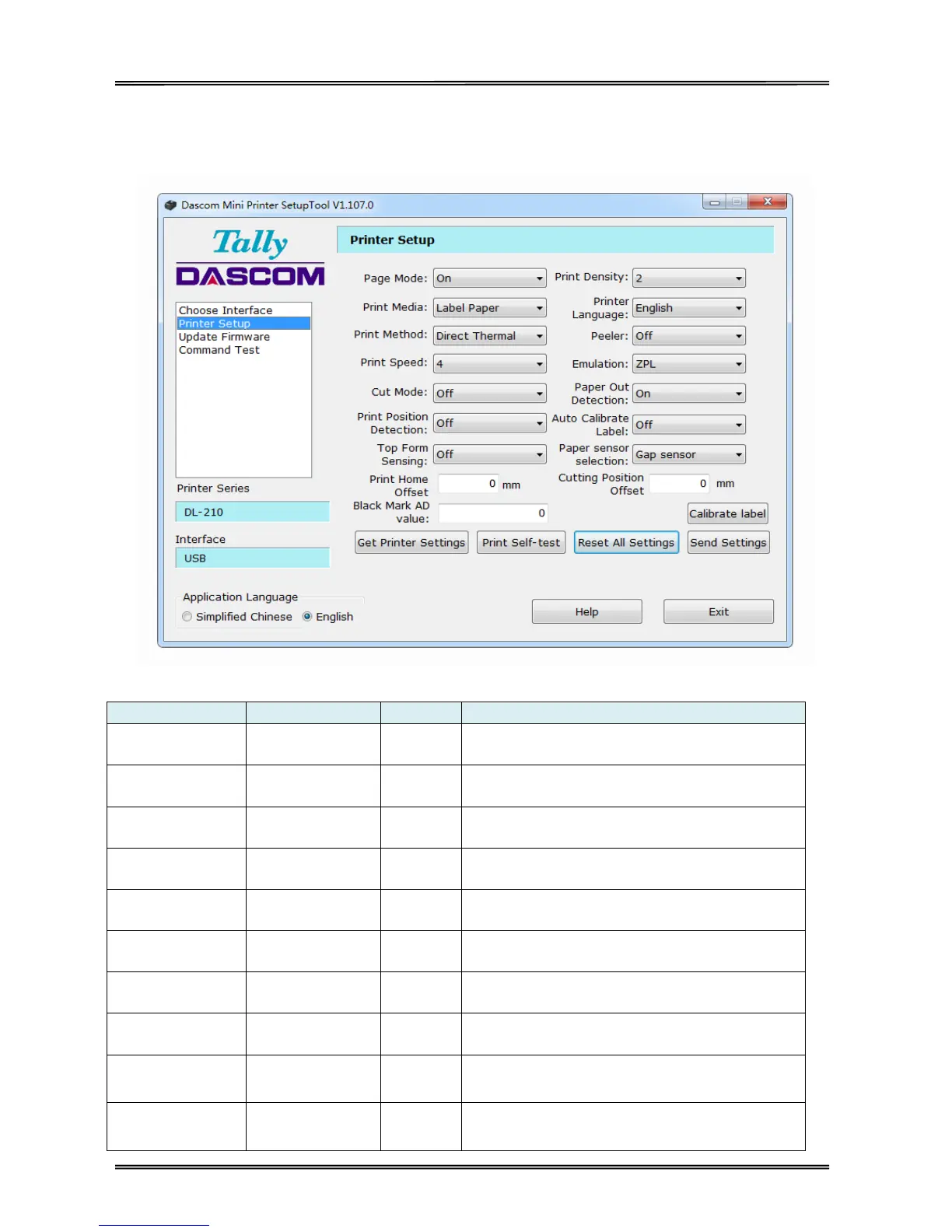
3.3.2 Configuring Printer
After model and interface setting, select “Printer Setup” tab for configurations.
Setup Items Explanation
Use un-continuous paper set to on; Use continuous
paper set to off.
Adjust print density. Level 1 is lowest, Level 6 is
highest.
Label Paper,
Continuous Paper
Select the actual media type.
Set the printer’s system language, Chinese or
English.
Thermal Transfer,
Direct Thermal
Use ribbon select thermal transfer; Use thermal
paper select direct thermal
Adjust the print speed. Level 1 is lowest, Level 4 is
highest.
Select ZPL/EPL while using un-continuous paper;
Select ESC/POS while using continuous paper.
Off, Full Cut,
Partial Cut
Set the printer’s cutting mode.
On: Detect the printer's paper is empty or not.
Off: Disable paper end detection.



 To Next Page