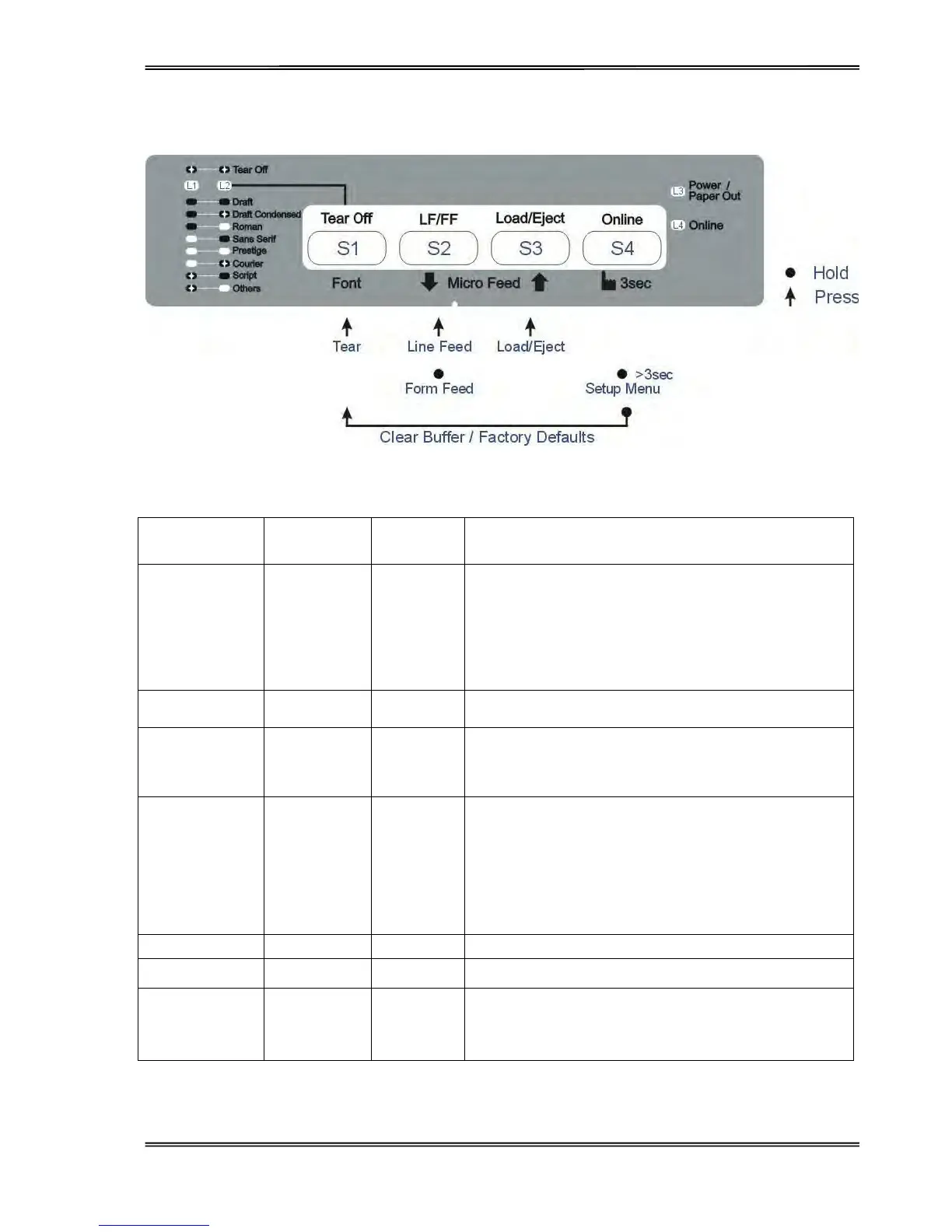
Tally Dascom 1125
17
Online State
Function Name
Switch
Operation
LED Function Description
Tear Off {S1} L1, L2 flash
This is valid for tractor mode only. It feeds the form to the
tear-off position. After tearing off the form, printing starts
on the next TOF by:
· pressing S1 once, or
· receiving print data from the host.
LF {S2}
-
Feeds a line with every press of S2.
FF [S2] -
By holding S2, the printer initially feeds a few lines; then
feeds the form to the next TOF for rear tractor or ejects
the form for cut sheets.
Load/Eject {S3} -
· Load: Automatically loads the paper (according to path
selection) when no paper is on the platen.
· Eject: For rear tractor, it retracts the form from the
platen to allow users to install cut sheets. (NOTE:
Users have to toggle the path selection lever.)
For cut sheets, it ejects the form on the platen.
Setup state [S4] > 3 secs L4 Toggles to Setup state. Indicated by flashing L4.
Clear Buffer [S4]+{S1} - Clears the print buffer and beeps once when completed.
Reset
[S4]+[S1] for
longer time
-
Initializes the printer to the factory default settings. Beeps
3 times when completed.



 To Next Page