21
◆ 「
Settings
」
Menu
:
Adjustment
By setting adjustment values beforehand, you can record and display the
post- adjusted measurement values. You can choose from two adjustment
methods: 1-point and 2-point. Adjustment will be carried out using an
adjustment equation of Y
=
aX
+
b; where X is the pre-adjusted measurement
value and Y is the post-adjusted value.
●
Rough Guidelines for Adjustment
1 point Adjustment: Use when measuring in a range of
±
20
℃
.
2 point Adjustment: Use when measuring in a wide range.
NOTE:
●
When adjusting at 2 points, make sure the difference in points is at least 10
℃
.
●
When measuring in a wide range and adjusting at 2 points, make sure that
the adjustment values reect the range you are measuring.
●
We cannot guarantee that after carrying out adjustment the measuring
accuracy will improve for all measuring ranges.
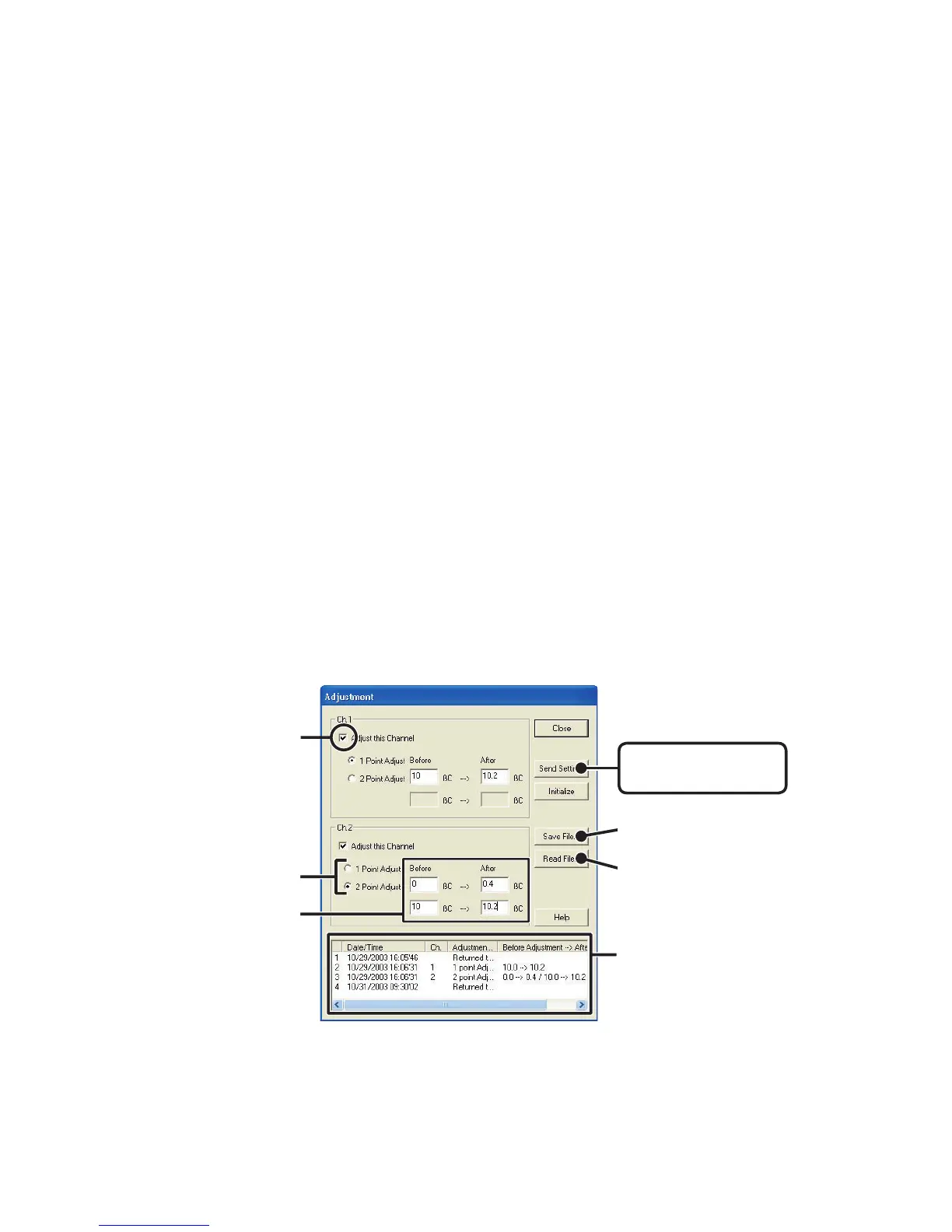
1.Check the channel you wish to adjust.
2.Check either [1 Point Adjustment] or [2 Point Adjustment].
[
Send Settings
]
button
[
Save File
]
button
[
Read File
]
button
Check here
Check one
of these
Enter Values
Adjustment History



 To Next Page