14 TASCAM CD-BT2
IMPORTANT SAFETY PRECAUTIONS
Quick Start Guide—Basic Operation
Using the Effects
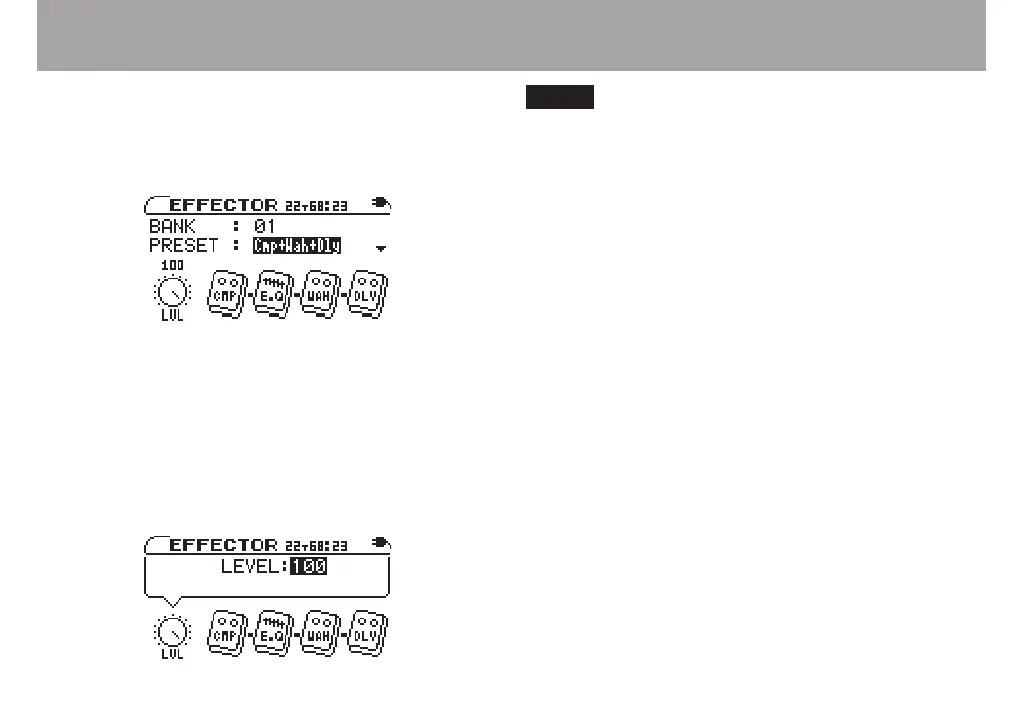
To apply effects to your bass sound, press the EFFECT key to
open the EFFECTOR screen. When the BANK value is high-
lighted as shown below, use the VALUE (+, –) keys to select one
of the effect banks (01–10).
After selecting an effect bank, select an effect preset by using
the down CURSOR (¶) key to highlight the PRESET value.
Then use the VALUE (+, –) keys to select a preset. Each preset
uses a different combination of effect modules. (See the
“Effect preset lists” on page 41.)
Press the right CURSOR key (¥) to open the effect level
adjustment screen. Use the VALUE (+, –) keys to change the
level.
You can change the parameter settings for every effect.
(For details, see “Using built-in effects” on page 31.)
Playing bass along with a CD
You can listen to the sound from both a CD and your bass at
the same time through headphones. To change the volume
balance between the CD and the bass, press the LEVEL key to
open the LEVEL screen. Press the right CURSOR key (¥) to
highlight the BASS LEVEL value, then use the VALUE (+,
–) keys to adjust the bass volume. (See “Adjusting the input
level” on page 30)
Turning off the power
When you stop using the player, press the POWER switch on
the back of the unit for about one second. Release the switch
when “TRAINER SERIES” appears on the display.
Restoring all settings to original values
If you press and hold both the µ and ≤ keys when you turn
the player power ON, the INITIALIZE screen appears.
After startup, follow the onscreen instructions and press the
¥/π key to restore every effect parameter, playback setting
and other adjustable setting to the values they were set at when
they unit was shipped from the factory.



 To Next Page