IMPORTANT SAFETY INSTRUCTIONS
21 TASCAM CD-BT2
Screen appearance and operation
Screen overview
The unit display shows one of the following screens according
to the active function. All of these screens can be opened by
pressing their dedicated keys. The TIME DISPLAY screen
also appears immediately after the unit’s power is turned ON.
Screens Keys
TIME DISPLAY TIME DISPLAY
TEMPO CHANGE TEMPO
KEY & PITCH KEY
B.E.E BEE
EFFECTOR EFFECT
LEVEL LEVEL
TUNER TUNER
SETUP & MISC. MISC.
PHONES VOLUME PHONES VOLUME (+, –)
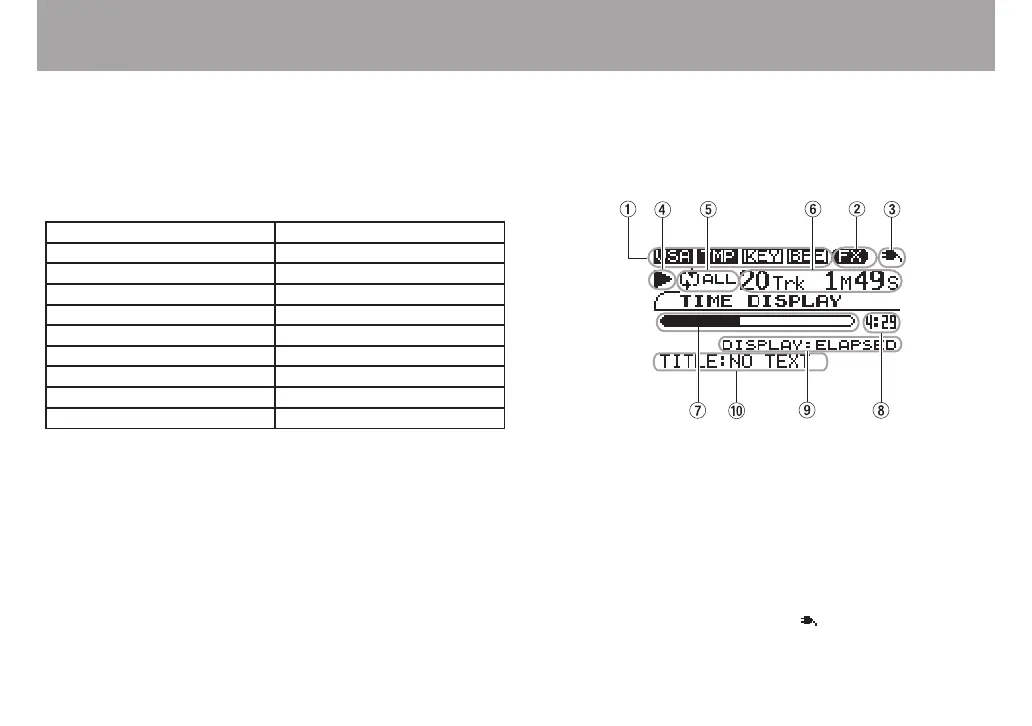
TIME DISPLAY screen
The TIME DISPLAY screen appears immediately after the
player’s power is turned ON.
1 VSA, TMP, KEY, BEE icons
The VSA, tempo change, key change and BEE icons
appear in inverse when their functions are on.
2 FX icon
This icon lights when the bass effects are operating.
3 Power status indicator
Shows the status of batteries when they are in use (See
“Using batteries” on page 10.). “ ” appears when AC
power is in use.



 To Next Page