y Status of sound quality enhancement during
playback
The status of the sound quality enhancement
function during playback is shown.
indicator shown: ON
indicator not shown: OFF
u Timer setting status
This icon appears when the timer is set for
recording.
i Built-in speaker setting status
This shows whether the built-in speaker is
ON or OFF.
: The speaker is set to ON.
: The speaker is set to OFF.
NOTE
Even if the
SPEAKER
setting is
ON
, no sound is
output from the speaker when recording or in
recording standby, or when headphones or a moni-
toring system is connected.
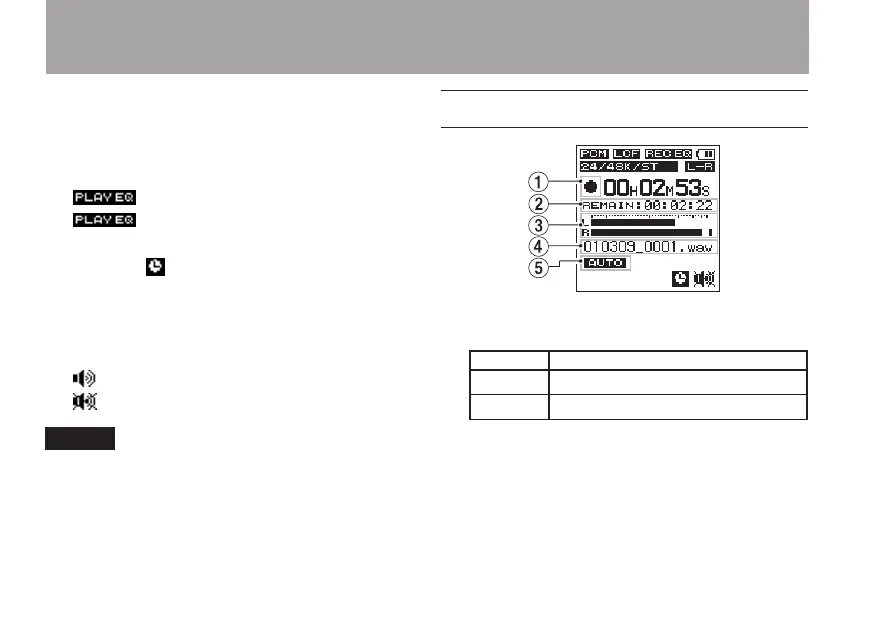
Recording Screen
1 Recorder operation status
This icon shows the recorder operation status.
Icon Meaning
ª
Stopped or in standby
–
Recording
2 Remaining recording time
This shows the remaining recording time,
which depends on the remaining card
capacity and the
ENCODING
setting.
3 Level meters
This shows the input sound levels.
2 – Names and functions of parts



 To Next Page