Need help?
Do you have a question about the TBB power Solar Mate and is the answer not in the manual?
Instructions for qualified personnel regarding opening and repairing the charge controller.
Precautions for indoor use, avoiding fire/shock, placement near inflammable goods or batteries.
Safety measures for handling battery acid and preventing explosions due to sparks or metal tools.
Introduces the Solar Mate MPPT charge controller and its key features like MPPT technology.
Describes the Solar Mate as an MPPT solar charge controller with advanced charging algorithms and features.
Explains the naming convention for the Solar Mate MPPT charge controller models.
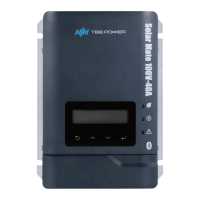
Shows a diagram of the charge controller's front view, including indicators and display.
Explains how MPPT technology maximizes energy harvest from the PV array.
Describes the automatic voltage and current regulation for battery charging using TBB premium III algorithm.
Details the configurable auxiliary output for wake-up or alarm functions, with usage warnings.
Describes the multistage charging algorithm for fast and full battery charging.
Explains how battery temperature affects charging and how the BTS sensor adjusts parameters.
Describes the shutdown and alarm response to detected PV reverse polarity.
Explains the shutdown mechanism for PV voltage exceeding operating limits, with a warranty disclaimer.
Shows a graph illustrating how ambient temperature affects the rated current output.
Details the reduction in charging current and shutdown due to high battery temperature.
Outlines checks for outer packing, model, and accessories after unpacking.
Lists the tools and instruments required for installation.
Specifies indoor installation, avoiding high-touch areas, flammable materials, and ensuring ventilation.
Details minimum clearance requirements around the unit for proper ventilation and heat dissipation.
Presents an overall wiring diagram showing connections between Solar Mate, PV Combiner BOX, battery, and PV array.
Discusses PV combiner box features and connection requirements for PV arrays.
Lists essential checks before powering on and configuring the device.
Provides step-by-step instructions for performing the power-on test and initial setup.
Explains the different menu levels and navigation flow of the device interface.
Settings related to system configuration, module addressing, and DC coupling.
Settings for external control mode, relay configuration, and silent mode.
Detailed settings for battery capacity, type, voltage, and charging parameters.
Option to change the user interface access password for security.
Guides the user through the initial configuration of the MPPT charger.
Allows restoring all configurable parameters to their factory default settings.
Configures screen settings such as backlight persistence and automatic page turning.
Allows setting the current date and time for the device.
Provides control for muting the buzzer for a single instance.
Lists fault codes, their reasons, and suggested solutions for troubleshooting.
 General
| Brand | TBB power |
|---|---|
| Model | Solar Mate |
| Category | Controller |
| Language | English |

 To Next Page