Internet
Radio
Menu
Operations
You
can
access
channel lists or setup menus using the Internet Radio
menu
of
this unit.
To
open
the
Internet
Radio menu
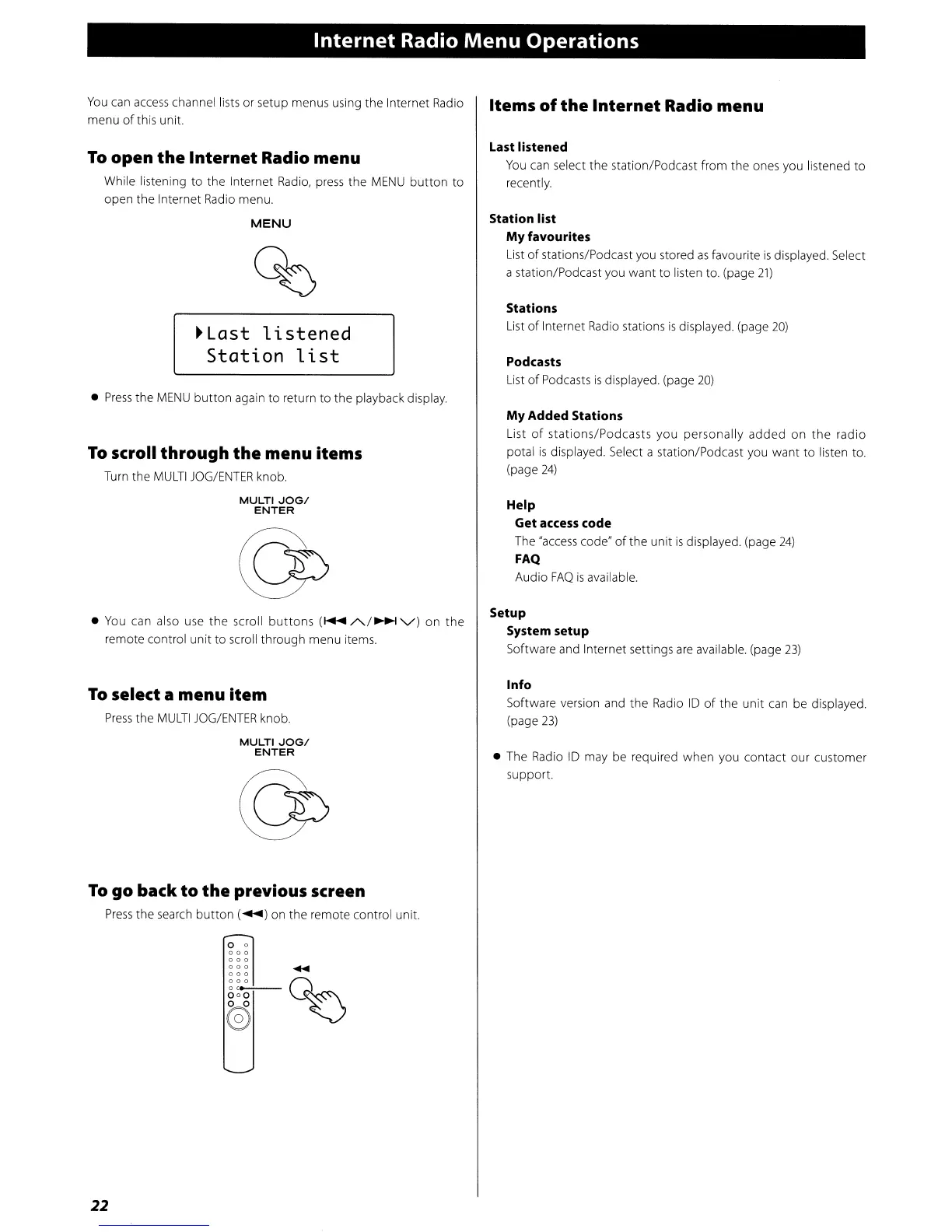
While listening
to
the Internet
Radio,
press the
MENU
button
to
open the Internet Radio menu.
MENU
~Last
listened
Station
list
•
Press
the
MENU
button
again
to
return
to
the playback display.
To
scroll through
the
menu items
Turn the
MULTI
JOG/ENTER
knob.
MULTI
JOG/
ENTER
• You can also use
the
scroll
buttons
(f+oII
/'../~
'V)
on
the
remote control
unit
to
scroll through menu items.
To
select a menu
item
Press
the
MULTI
JOG/ENTER
knob.
MULTI
JOG/
ENTER
To
go back
to
the
previous screen
Press
the
search
button
(~)
on the remote control unit.
o 0
000
000
000
....
~~L-Q~
000
@)
22
Items
of
the
Internet
Radio menu
Last listened
You
can select
the
station/Podcast from the ones you listened
to
recently.
Station list
My
favourites
List
of
stations/Podcast you stored
as
favourite
is
displayed. Select
a station/Podcast you
want
to
listen to. (page
21)
Stations
List
of
Internet Radio stations
is
displayed. (page
20)
Podcasts
List
of
Podcasts
is
displayed. (page
20)
My
Added Stations
List
of
stations/Podcasts
you
personally
added
on
the
radio
potal
is
displayed. Select a station/Podcast you want to listen to.
(page
24)
Help
Get
access
code
The
"access
code"
of
the
unit
is
displayed. (page
24)
FAQ
Audio
FAQ
is
available.
Setup
System setup
Software and Internet settings
are
available. (page
23)
Info
Software version and the Radio
ID
of
the
unit
can be displayed.
(page
23)
• The Radio
ID
may be required when you contact our customer
support.


 To Next Page