Music Player Initial Setup
Initial setup
When you
use
the Music player function for the first time,
the
unit
starts
an
initial setup procedure to connect to the
LAN.
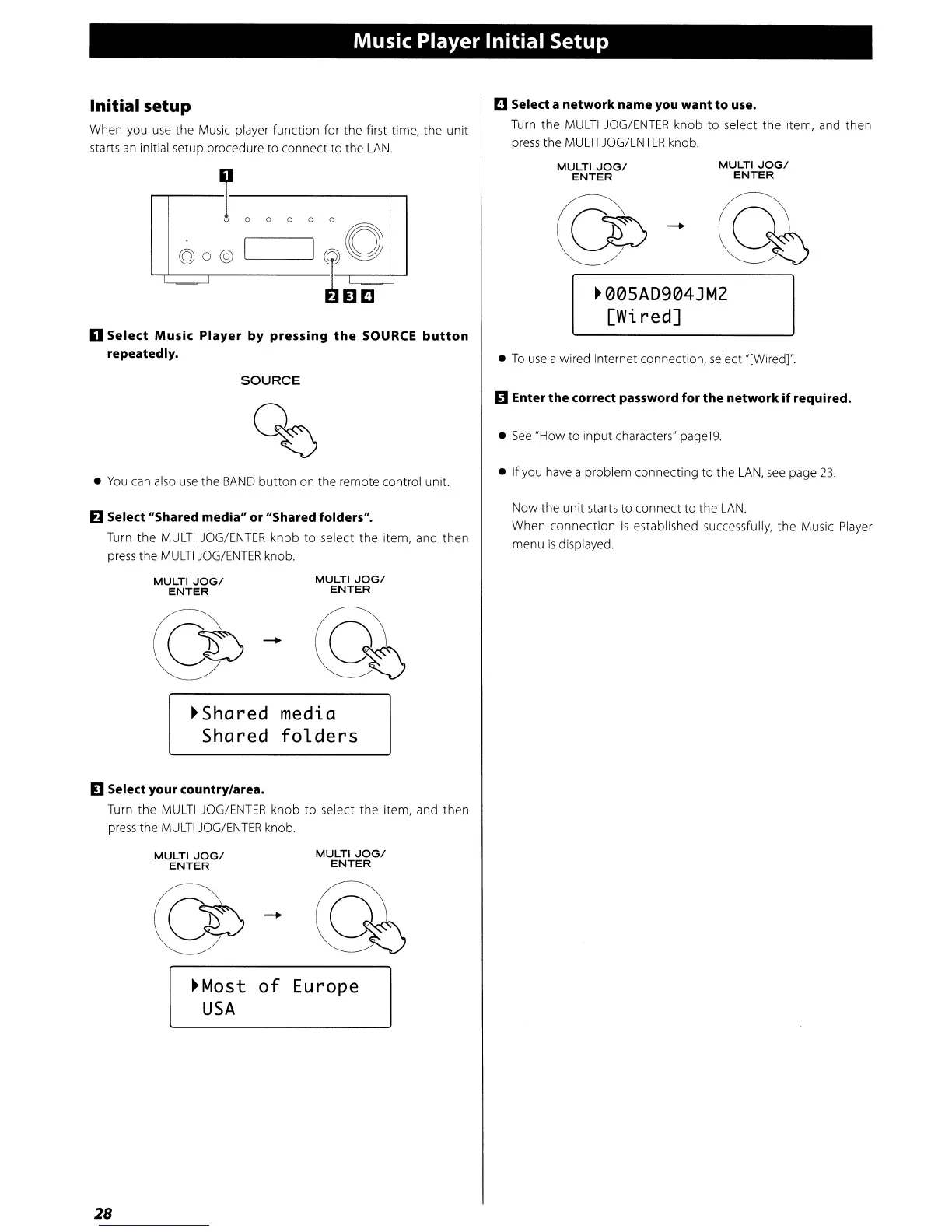
C Select a networkname you want to use.
Turn the
MULTI
JOG/ENTER
knob
to
select
the
item, and
then
press the
MULTI
JOG/ENTER
knob.
©o@
•
To
use
a wired Internet connection, select "[Wired]".
MULTI
JOGI
ENTER
-
MULTI
JOGI
ENTER
~005AD904JMZ
[Wi.
red]
......-.---L
0 0 0 0
,--------I
~
0
~l]C
o Select Music Player by pressing
the
SOURCE
button
repeatedly.
SOURCE
11
Enter the correct password for the network
if
required.
•
See
"How
to
input
characters"
page19.
•
You
can
also
use
the
BAND
button
on the remote control unit.
• If you
have
a problem connecting to the
LAN,
see
page
23
.
D Select "Shared media" or "Shared folders".
Turn
the
MULTI
JOG/ENTER
knob
to
select the item, and then
press
the
MULTI
JOG/ENTER
knob.
Now
the unit starts to connect to the
LAN.
When
connection
is
established successfully, the Music Player
menu
is
displayed.
MULTI
JOGI
ENTER
MULTI
JOGI
ENTER
~Shared
medi.a
Shared
folders
D Select your country/area.
Turn
the
MULTI
JOG/ENTER
knob
to
select
the
item, and
then
press
the
MULTI
JOG/ENTER
knob.
MULTI
JOGI
ENTER
MULTI
JOGI
ENTER
~Most
of
Europe
USA
28


 To Next Page