Network
Configuration
Software
update
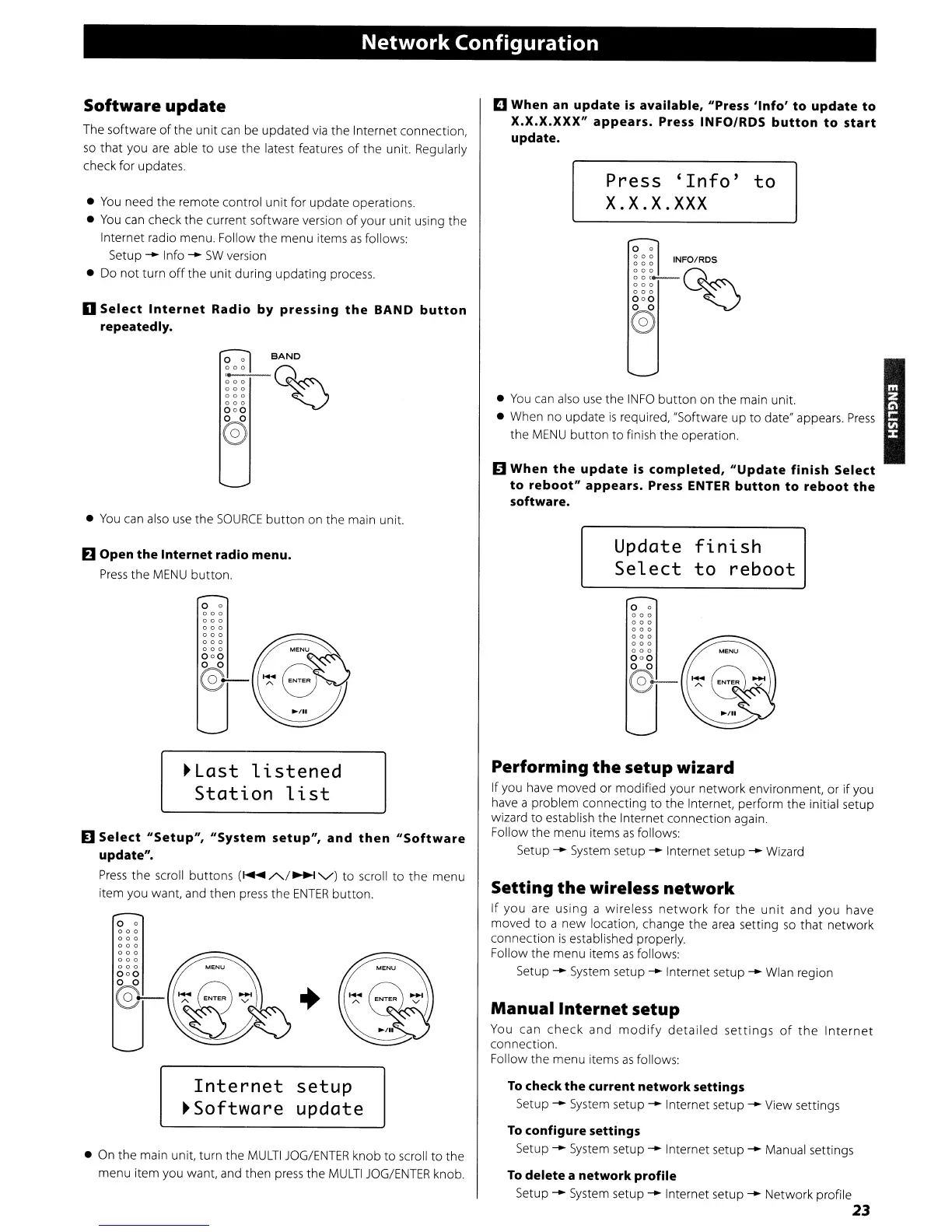
The software
of
the unit
can
be updated
via
the Internet connection,
so
that you
are
able to
use
the latest features
of
the unit. Regularly
check for updates.
•
You
need the remote control unit for update operations.
•
You
can
check the current software version
of
your unit using the
Internet radio menu. Follow the menu items
as
follows:
Setup
--
Info
--
SW
version
• Do
not
turn
off
the
unit
during updating process.
o
Select
Internet
Radio
by
pressing
the
BAND
button
repeatedly.
BAND
~Q~
000
000
000
000
(s)
•
You
can
also
use
the
SOURCE
button
on the main unit.
IE)
Open
the
Internet
radio menu.
Press
the
MENU
button.
o 0
000
000
000
000
000
000
000
o 0
@-
~Last
li.stened
Station
list
D
Select
"Setup",
"System
setup",
and
then
"Software
update".
Press
the scroll buttons (
.....
A/~
v)
to scroll
to
the menu
item you want, and then
press
the
ENTER
button.
o 0
000
000
000
000
000
000
000
o 0
@-
Internet
setup
~Software
update
• On the main unit, turn the
MULTI
JOG/ENTER
knob to scroll
to
the
menu item you want, and then
press
the
MULTI
JOG/ENTER
knob.
D When an
update
is
available,
"Press
'Info'
to
update
to
X.X.X.XXX"
appears.
Press INFO/RDS
button
to
start
update.
Press
'Info'
to
X.X.X.XXX
o 0
~
~
~
INFO/RDS
~~~_n~
000
~
000
000
(s)
•
You
can
also
use
the
INFO
button
on the main unit.
• When no update
is
required, "Software up to date" appears.
Press
the
MENU
button
to
finish the operation.
II
When
the
update
is
completed,
"Update
finish
Select
to
reboot"
appears.
Press ENTER
button
to
reboot
the
software.
Update
fini.sh
Select
to
reboot
o 0
000
000
000
000
000
000
000
~
0-
Performing
the
setup
wizard
If you
have
moved or modified your network environment, or
if
you
have
a problem connecting to the Internet, perform the initial setup
wizard to establish the Internet connection again.
Follow the menu items
as
follows:
Setup
--
System
setup
--
Internet setup
--
Wizard
Setting
the
wireless
network
If you are using a wireless
network
for
the
unit
and you have
moved
to a new location, change the
area
setting
so
that network
connection
is
established properly.
Follow the menu items
as
follows:
Setup
--
System
setup
--
Internet setup
--
Wlan region
Manual
Internet
setup
You
can
check
and
modify
detailed
settings
of
the
Internet
connection.
Follow the menu items
as
follows:
To
check
the
current
network
settings
Setup
--
System setup
--
Internet setup
--
View settings
To
configure settings
Setup
--
System setup
--
Internet setup
--
Manual settings
To
delete
a
network
profile
Setup
--
System setup
--
Internet setup
--
Network profile
23


 To Next Page