Internet
Connection System Connection
To
enjoy the Internet Radio and the Music
Player
function, connect
the unit to the broadband internet
network
.
If you have
TEAC
compact disc player PD-H600, convenient system
control functions
are
possible.
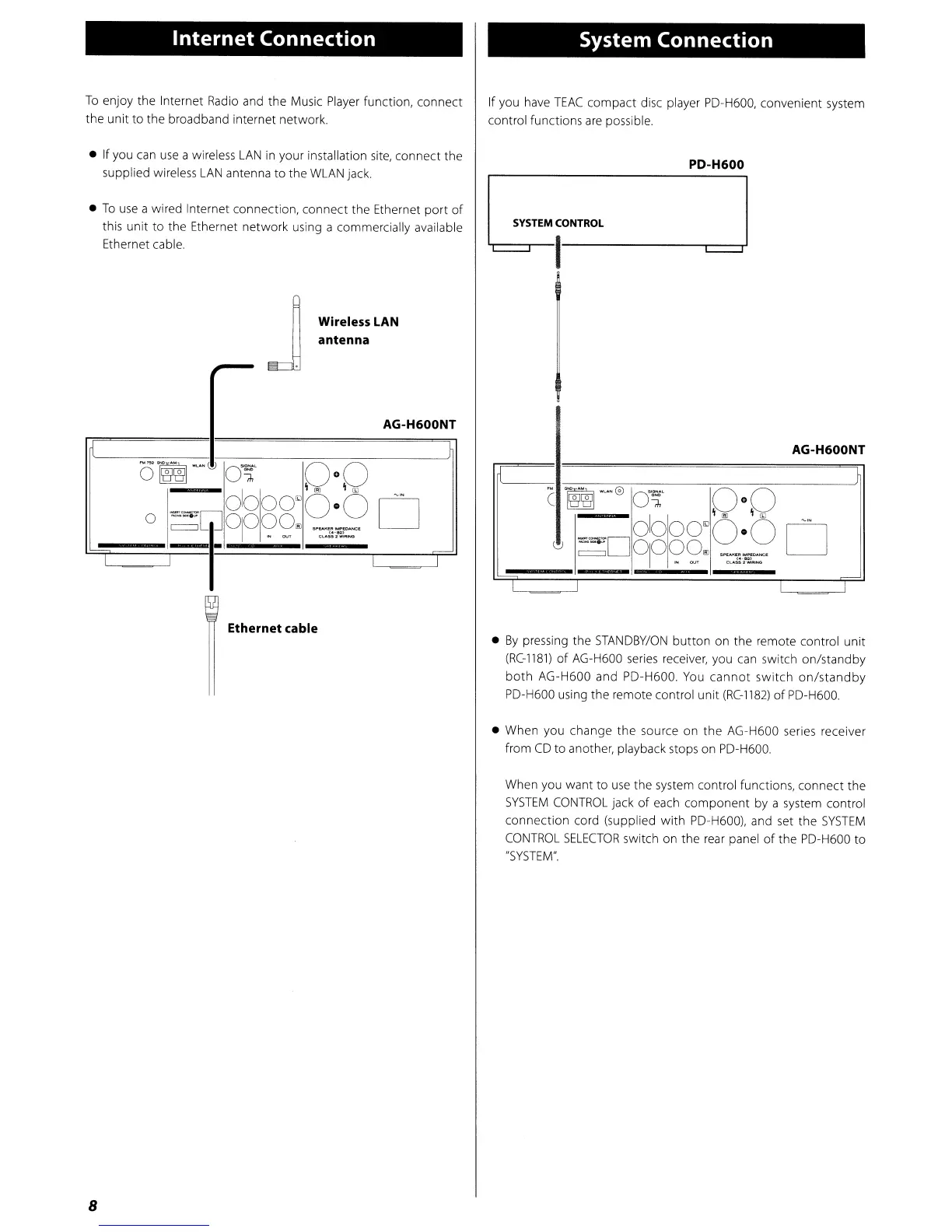
• If you
can
use
a wireless
LAN
in your installation
site,
connect the
supplied wireless
LAN
antenna to the
WLAN
jack.
•
To
use
a wired Internet connection, connect the Ethernet
port
of
this unit to the Ethernet network using a commercially available
Ethernet cable.
PD-H600
AG-H600NT
C
~~@
O~
0°0
OlooO~
0-0
,.
~D
D
~
0jO?9,.
("
..
.o.SSI-.c
Wireless
LAN
antenna
J
~
AG-H600NT
O~~
O~
0°0
~GJ
Olooo~
0-0
D
0
°IO?9"
~
...
Dt_l),O,HC(
("""552"_
--
I I
Ethernet cable
•
By
pressing the
STANDBY/ON
button
on the remote control unit
(RC-1181)
of
AG-H600
series
receiver, you
can
switch on/standby
both
AG-H600 and PD-H600.
You
cannot
switch
on/standby
PD-H600 using the remote control unit
(RC-1182)
of
PD-H600.
• When you change the source on the AG-H600 series receiver
from
CD
to another, playback stops on PD-H600.
When you want to
use
the system control functions, connect the
SYSTEM
CONTROL
jack
of
each
component
by a system control
connection cord (supplied
with
PD-H600), and set the
SYSTEM
CONTROL
SELECTOR
switch on the
rear
panel
of
the PD-H600 to
"SYSTEM".
8



 To Next Page