Preparations
for
Shared
Folders
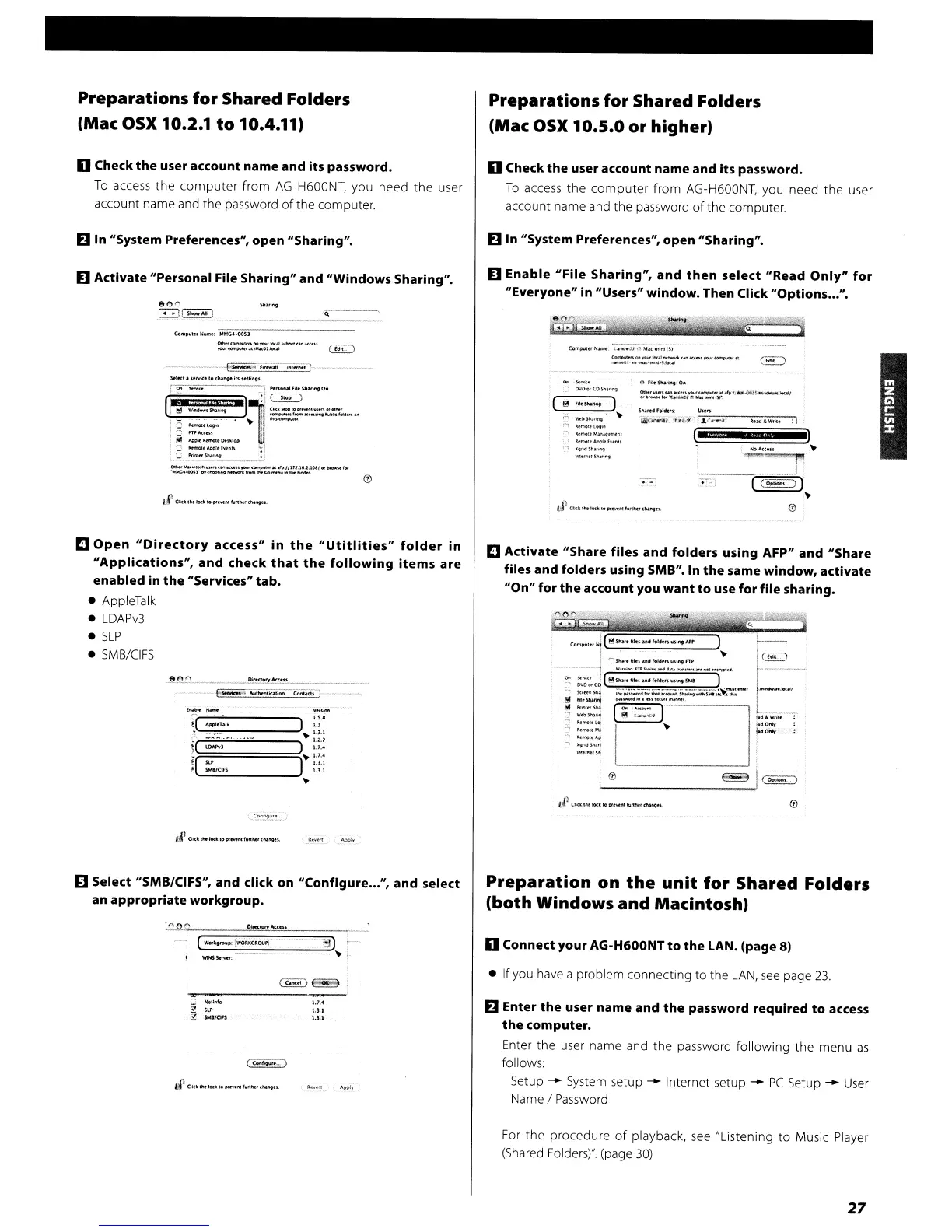
(Mac OSX 10.2.1
to
10.4.11)
Preparations
for
Shared
Folders
(Mac
OSX
10.5.0
or
higher)
o Check
the
user
account
name
and
its
password.
To
access
the
computer
from
AG-H600NT, you need
the
user
account name and the password
of
the computer.
o Check
the
user
account
name
and
its
password.
To
access
the
computer
from
AG-H600NT, you need
the
user
account name and the password
of
the computer.
Elln
"System
Preferences",
open
"Sharing".
Elln
"System
Preferences",
open
"Sharing".
D
Activate
"Personal
File
Sharing"
and
"Windows Sharing".
o
Enable
"File
Sharing",
and
then
select
"Read
Only"
for
"Everyone"
in
"Users"
window.
Then
Click
"Options
...".
80"
SIwi"9
~L~"'I
_
Q
..
or
....
~AIl
......
Q
SN!,lI'dfolckts
Qir
......
if
U';Y-!J.-:.-_l
:\
IF
0<0
'S<l""'.<
--:-'
0'.10o,
(OS.~""'l
!ll "
.......
)
~
W,I)SIU'IlO9'
'"
::
~'"Oltt09'''
:-ltc
........
~_
...
~
«f"lOl''''-'P!fh"l'fItI
q
l(Qrod~~
"".....
's~
.....
(om'UI~H~
.....
~.a·
.....
:.s·~M
...
(_
..
t~1
~;"":'=':::s::"""':"·"'·""-·-·"
C!E:)
----
_._
..
__
•.
Co
..
~u
~
....
: MMG<I-OOSl
=-=::.=-=_
....
MU..
GE:)
_~_.
._.
__
,._"
~·FI
__
.alI
1'11""'1
L_"
__
•
~
•.
~_
~1t"(1.
$~Mc.loW.lr'lI't1rl\lIl
161-~"-----··-~·1
'-"onal"..
Slo
.......'O"
[
*"WII8it
IJ
II,
.M11"
CE)
.1
e
W'ft~~"'9
_
=::::.:::~~~
.....
§
~:~:'~..
.
~
--,.
l!!!
~~_fOt,klo;)
'-'
__
..
Appo:f
lw
..u
1...-;;
"Wi-
.....
)l'I,ltl
...
~
__
..
~._.<o"
__
IIIU.I'.l.UI.J
..
_f...
~~)·"'.
__
rr_~Go_
,_.
......
D
Activate
"Share
files
and
folders
using
AFP"
and
"Share
files
and
folders
using
5MB".
In
the
same
window,
activate
"On"
for
the
account
you
want
to
use
for file
sharing.
Q
)
~
CO""""I~'
Nl
(!'i!'tSl'Ilft
h~~
lM'ol4u~
",~lfl9
AI,
1 .
----
..
,
':'Shattlil
..
~fol6l""""iIrTJO
IGD_
~.
(;:."_~
__
~""~'~'
__
")_N I
r~
~~(.o
t!:ISh...
~I'Il~.an6foldt""'I"'9S14:
.
;
~:~
::.::'~~:;.:.:~~''';;-~'';''~:::-''
L-....·'
"'._
....
~
I
g
:t:::~
I
~
:
__
'-J
..
....~.
E'I;-1
.-.
lto"'Oltll;t
~
I(,
..
lt~!
...
l
W,tm'ISIf
~I(
...
_·)
'----------'
D
Open
"Directory
access"
in
the
"Utitlities"
folder
in
"Applications",
and
check
that
the
following
items
are
enabled
in
the
"Services"
tab.
• AppleTalk
•
LDAPv3
•
SLP
•
5MB/CIFS
Ii)
Select
"SMB/CIFS",
and
click
on
"Configure
...
",
and
select
an
appropriate
workgroup.
Preparation
on
the
unit
for
Shared
Folders
(both
Windows
and
Macintosh)
~
,..,
Dn«ory
_un
(WOfI<gtou':~Ol!-"
) -
':
....
=
..
=-=-,
:::::::;:~===::;-'~
,
o
Connect
your
AG-H600NT
to
the
LAN.
(page
8)
'"11"10
?
SLI'
~
SWI/OfS
• Ifyou have a problem connecting
to
the
LAN,
see
page
23.
El
Enter
the
user
name
and
the
password
required
to
access
the
computer.
Enter the user name and the password
following
the menu
as
follows:
Setup
--
System setup
--
Internet setup
--
PC
Setup
--
User
Name I Password
For
the
procedure
of
playback,
see
"Listening
to
Music Player
(Shared Folders)". (page
30)
27


 To Next Page