Setting
up
Music
Player (2)
Preparations
for
Shared
Folders
(Windows
XP)
Preparations
for
Shared
Folders
(Windows Vista)
o Check
the
name
of
the
Domain
or
the
"Workgroup"
your
computer
belongs
to.
To
enable
Shared
Folders, your computer needs
to
be a member
of
a Domain or a "Workgroup".
Usually,
your computer belongs
to
a "Workgroup" by default.
To
see
the name
of
the Domain or the "Workgroup" your computer
belongs
to, check the
PC
setting
as
follows:
Control
Panel
....
System
.... Computer Name
oCheck
the
name
of
the
Domain
or
the
"Workgroup"
your
computer
belongs
to.
To
enable
Shared
Folders, your computer needs to be a member
of
a Domain or a "Workgroup".
Usually,
your computer belongs to a "Workgroup" by default.
To
see
the name
of
the Domain or the "Workgroup" your computer
belongs
to, check the
PC
setting
as
follows:
Control
Panel
....
System
and Maintenance .... System
D Check
the
user
account
name
and
its
password.
To
access the
computer
from AG-H600NT, you need the user
account name and the password
of
the computer.
D Check
the
user
account
name
and
its
password.
To
access the
computer
from AG-H600NT, you need the user
account name and the password
of
the computer.
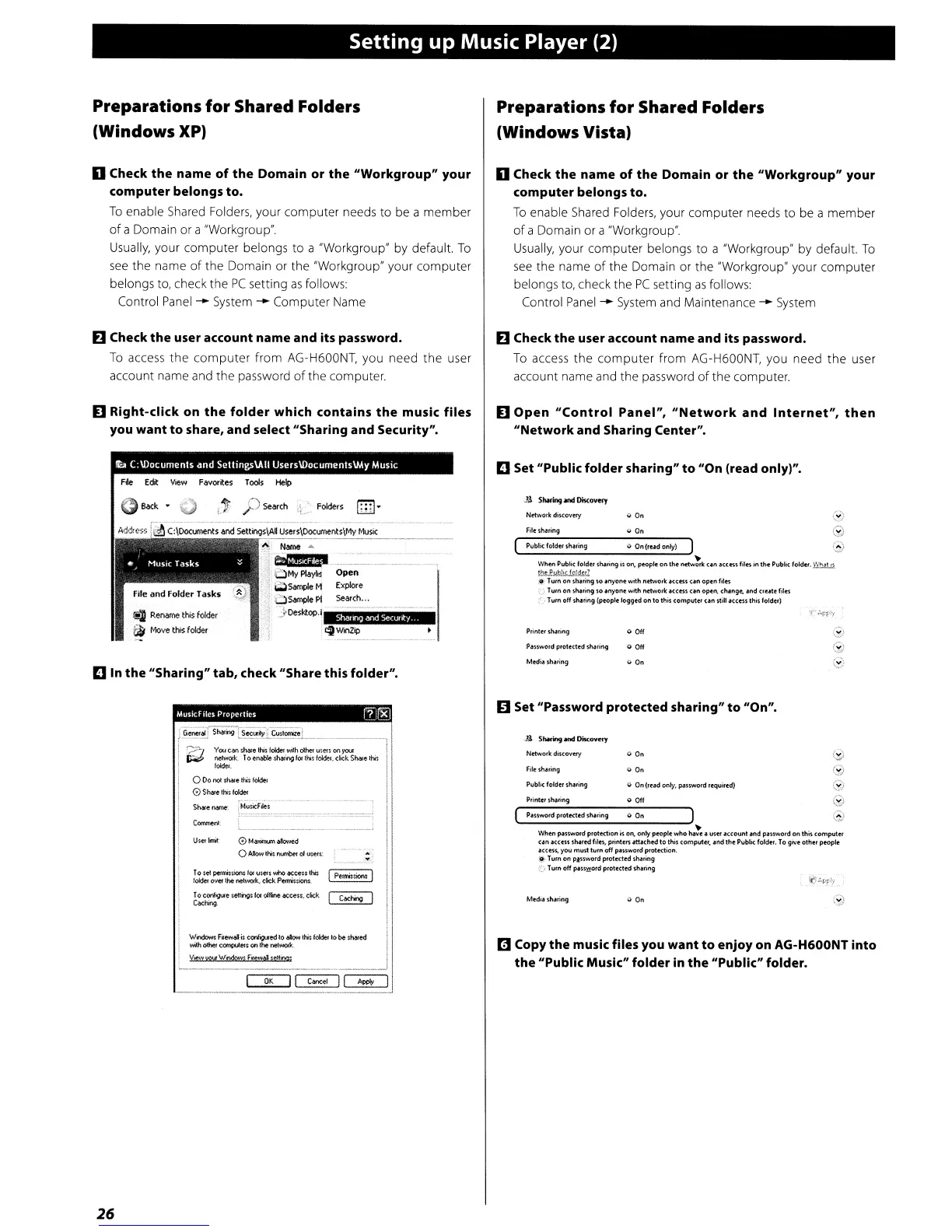
D Right-click
on
the
folder
which
contains
the
music
files
you
want
to
share,
and
select
"Sharing
and
Security".
D
Open
"Control
Panel",
"Network
and
Internet",
then
"Network
and
Sharing
Center".
e
000
Printer
\hning
Network
diKOVuy v
On
File
sharing
Public
foldn
lhtring
oJ
On
(rud
only) ) 0
Wtw1 PublK folder
~,ing
it
on.
people
on
the
nctw~
un
a((~s
file\ in
the
Public fokfel.
~
lhePub!O{fpJdtl?
.l?"
Tum
on
sh"ing
so
.nyone
with
ndwo,k
.cces~
un
open
files
.~)
Tum
on
sharing so
'nyone
with nnworte
~us~
un
optn.
ch.nge.
altd
crute
file'S
:.
Turn off sharing
~ple
logged
on
to
this computf:l
un
still
.ecess
this foldf:l)
D
Set
"Public
folder
sharing"
to
"On
(read
only)".
Open
Exp!«e
search
...
~
MyP\oyH
~SampleM
OSomplePl
JDesl<.top.1
~WinZip
~
Renome
this
folder
~
Move
this
folder
D
In
the
"Sharing"
tab,
check
"Share
this
folder".
MUS1CfIIC$
PropertIes
11]rg)
II
Set
"Password
protected
sharing"
to
liOn".
r1!
Copy
the
music files you
want
to
enjoy
on
AG-H600NT
into
the
"Public Music"
folder
in
the
"Public" folder.
Public
foldtt
sharing 0 On (lead only, password requirtd) e
P,inter sharing 0
Off
~)
Password protected sharing 0'
On)
e
When pass
.....
ord protection
ts
on,.
only people
who
ha~e.
user
.ccount
and
password
on
this
computer
un
.CCtiS
shartd
fil6,
printers
att"htd
to
this compU'ttt,
Ind
the
Public folder.
To
give other
~Ie
OICcess.
you
must
tum
off password protection.
,0'
T
utn
on
pJSlWord
proteded
sharing
._' Turn
off
pauy!ord
protKtt'd
sharing
[G;;;-ail
Shamg
Ts~~;(
Customizel
1,-;:=-_J
YeAl
eM
:;:::;~,:-:::'~~':::-~--'-'-!
I
r;;;;;,
network..
To
eNb&e
SMrlO9
l
or
thit
foldtt.
click
Share
lnit I
i
,-
i o
Do
not
sha!e
this
foldel
I
0Sh¥elhisloldei
::
~~;j~:~IP,,-.-'.'--~1
!I'
To
set
pennissions
for
UStfS whoateen lhis
..........
'~
lo6def
over
the
nelWOfk.
ckk
PenTissKwu.
~
••
....,."
..
"line acce
...
cick I
c.aw.o
I I
"'.ndowJ;
F.ew4
is
eorYigl.Iedlo
bbH!tis
tolder
10
be
marJ
Mhdhe'~~$onthenel.worit.
V.ew
you'
\ll"ndPw$ Fi-ew4
sdtM"
Netwod:: discovery
Filesha,ing
MedII sh.ring
o
On
<9
e
26


 To Next Page