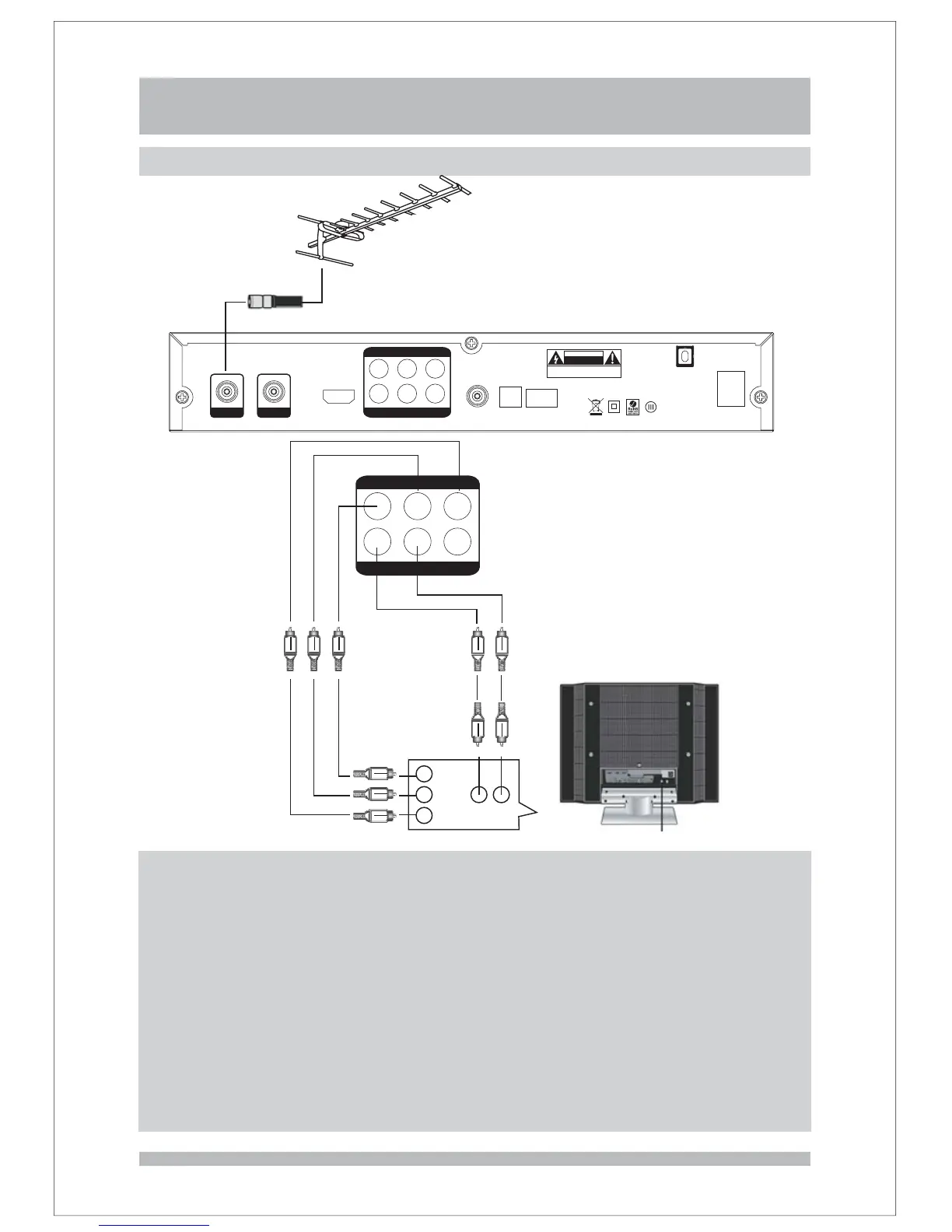
Connecting to YPbPr
YPbPr
R
L
CVBS
ANTENNA
R AUDIO L--
Y
Pb
Pr
11
Connections and preparation
HDMI
Component YPbPr
S Video
Composite ideo
Digital udio
Analog Audio
:
-( )
-.
() .
.-
.
,
-.
and sound
red green blue cable
provides excellent picture quality
a yellow video jack provides good picture quality
connections provide the clearest sound Connect to your Hi Fi System
for the best sound quality
If digital audio connections are not possible connect to red and white
out jacks to the audio in jacks of your TV or Hi Fi System
V
A
provides best possible picture quality
provides best possible picture quality
Best possible connections
The capabilities of your existing equipment, especially your TV, will determine your
connection possibilities. However, the following guidelines describe which options
provide the best picture and sound quality.
ANT IN
ANT OUT
OFF
ON
YPbPr
R
L
CVBS
AC90 240V
50Hz 60Hz
10W max
-
/
SVIDEO
-
OPTICAL
USB
()For upgrade only
CAUTION
RISK OF ELECTRIC SHOCK
DO NOT OPEN
SHOCK HAZARD DO NOT OPEN
RISQUE CHOC NE PAS ENLEVER
:
:
HDMI



 To Next Page