12
First Time Installation
After all the connections have been made properly, turn on your TV and switch the TV to
the input that the set-top box is connected to. Make sure the receiver is connected to the
mains and turn on the power switch on the rear panel. If you are using the receiver for the first
time, you should do some settings first. Use the remote controller to finish the installation.
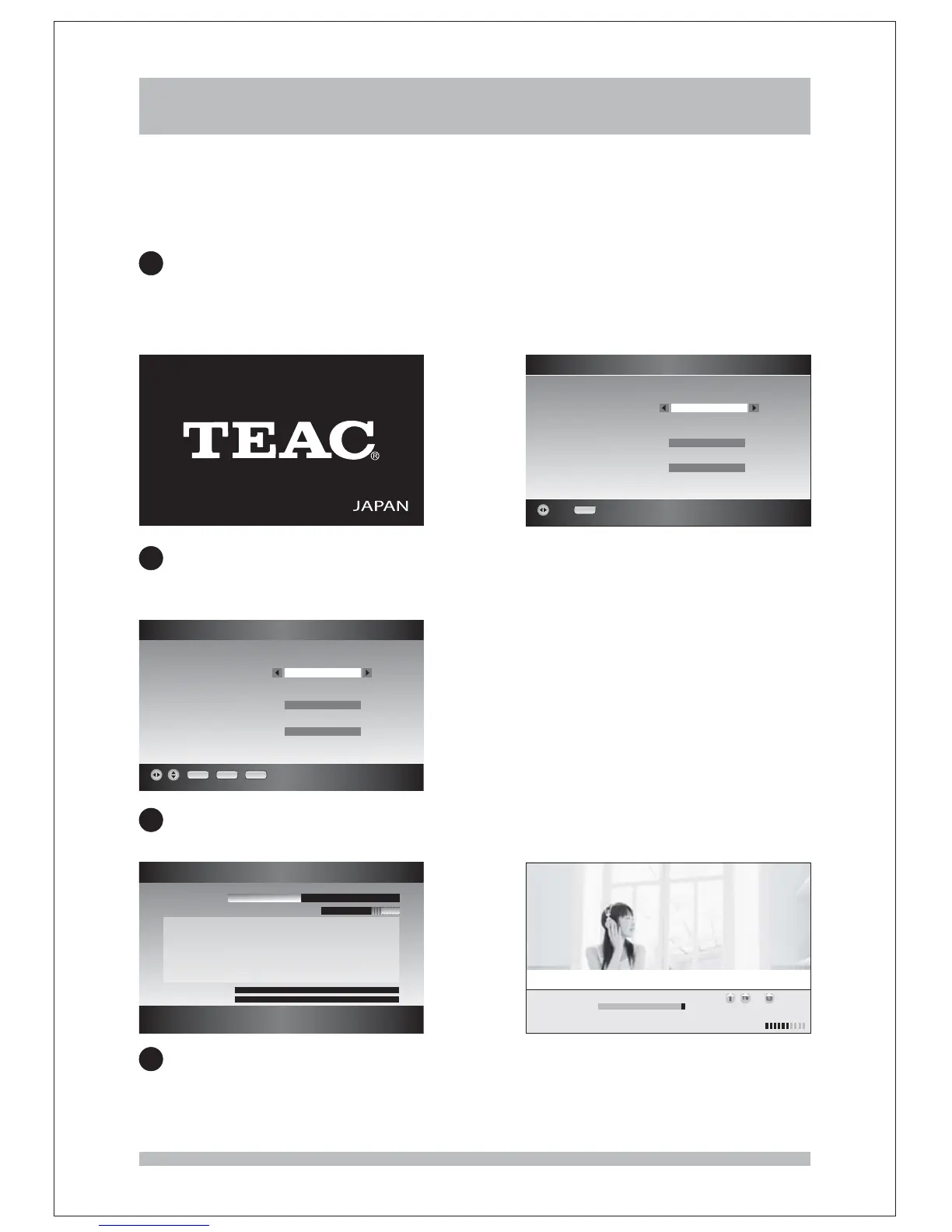
When the receiver is on, you can see the logo of “ ” first on the screen. After a
while the menu will be shown. Press the keys
you can choose the where you live. is . The
setting of is fixed to Australia and is fixed to .
TEAC
First Time Installation LEFT / RIGHT
Time Zone The default Time Zone VIC
Country Menu Language English
1
2
3
4
First Time Installation
OK EXIT RECALL
Screen TV format
HD Video Output
HD definition
16 9 Full Screen
YPbPr
1080i
:
First Time Installation
OK
Time zone
Country
Menu Language
VIC
Australia
English
After you chose the Time Zone and press , then another menu will be shown
which allow user to set the , and .
Press the keys to choose.
OK
Screen TV format Video Output Screen definition
LEFT/RIGHT
key
Press the key to start channel scan. Wait to complete the scanning. The channels
already found will be stored.
OK
Auto Scan
CH 35 586 MHz:
Scan Progress
Scanned Channel 6 Scanning:
TV Channels 4 Audio Channels 2
ABC HDTV ABC DIG Radio
ABC TV Melbou ABC DIG Jazz
ABC2
ABC TV
::
Signal Level
Signal Quality
When finished, all active channels found will be stored automatically. The first found
channel will be displayed.
TV 21 ABC2 SD MPEG 10 11[][ ] :
Engle Benjy Snow Fun
10 01 10 11
10 11 10 17 Ja5per The Penguin Wet Paine
-
:-:
:-: :



 To Next Page