13
Remote Control
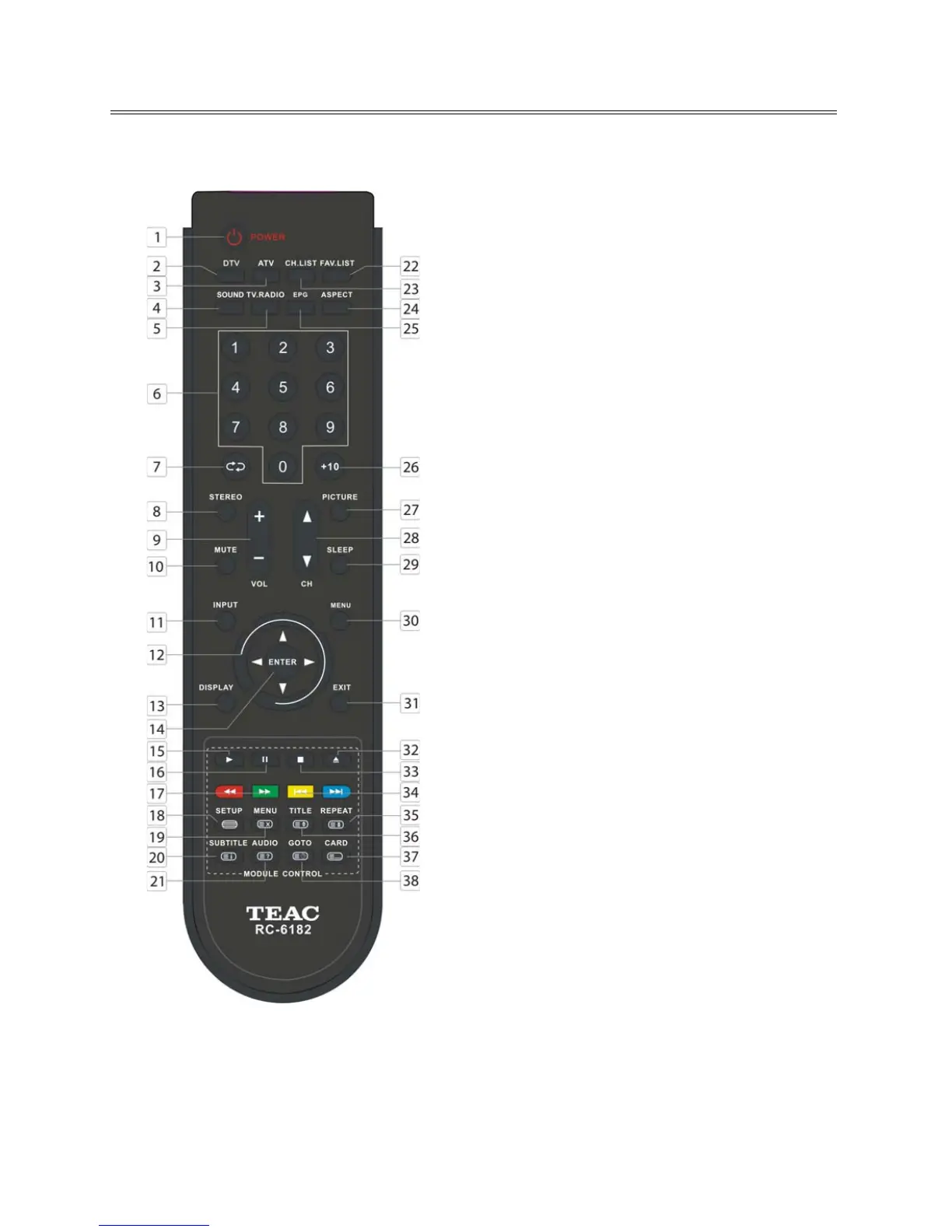
Remote Control Drawing
35. REPEAT button
Press to repeat a chapter, track, title or all
program content in DVD mode.
In teletext mode, press to hold the current
page and press again to resume.
36. TITLE button
During disc normal playback, press to go to
display the title menu.
In teletext mode, press the button first time
to double the size of teletext letters in the
upper half of the screen, second to double
the size of teletext letters in the lower half of
the screen and third to resume normal status.
37. CARD button
Press to display the media selecting menu in
DVD mode.
In teletext mode, press to select four groups
of 3-digit numbers that are displayed in
different colors at the bottom of the screen.
Press the color buttons on the remote control
to select, then use the number buttons to
input the corresponding number to display
the page.
Repeat the above procedures for each page
to be stored, using a different color button
each time.
38. GOTO button
Press to select the desired disc starting time,
title or chapter in DVD mode.
In TV mode, press to display the real clock
and press the EXIT button to exit.



 To Next Page