33
TV Function
Option Setting
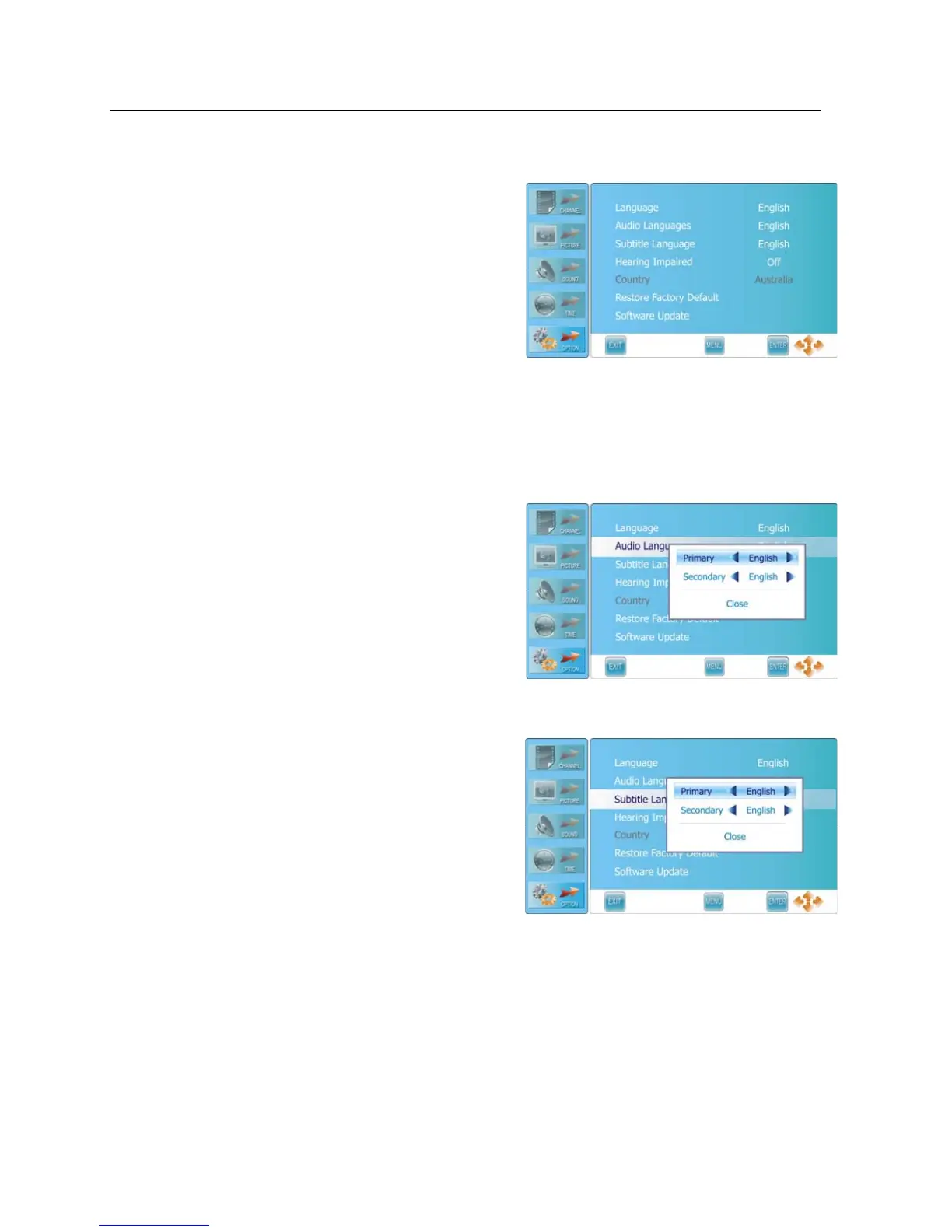
Press the MENU button once to enter CHANNEL setup
menu and press the ▲▼ button to select OPTION, the
screen will display as shown.
Press the ENTER or ► button to enter the menu.
In the OPTION setup menu, press the ▲▼ button to
select the desired item.
Press the MENU button to return to the previous menu.
Press the EXIT button to exit.
Language
Press the ▲▼ button to select Language and press the ◄► button to select desired language.
Audio Languages
Press the ▲▼ button to select Audio Languages and
press the ENTER or ► button to prompt a information
box, as shown:
Press the ▲▼ button to select Primary or Secondary,
press the ◄► button to select desired language.
Press the ENTER button to confirm before selecting
Close.
Note: This item is only available in DTV mode.
Subtitle Language
Press the ▲▼ button to select Subtitle Language and
press the ENTER or ► button to prompt a information
box, as shown:
Press the ▲▼ button to select Primary or Secondary,
press the ◄► button to select desired language.
Press the ENTER button to confirm after selecting Close.
Note: This item is only available in DTV mode.
Hearing Impaired
Press the ▲▼ button to select Hearing Impaired and press the ◄► button to select On or Off.
Country
This item is used to shown the current country.



 To Next Page