26
TV Function
If you did not use the unit for the first time or if your setup has changed, you can setup the unit from
Channel Setup menu. Please follow the instructions below:
Channel Setting
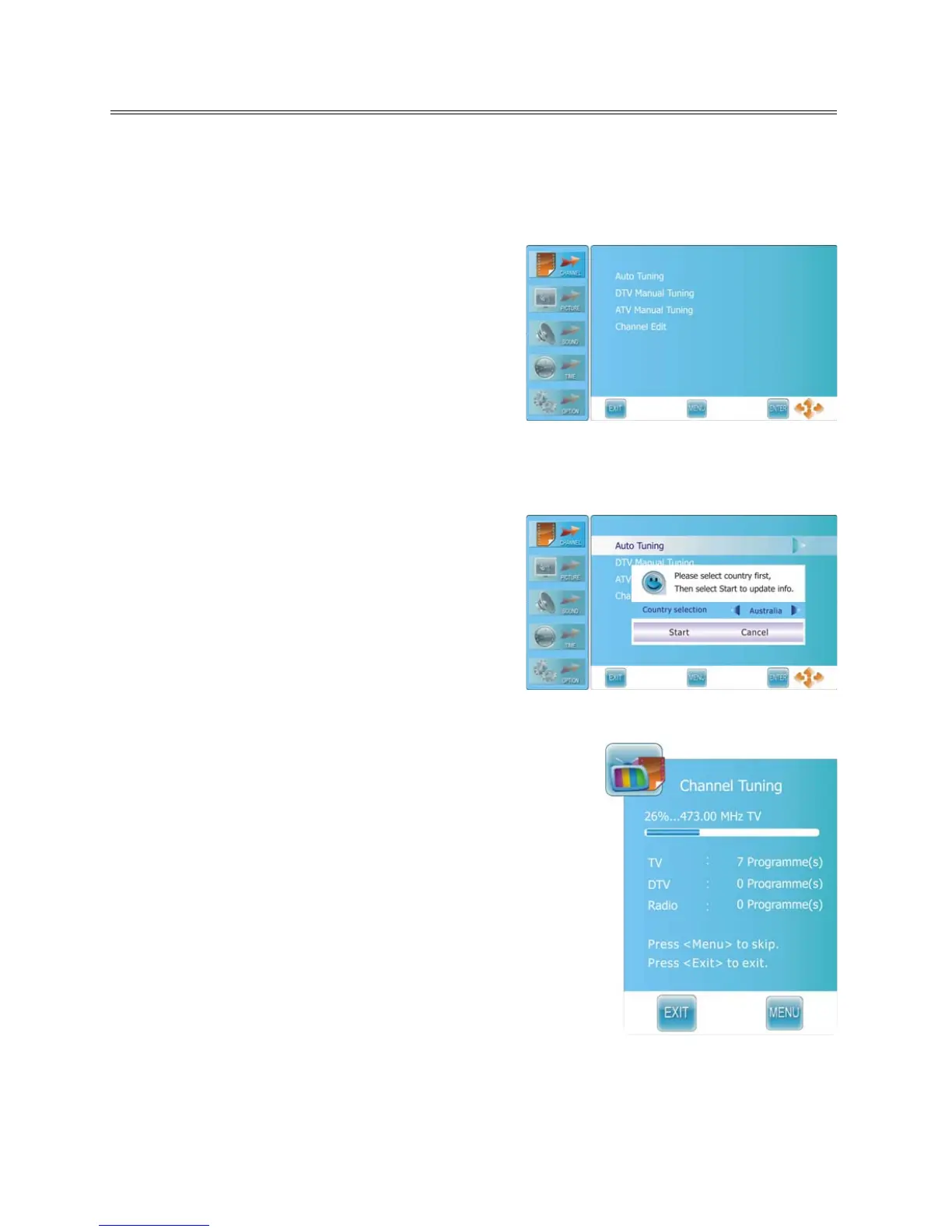
Press the MENU button once to enter CHANNEL setup
menu as shown on the right.
Press the ENTER or ► button to enter the menu.
In the CHANNEL setup menu, press the ▲▼ button to
select the desired item.
Press the MENU button to return to the previous menu.
Press the EXIT button to exit.
Auto Tuning
Press the ▲▼ button to select Auto Tuning and press
the ENTER or ► button, the screen will display as shown
on the right:
Press the ◄► button to select desired country and
press the ▼ button to highlight “Start”.
To cancel auto tuning, press the ENTER button after
highlight “Cancel” by pressing the ◄► button.
To start auto tuning, press the ENTER button after highlighting
“Start”. The screen will display as shown:
When auto tuning is over, all searched channels will be stored
automatically and it will return to the first searched channel.
During searching, press the MENU button to skip some range of
available channels. Press the EXIT button to exit.
Notes:
Channel Tuning scans the analog channels, digital channels
and Radio programs.
Please allow a few minutes for this feature to scan the entire
range of available channels to ensure accurate programming of
available channels.



 To Next Page