ENGLISH
Connection 3
18
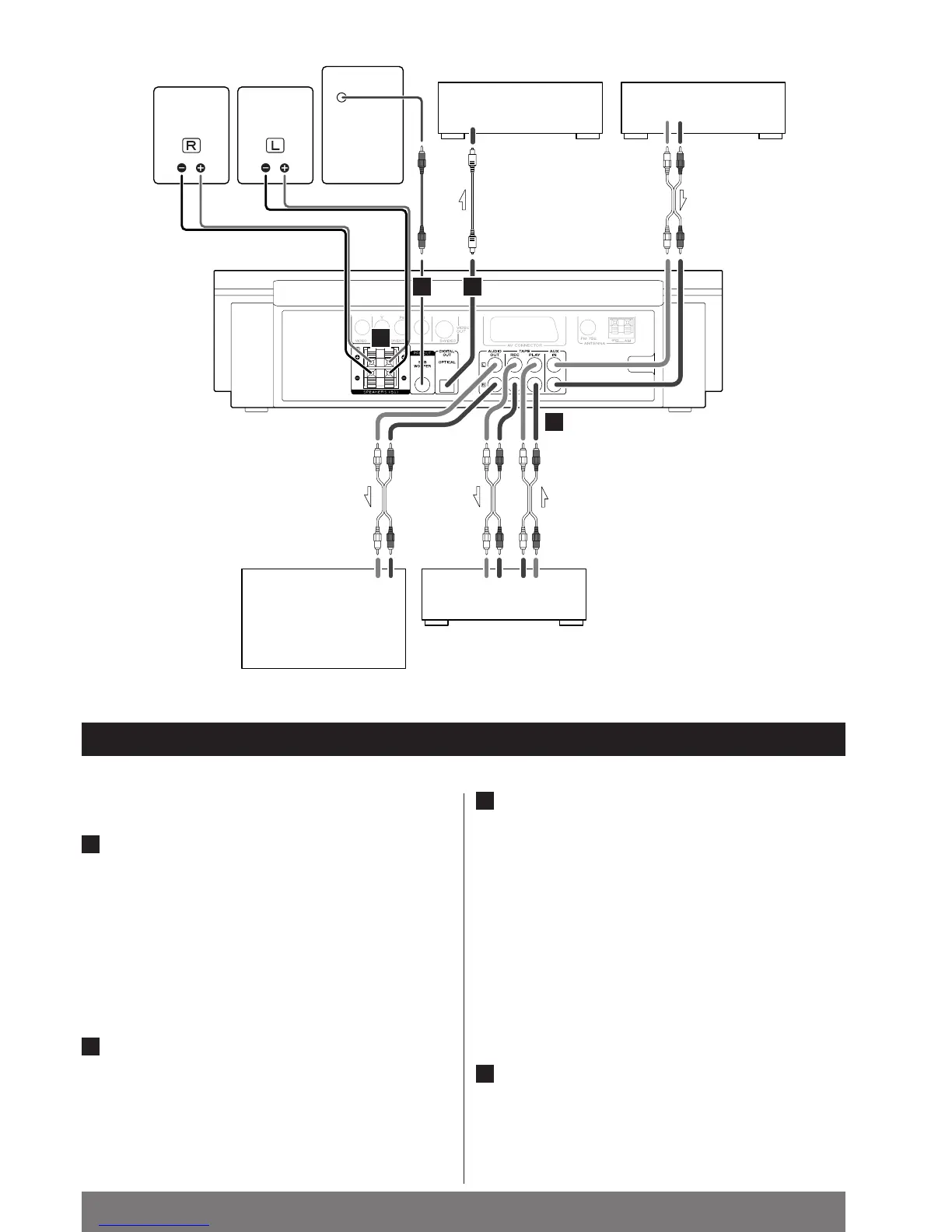
Connection to an audio component
DIGITAL OUT terminal
If the component has an DIGITAL IN terminal, connect it with
an optical cable.
DIGITAL OUT (MC-DV250)
q
DIGITAL IN (CD-R, MD, etc.)
<
Select the proper digital output mode in accordance with
your connection (see page 72).
AUDIO IN/OUT jacks
Analog 2-channel audio signal is input or output from these
jacks. Connect the component with an RCA pin cable.
Make sure to connect:
white plug q
white jack (L: left channel)
red plug q
red jack (R: right channel)
B
A
LINE OUTLINE IN
RLRLRL
MD, CD-R, etc. MD, VCR, etc.
TAPETV
DIGITAL
IN
AUDIO OUT
AUDIO IN
RL
SPEAKER
SUBWOOFER
AUDIO IN
SPEAKER
AD
C
B
Speaker Connections
CAUTION:
To avoid damaging the speakers with a sudden high-level
signal, be sure to switch the power off before connecting
the speakers.
The red speaker terminals are +
(positive), and the black
terminals are _
(negative).
Connect the black side of the speaker cable to the black
terminal and the other side to the red terminal.
<
If not using the included speakers, make sure the speakers
you use offer a 6 Ω impedance.
Subwoofer Connection
Connect the subwoofer with the supplied RCA pin cable.
D
C



 To Next Page