130
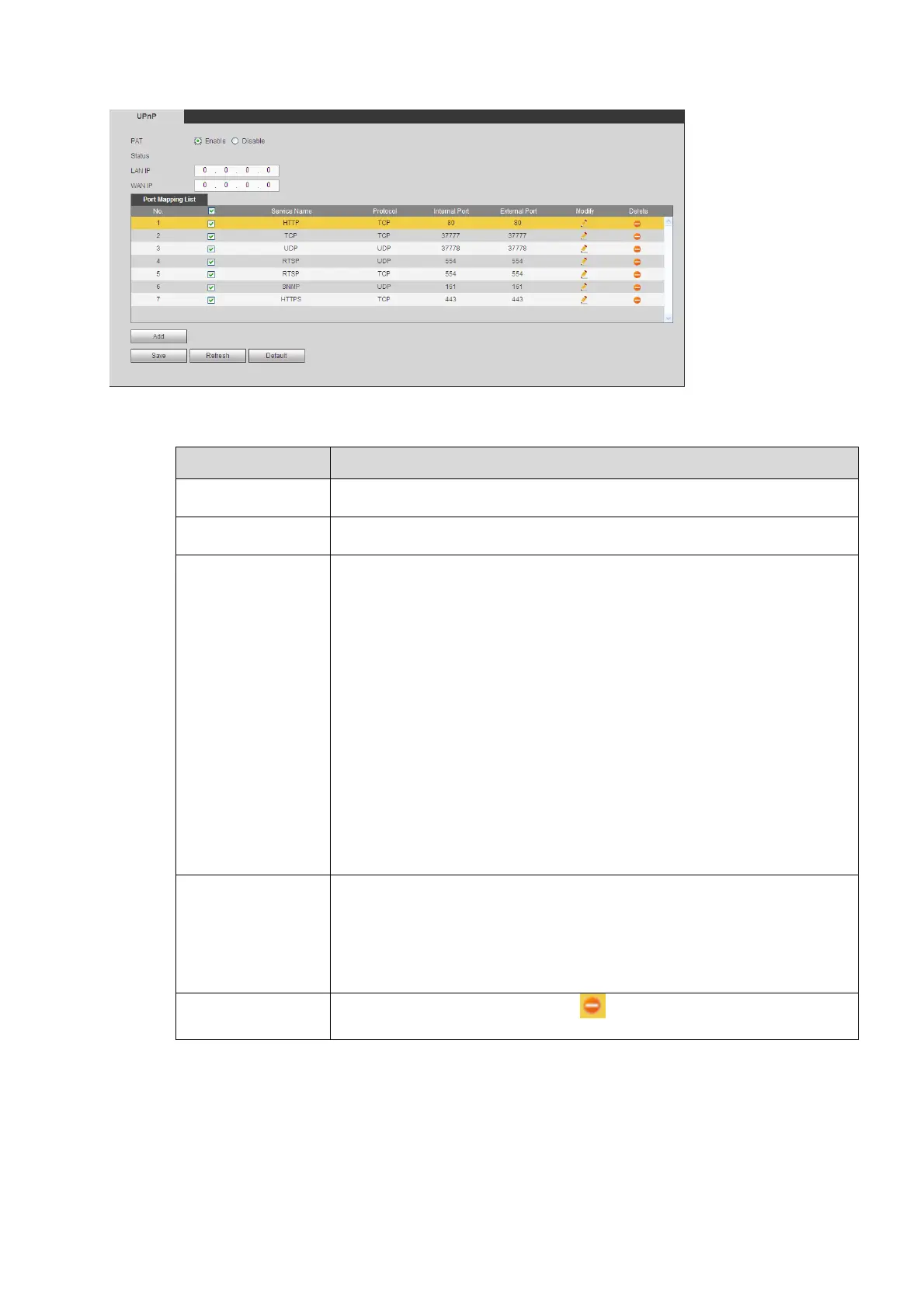
Figure5‐35
Refer to the following sheet for detailed information.
Parameter Function
PAT Check the corresponding box to enable PAT function.
Status Dsiplay UPnP function status.
Port mappling list
It is corresponding to the UPnP mapping information on the router.
Check the box before the service name to enable current PAT service.
Otherwise, the service is null.
Service name:Custmozied name.
Prptocol:Protocol type.
Internal port:The port maped to the port.
External port:The port current device needs to map.
Device has three mapping items: HTTP/TCP/UDP.
Note
When you set the external port (outport) of the router, the value ranges
from 1024 to 5000. Do not use port 1~255 or system port 256~1023,
in case there is conflict.
Add
Click Add button to add map relationship.
Note: For the data transmission protocol TCP/UDP, the external port
and the internal port shall be the same to guarantee proper data
transmission.
Delete
Select ona service and then click to delete map relationship.


 To Next Page