EasyManua.ls Logo

Technics SA-EX320 - Page 24

Technics SA-EX320
28 pages
Print Icon
To Next Page IconTo Next Page
To Previous Page IconTo Previous Page
Loading...
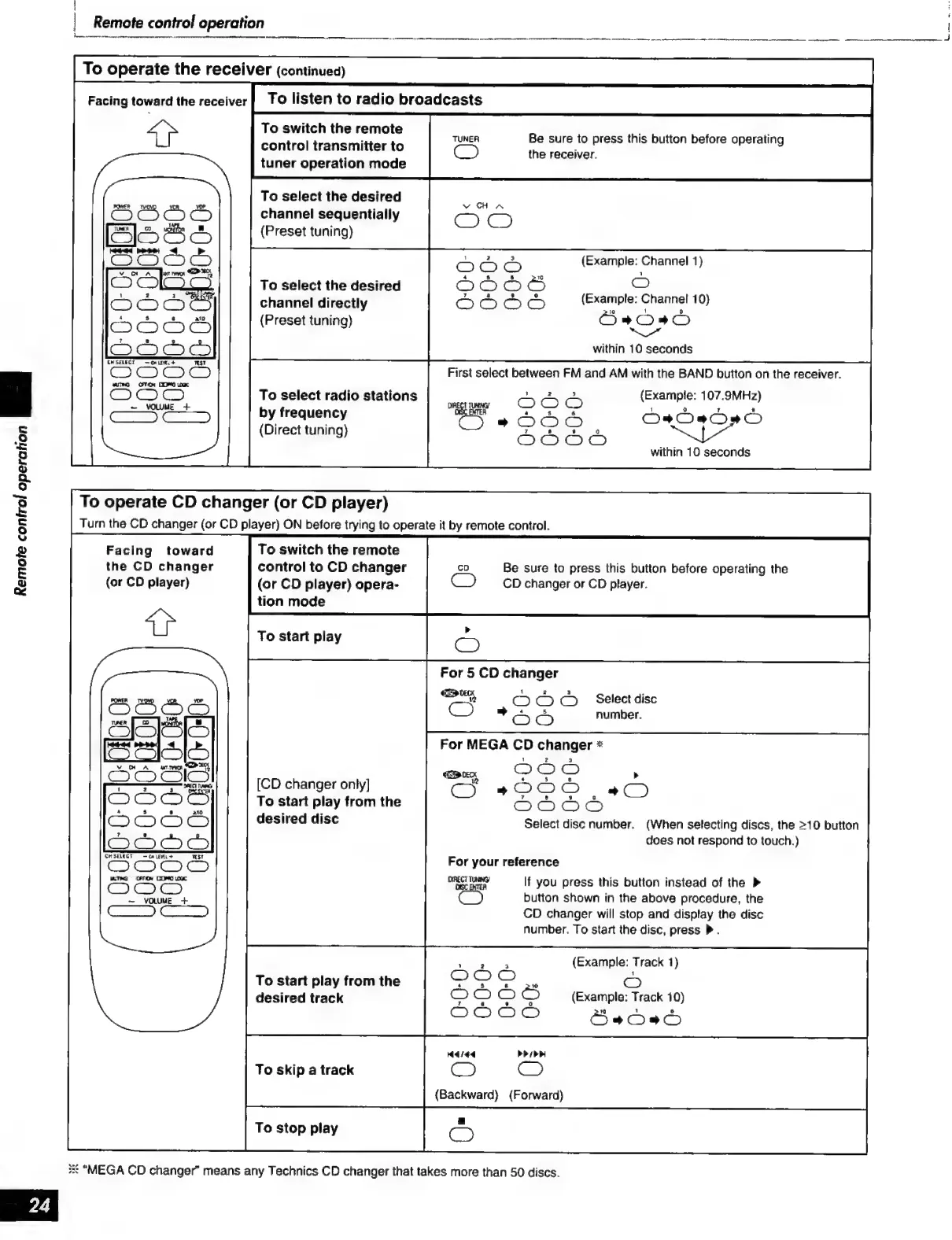
Remote
control
operation
ИШ
OO
-
VOWME
+
To
switch
the
remote
control
transmitter
to
tuner
operation
mode
To
select
the
desired
channel
sequentially
(Preset
tuning)
To
select
the
desired
channel
directly
(Preset
tuning)
To
select
radio
stations
by
frequency
(Direct
tuning)
To
operate
CD
changer
(or
CD
player)
Turn
the
CD
changer
(or
CD
player)
ON
before
trying
to
operate
it
by
remote
control.
Facing
toward
the
CD
changer
(or
CD
player)
митно
OFON
DOMO
OGC
(2070)
~
VOLUME
+
To
switch
the
remote
control
to
CD
changer
(or
CD
player)
opera-
tion
mode
To
start
play
For
5
CD
changer
CRD
DEK
[CD
changer
only]
To
start
play
from
the
desired
disc
To
start
play
from
the
desired
track
To
skip
a
track
To
stop
play
Be
sure
to
press
this
button
before
operating
the
receiver.
(Example:
Channel
1)
С»
(Example:
Channel
10}
Baa
“ж
within
10
seconds
First
select
between
FM
and
AM
with
the
BAND
button
on
the
receiver.
(Example:
107.9MHz)
1
о
8
СО»
oS
о
within
10
seconds
Be
sure
to
press
this
button
before
operating
the
CD
changer
or
CD
player.
%,
CO
C5
C5
Select
disc
=
Od
number.
For
MEGA
CD
changer
*
Select
disc
number.
(When
selecting
discs,
the
>10
button
does
not
respond
to
touch.)
For
your
reference
ОРЕСТ TUNG)
If
you
press
this
button
instead
of
the
>
Cy
button
shown
in
the
above
procedure,
the
CD
changer
will
stop
and
display
the
disc
number.
To
start
the
disc,
press
М.
(Example:
Track
1)
©
(Example:
Track
10)
3€
"MEGA
CD
changer"
means
any
Technics
CD
changer
that
takes
more
than
50
discs.

Other manuals for Technics SA-EX320

Related product manuals