
 Need help?
Do you have a question about the TechniSat DIGITRADIO 574 IR and is the answer not in the manual?
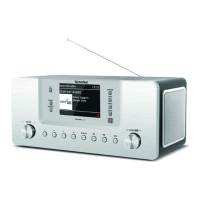
Diagram showing the front panel layout and controls of the DIGITRADIO 574 IR.
Diagram illustrating the rear panel connections and ports of the DIGITRADIO 574 IR.
Illustration and numbering of the remote control buttons and their functions.
Explanation of warning symbols and important notes for safe operation.
Defines the proper and intended applications for the DIGITRADIO 574 IR.
Identifies the intended audience for these operating instructions.
Instructions for minimizing safety risks and preventing damage to the appliance.
Contains legal declarations and conformity statements for the device.
Information on product testing, warranty claims, and technical support contact details.
Lists all items included in the product package.
Highlights the main functionalities and capabilities of the DIGITRADIO 574 IR.
Guidelines for placing and ensuring proper ventilation for the device.
Instructions on how to position the telescopic antenna for optimal reception.
How to safely connect the device to the mains power.
Steps for installing batteries in the remote control.
How to connect headphones and the implications for audio output.
Connecting external devices for audio playback via AUX-IN.
Procedures for powering on the DIGITRADIO 574 IR and initial setup.
How to put the DIGITRADIO 574 IR into standby mode.
Guidelines for using the remote control effectively.
Adjusting the audio volume level on the device.
Muting and unmuting the audio output.
Accessing additional information displayed on the screen.
Understanding the information shown on the device's display.
Choosing the desired audio source for playback.
Browsing and selecting available internet radio channels.
Saving preferred internet radio stations for quick access.
Retrieving saved favourite internet radio stations.
Removing saved stations from memory.
Selecting and playing tracks from a connected USB device.
Configuring repeat modes for USB media playback.
Explains the DAB+ digital radio format and its benefits.
Activating the DAB+ radio reception mode on the device.
Scanning for available DAB+ radio stations.
Manually tuning to specific frequencies to find DAB+ stations.
Displaying and selecting from the list of found DAB+ stations.
Storing favourite DAB+ radio stations.
Accessing previously saved DAB+ stations.
Removing saved DAB+ station presets.
Checking the reception quality for DAB+ broadcasts.
Displaying additional text information from DAB+ stations.
Adjusting the dynamic range control for volume compensation.
Removing stations that are no longer broadcasting.
Sorting the list of DAB+ stations by provider or name.
Activating the FM radio reception mode on the device.
Receiving station name and additional data via RDS.
Manually tuning to FM frequencies.
Automatically scanning for available FM stations.
Adjusting audio output for mono or stereo sound.
Storing favourite FM radio stations.
Accessing previously saved FM stations.
Removing saved FM station presets.
Enabling the Bluetooth function on the device.
Connecting a music player or smartphone via Bluetooth.
Playing audio from a paired Bluetooth device.
Sets a timer for the appliance to switch to standby automatically.
Configure and manage alarm functions, including wake-up times and sources.
Adjust audio sound profiles like jazz, rock, and pop.
Set quality for internet radio audio streams.
Configure network and internet connection parameters.
Step-by-step guide for establishing a WLAN connection.
Connect to Wi-Fi using WPS for secure network access.
Display details of the current network connection.
Set and update the device's time and date manually or automatically.
Configure automatic standby mode for power saving.
Change the device menu display language.
Reset device to original factory default settings.
Check for and install device software updates.
Initial setup guide for language, network, and time.
View software version and device information.
Adjust screen brightness for operation and standby modes.
Access the device's privacy policy link.
 General
| Alarm function | Yes |
|---|---|
| Headphone jack | 3.5 mm |
| USB port | Yes |
| App control | No |
| Connectivity | WLAN |
| Type | DAB+/FM radio with internet radio functionality |
| Display | 2.4" TFT colour display |









 To Next Page