EasyManua.ls Logo

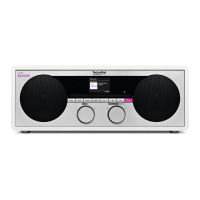
TechniSat DIGITRADIO 451 CD IR - User Manual

TechniSat DIGITRADIO 451 CD IR
220 pages
Go to English
Print Icon
To Next Page IconTo Next Page
Loading...
DIGITRADIO 451 CD IR

Table of Contents

Questions and Answers

  • D
    Diamond GeorgeAug 16, 2025
    Why is there interference on my TechniSat DIGITRADIO 451 CD IR?
    • A
      Andrew JeffersonAug 16, 2025
      If you are experiencing interference while using your TechniSat Radio, it might be due to radio waves emitted by nearby devices like mobile phones. To resolve this, move the mobile phone or any other emitting device away from the radio.
  • G
    garybrowningAug 19, 2025
    How to improve sound quality on TechniSat Radio?
    • H
      heidi25Aug 19, 2025
      If your TechniSat Radio is producing low or poor quality sound, other devices such as televisions might be disrupting the reception. Try moving the radio further away from these devices. Also, make sure that the antenna is correctly aligned by changing its position.
  • A
    Ashley TorresAug 21, 2025
    What to do if TechniSat DIGITRADIO 451 CD IR remote control is not working?
    • C
      Cody ReyesAug 22, 2025
      If your TechniSat Radio remote control isn't working, check the batteries to ensure they are correctly inserted with the right polarity, and replace them if they are low. Also, remove any obstructions between the remote control and the radio. Ensure that you are within the maximum operational distance of approximately 4 meters.
  • B
    blakesherryAug 25, 2025
    How to turn on TechniSat DIGITRADIO 451 CD IR Radio if it won't switch on?
    • C
      Christopher Hernandez DDSAug 26, 2025
      If your TechniSat Radio is not switching on, it may not be getting power. Ensure the mains adapter is correctly attached to the mains socket, and try another socket if necessary.
  • R
    rubenhullAug 28, 2025
    What to do when TechniSat DIGITRADIO 451 CD IR Radio CD player skips?
    • S
      Sheila LewisAug 28, 2025
      If your TechniSat Radio is not playing CDs or skips during playback, the device may not be in CD mode or an incorrect CD might be inserted. Ensure the CD is correctly inserted with the labeled side facing upwards. The CD might also be dirty or faulty, so try cleaning it or using another CD. If moisture has penetrated the CD compartment, remove the CD and let the CD tray dry for about an hour. Also, the playing time of the CD may be longer than 74 minutes.
  • W
    wburtonAug 30, 2025
    Why is there no sound from AUX on my TechniSat DIGITRADIO 451 CD IR Radio?
    • S
      sherry95Aug 31, 2025
      If you're not getting any sound from the external input (AUX) on your TechniSat Radio, ensure that the external device is correctly connected. Also, check if AUX is selected as the input source. Finally, verify that playback has started on the external device and the output volume is set appropriately.
  • J
    Jorge GarciaSep 2, 2025
    What to do if my TechniSat DIGITRADIO 451 CD IR Radio is malfunctioning?
    • K
      Kelly RichardsSep 3, 2025
      If you are experiencing other operational faults, loud noises, or a malfunctioning display with your TechniSat Radio, faulty electronic components in the device may be the cause. Remove the mains plug, leave the device disconnected from the power source for approximately 10 seconds, and then reconnect the device.
  • M
    Madison GilbertSep 6, 2025
    Why is my TechniSat DIGITRADIO 451 CD IR Radio not receiving DAB signal?
    • A
      ariasanitaSep 6, 2025
      If you are not receiving a DAB signal on your TechniSat Radio, check whether DAB reception is available in your region. Readjust the antenna, try to receive other stations, and perform a station scan.
  • B
    Brianna MatthewsSep 8, 2025
    How to fix no sound on TechniSat DIGITRADIO 451 CD IR Radio?
    • K
      Kelly ArcherSep 9, 2025
      To address the issue of no sound from your TechniSat Radio, increase the volume. Ensure that the correct source is selected and that the mute function is not active.
  • T
    Tina GraySep 12, 2025
    What to do if TechniSat DIGITRADIO 451 CD IR display won't turn on?
    • C
      Christopher PittsSep 12, 2025
      If the display on your TechniSat Radio does not switch on, switch the device off, unplug it from the mains briefly, and then switch the device back on.

Summary

Safety and Device Information

Safety Precautions

Safety precautions for operating the device.

Getting Started

Radio Functions

DAB Radio Reception

Receiving, scanning, saving, and managing DAB stations.

Media Playback

USB Media Playback

Instructions for playing music files from a USB device.

Bluetooth Wireless Audio

Connecting and playing audio via Bluetooth from external devices.

Network and Advanced Features

Internet Radio and Spotify

Connecting to and using Internet Radio and Spotify Connect.

System Configuration

Network and Internet Configuration

Configuring Wi-Fi connections and network profiles.

Maintenance and Troubleshooting

Troubleshooting Common Issues

Solutions for general, radio, and media playback problems.

TechniSat DIGITRADIO 451 CD IR Specifications

General IconGeneral
Radio typePersonal
Tuner typeAnalog & digital
Antenna typeExternal
FM band range87.5 - 108 MHz
DAB band range174 - 240 MHz
PLL synthesizerYes
Supported radio bandsDAB+, FM
Preset stations quantity80
RMS rated power30 W
Device typePersonal CD player
Thermometer-
Product colorBlack, White
Volume controlRotary
Internet radio services supportedSpotify
Number of built-in speakers2
Display typeTFT
Display diagonal2.4 \
Power sourceAC
AC input voltage230 V
AC input frequency50 Hz
Power consumption (standby)1.85 W
Power consumption (typical)24 W
Wi-Fi standards802.11a, 802.11b, 802.11g, Wi-Fi 4 (802.11n)
Bluetooth profilesA2DP, AVRCP
USB connector typeUSB Type-A
Headphone connectivity3.5 mm
USB 2.0 ports quantity1
Operating temperature (T-T)5 - 35 °C
Operating relative humidity (H-H)5 - 90 %
Package depth260 mm
Package width445 mm
Package height230 mm
Package weight4690 g
Playback disc typesCD
Weight and Dimensions IconWeight and Dimensions
Depth210 mm
Width375 mm
Height150 mm
Weight3580 g

Related product manuals