Home
Technogym
Treadmill
RUN PERSONAL
Page 10
Technogym RUN PERSONAL - Page 10
38 pages
Manual
Save Page as PDF
To Next Page
To Next Page
To Previous Page
To Previous Page
Loading...
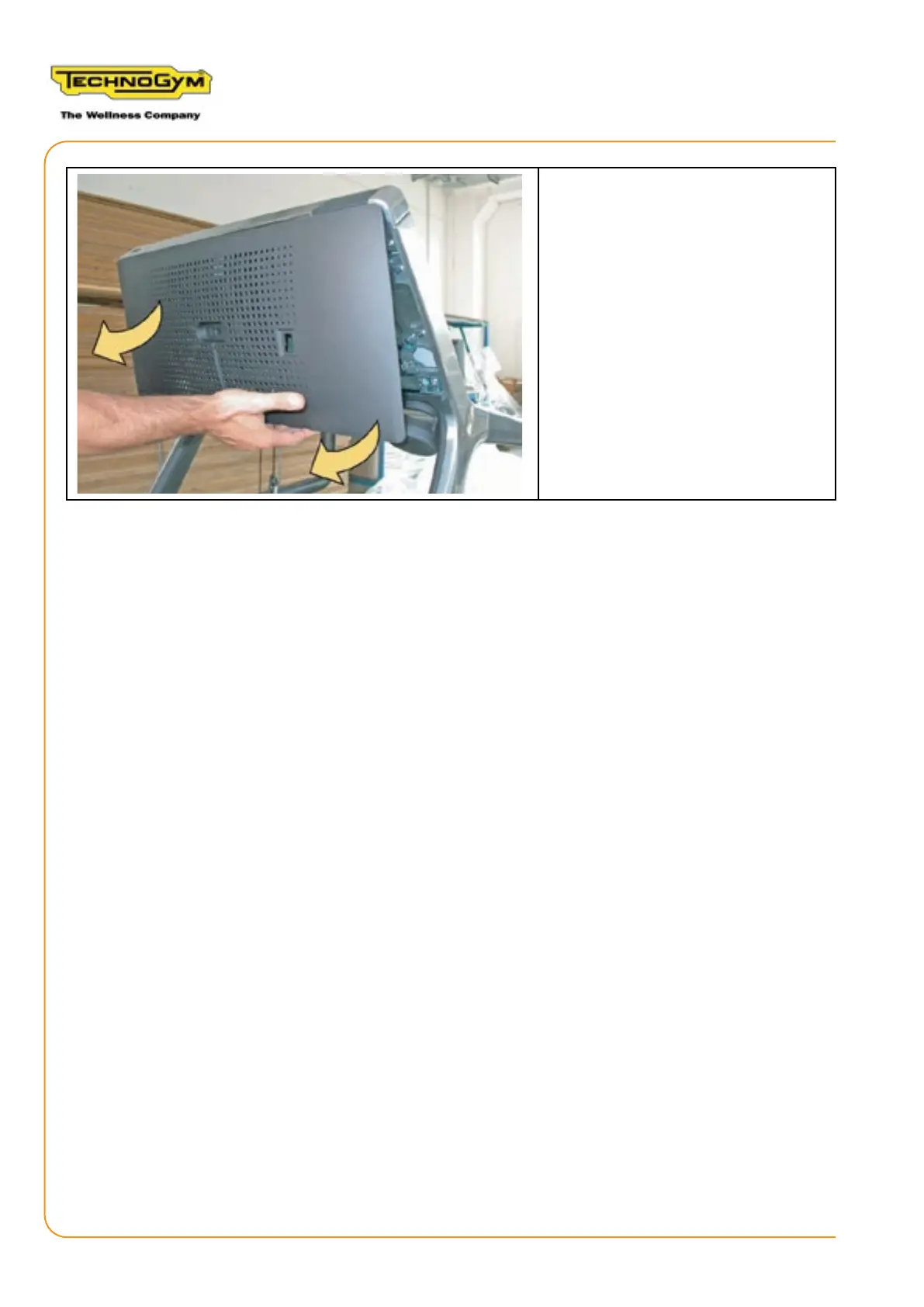
3. Remove the rear guard (C).
4.
Using
slide
pressure,
lift
the
guard
as
indicated
by
the
arrows
in the
g-
ure to the side and remove it.
RUN PERSONAL-UPGRADE VISIOWEB-UNITY 2.0
Assembly instructions- Rev. 1.1
e-ma
il:
support@technogym.com
P
age 10
9
11
Table of Contents
Main Page
Table of Contents
3
General Warnings
7
Introduction
7
Useful Advice
8
General Regulations Regarding Service Work
8
Personal Protective Equipment
8
Run Personal Equipment: Visioweb - Unity 2.0 Upgrade Instructions
9
Disassembling The Rear Guard
9
Disassembling The Display
11
Disassembling The Central Handlebar And Joystick
14
Replacing The Receiver And Joystick Signal Cable
17
Assembling The Display Magnetic Sensor And Headphone Board
19
Reassembling The Unity Display And W0008011 Guard
20
Connecting Cables To The Unity Display
24
Disassembling And Wiring The Low Kit
29
Reassembling The Display Guard And Low Kit
32
2.10 Operating Test
33
2.11 Configuring the Equipment
33
List of Changes for Manual Version
35
Manual Version 1 . 0
35
Manual Version 1 . 1
35
Other manuals for Technogym RUN PERSONAL
Service Maintenance Manual
156 pages
User Manual
35 pages
Technical Service Guide
126 pages
Related product manuals
Technogym Run XT
132 pages
Technogym RUN 1000
72 pages
Technogym Artis Run
37 pages
Technogym Run Forma
35 pages
Technogym RUN 600 XTPRO
158 pages
Technogym EXCITE Run 700
234 pages
Technogym EXCITE Run 500
234 pages
Technogym EXCITE Run 900
234 pages
Technogym Run Excite 500
42 pages
Technogym RUN NOW EXCITE +
252 pages
Technogym RUN EXCITE LIVE 5000
32 pages
Technogym RUN EXCITE LIVE 9000
32 pages












 To Next Page