C
Copyright Technolog Ltd. 2017. All rights reserved.
Information contained in this document subject to
change without prior notice.
Sheet 28 of 41
Technolog Limited,
Ravenstor Road,
Wirksworth,
DE4 4FY,
United Kingdom
T: +44 (0) 1629 823611
E: technolog@technolog.com
www.technolog.com
DMR No.: 7311
2137PM9001 Rev. A
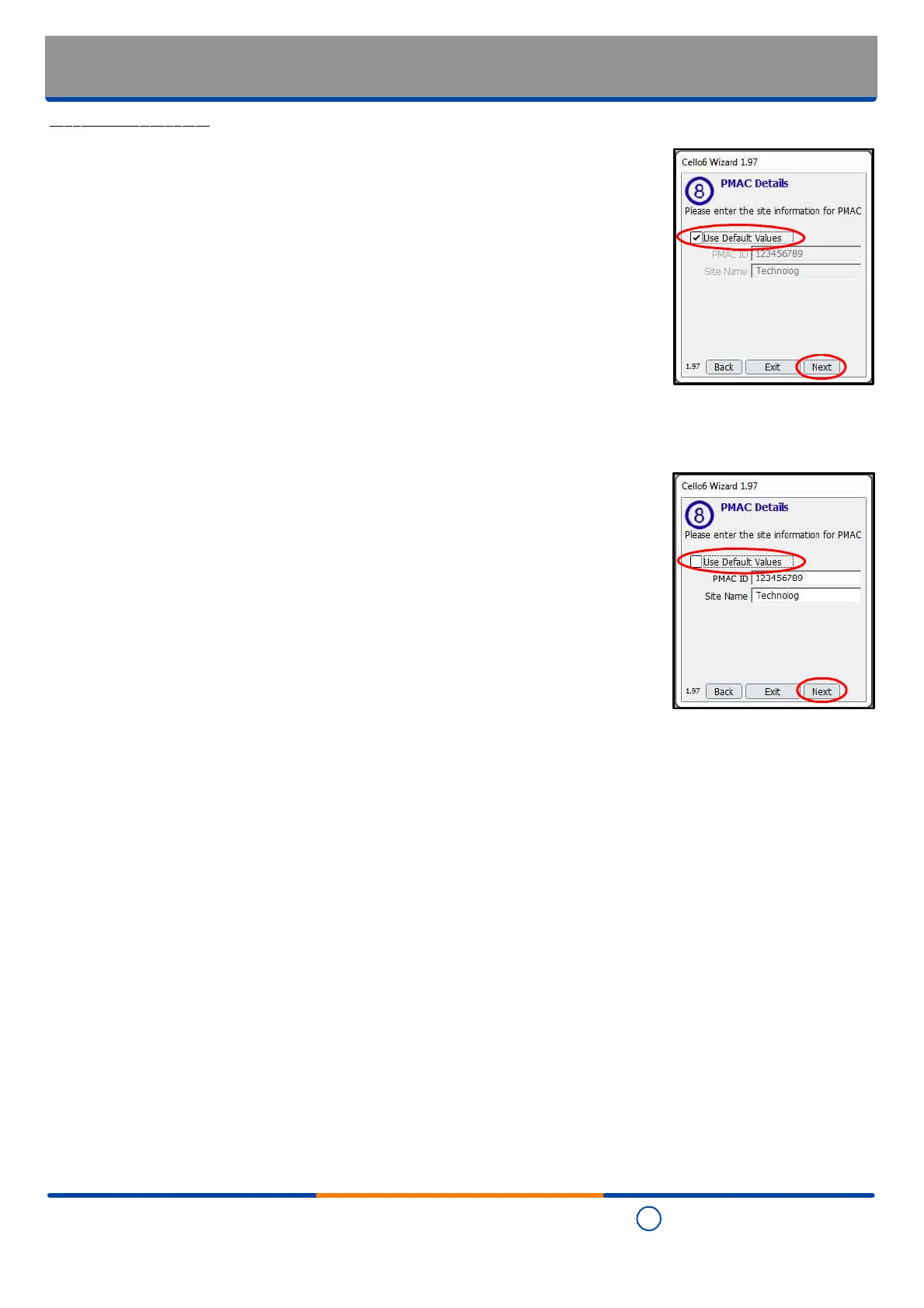
Step 11 - PMAC details
- Where it is required that the
telephone number
of the Cello 6S is sent as the identifier
then the "Use Default Values" box is to be ticked. Where this option is selected all
remaining fields will be greyed out and not accessible.
- Once set as required, select "Next".
- Where it is required that the
PMAC ID and site name
of the Cello 6S are sent as
identifiers then the "Use Default Values" box is to be left unticked.
- Enter the required 'PMAC ID' and 'Site Name'.
- Review the entries made and when set as required, select "Next".
Installation: Commissioning
- Cello 6 Wizard:
PMAC details


 To Next Page