C
Copyright Technolog Ltd. 2017. All rights reserved.
Information contained in this document subject to
change without prior notice.
Sheet 33 of 41
Technolog Limited,
Ravenstor Road,
Wirksworth,
DE4 4FY,
United Kingdom
T: +44 (0) 1629 823611
E: technolog@technolog.com
www.technolog.com
DMR No.: 7311
2137PM9001 Rev. A
Installation: Commissioning
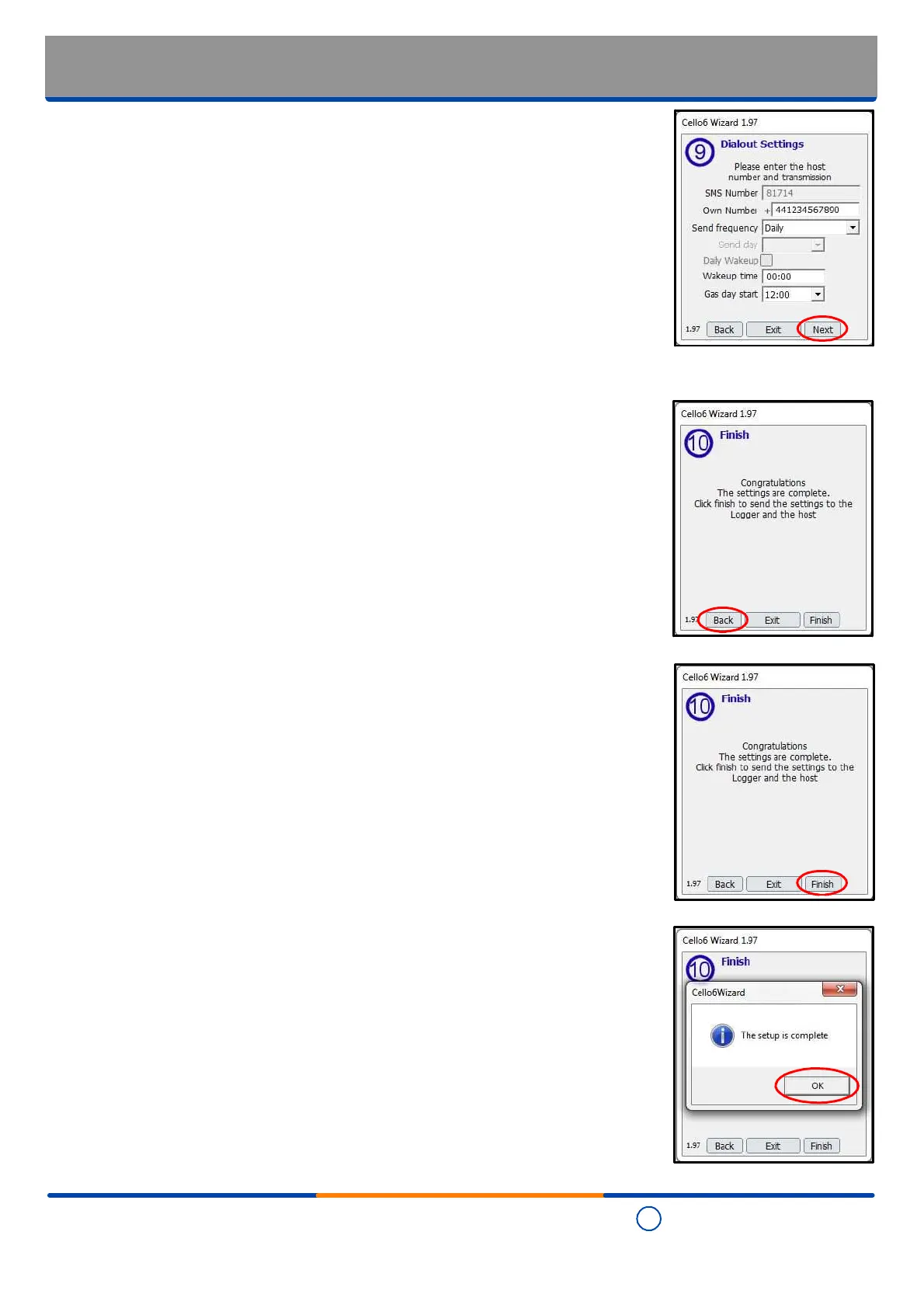
- Cello 6 Wizard: Dialout settings - Finalising
- Review the allocated "Dialout settings" and when they are set as required, select "Next".
Step 13 - Finish
- All configurable options should now have been set as required however where you are
unsure, select "Back" to revisit the previous settings and ensure they are all set as
required.
- When it has been ensured that all settings are as required, select "Finish".
- The configuration setup is now written into the Cello 6S
- Once completed the following is displayed:
- Select "OK" to close the "Cello 6 Wizard" software.


 To Next Page