C
Copyright Technolog Ltd. 2017. All rights reserved.
Information contained in this document subject to
change without prior notice.
Sheet 31 of 41
Technolog Limited,
Ravenstor Road,
Wirksworth,
DE4 4FY,
United Kingdom
T: +44 (0) 1629 823611
E: technolog@technolog.com
www.technolog.com
DMR No.: 7311
2137PM9001 Rev. A
Sub-monthly sends
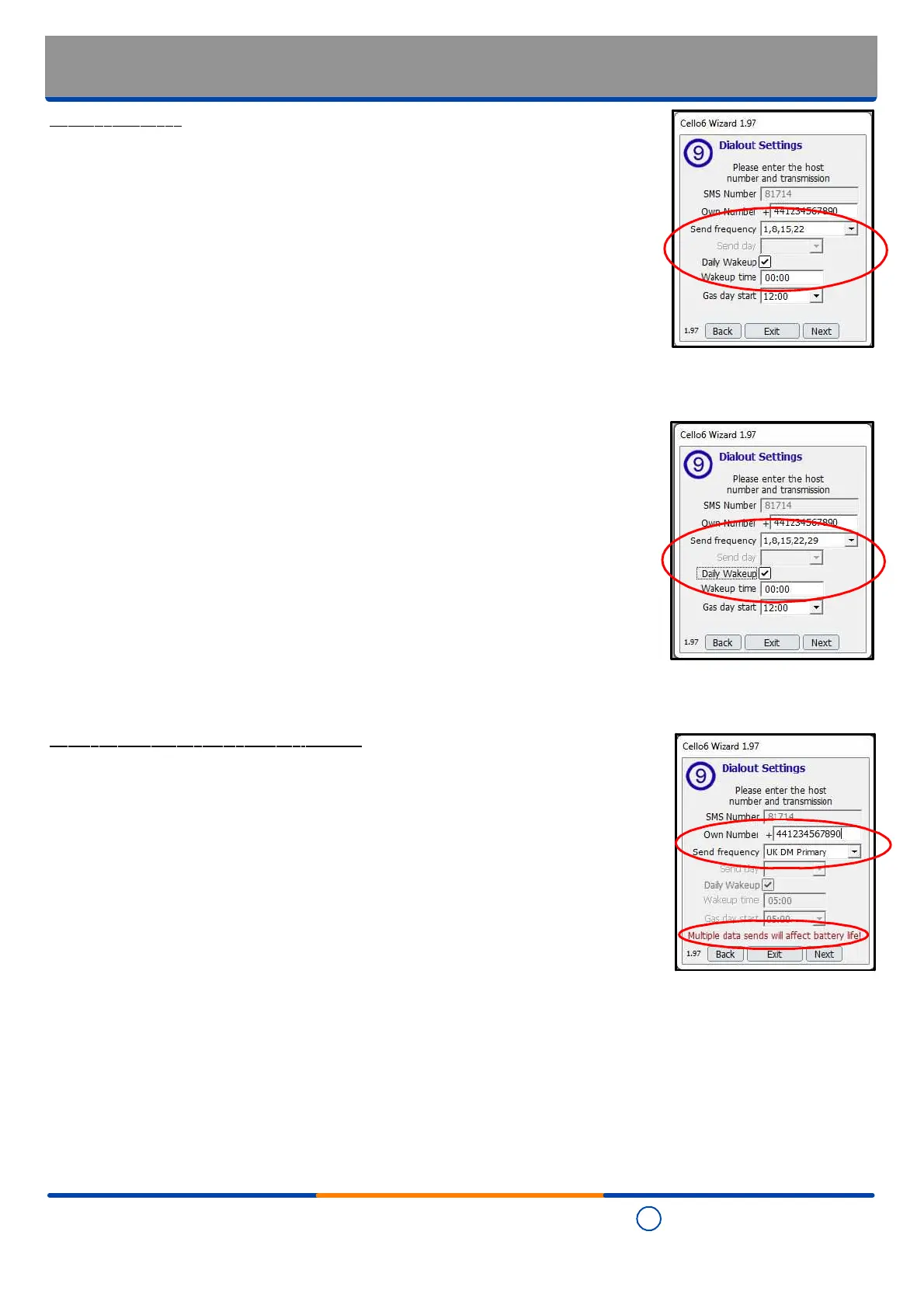
- Where the "Send frequency" is set as '1,8,15,22' then Cello 6S send its data on the 1st,
8th, 15th and 22nd days of the month (applicable to 4 week months).
- Where it is required that even though the Cello 6S will only send its date weekly, by
clicking the "Daily Wakeup" box it will wake up and 'listen' for any SMS configuration
messages being sent to it thereby allowing remote, over the air, setup and changes to
be made by the host computer. Where this option is not required then the box is to be
left unticked.
- The time of day at which it is required that Cello 6S will send its data is entered in the
"Wakeup time" box.
- Where the "Send frequency" is set as '1,8,15,22,29' then Cello 6S send its data on the
1st, 8th, 15th, 22nd and 29th days of the month (applicable to 5 week months).
- Where it is required that even though the Cello 6S will only send its date weekly, by
clicking the "Daily Wakeup" box it will wake up and 'listen' for any SMS configuration
messages being sent to it thereby allowing remote, over the air, setup and changes to
be made by the host computer. Where this option is not required then the box is to be
left unticked.
- The time of day at which it is required that Cello 6S will send its data is entered in the
"Wakeup time" box.
Sub-daily sends (project / application specific)
- Not to be used without first consulting Technolog!
- Where the "Send frequency" is set as 'UK DM Primary' then Cello 6S sends its data at
1am, 5am, 6am, 9am, 1pm, 5pm and 9pm - be aware that this method of data send
significantly reduces battery life expectancy!
- Note where this send frequency is selected it automatically:
- Enables the "Daily Wakeup" option to wake up and 'listen' for any SMS configuration
messages being sent to it thereby allowing remote, over the air, setup and changes to
be made by the host computer.
- Sets up the Cello 6S for daylight saving time ('DST') - refer to the "Installation:
Commissioning - Cello 6 Wizard: Setting the time" section of this manual for details.
- Configures the time of day at which Cello 6S takes its readings and sends the data so
the "Wakeup time" and "Gas day start" values cannot be changed.
Installation: Commissioning
- Cello 6 Wizard: Dialout settings - Other send options


 To Next Page