User’s manual 6 UPS EXA LCD 1.5 – 2-0 – 2.6
4.1.1 LCD Display
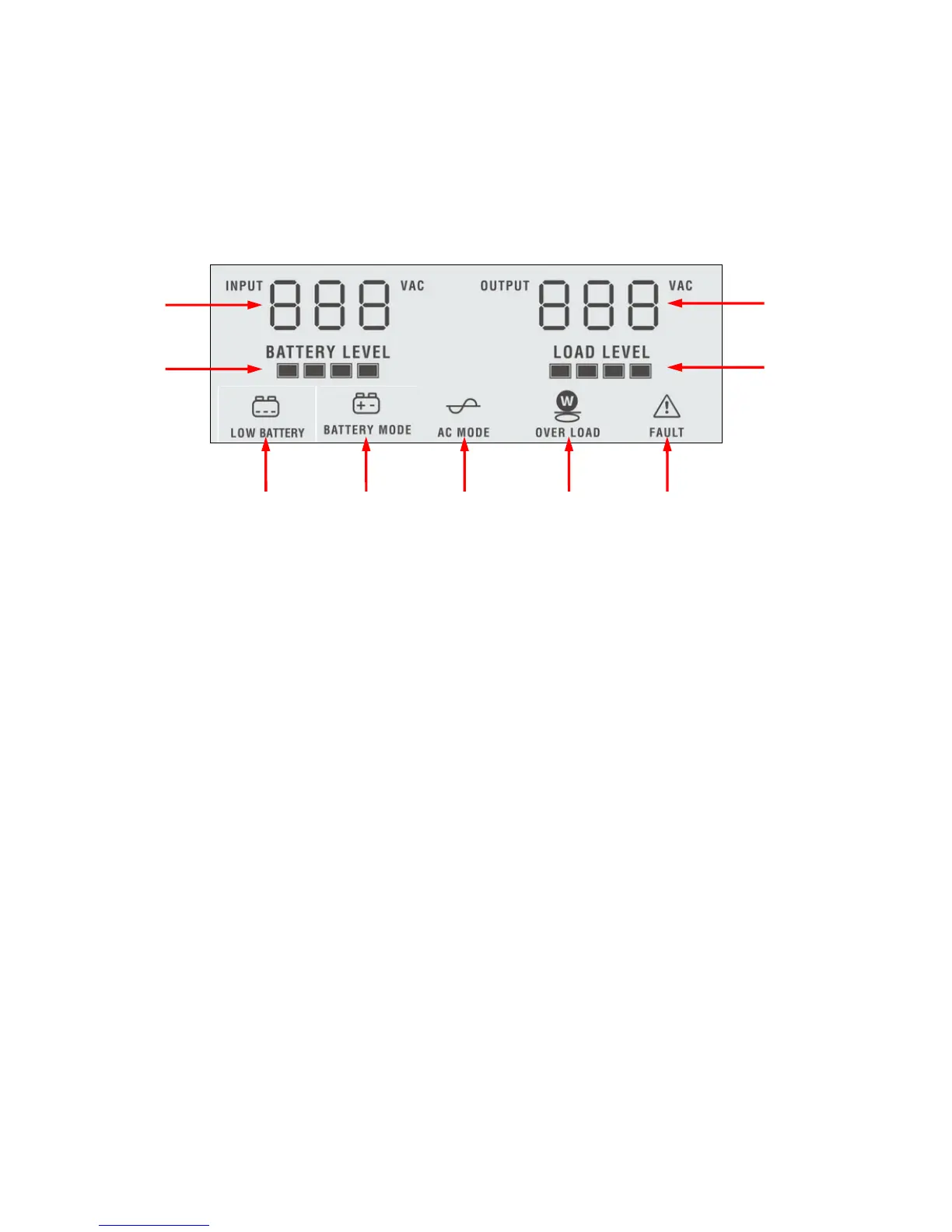
Please refer to figure 2.
Figure 2 –LCD Display
1. INPUT: the 3 digits indicate the Input Voltage.
2. OUTPUT: the 3 digits indicate the Output Voltage.
3. BATTERY LEVEL: is a four-segment light bar. This bar indicates the battery charging percentage as
explained below:
•
••
• 0~25%: only 1 segment is on.
•
••
• 25~50%: 2 segments are on.
•
••
• 50~75%: 3 segments are on.
•
••
• 75~100%: all the 4 segments are on.
4. LOAD LEVEL: is a four-segment light bar. This bar indicates the Output Load percentage as explained below:
•
••
• 0~25%: only 1 segment is on.
•
••
• 25~50%: 2 segments are on.
•
••
• 50~75%: 3 segments are on.
•
••
• 75~100%: all the 4 segments are on.
5. AC MODE: this icon is on to indicate the UPS is working in Normal mode.
6. BATTERY MODE: this icon is on to indicate the UPS is working in Battery mode.
7. LOW BATTERY: is on to indicate the Low Battery condition.
8. OVER LOAD: is on to indicate the Overload condition.
9. FAULT: is on to indicate the Fault condition.
1








 To Next Page