UPS EXA LCD 1.5 – 2-0 – 2.6 7 User’s manual
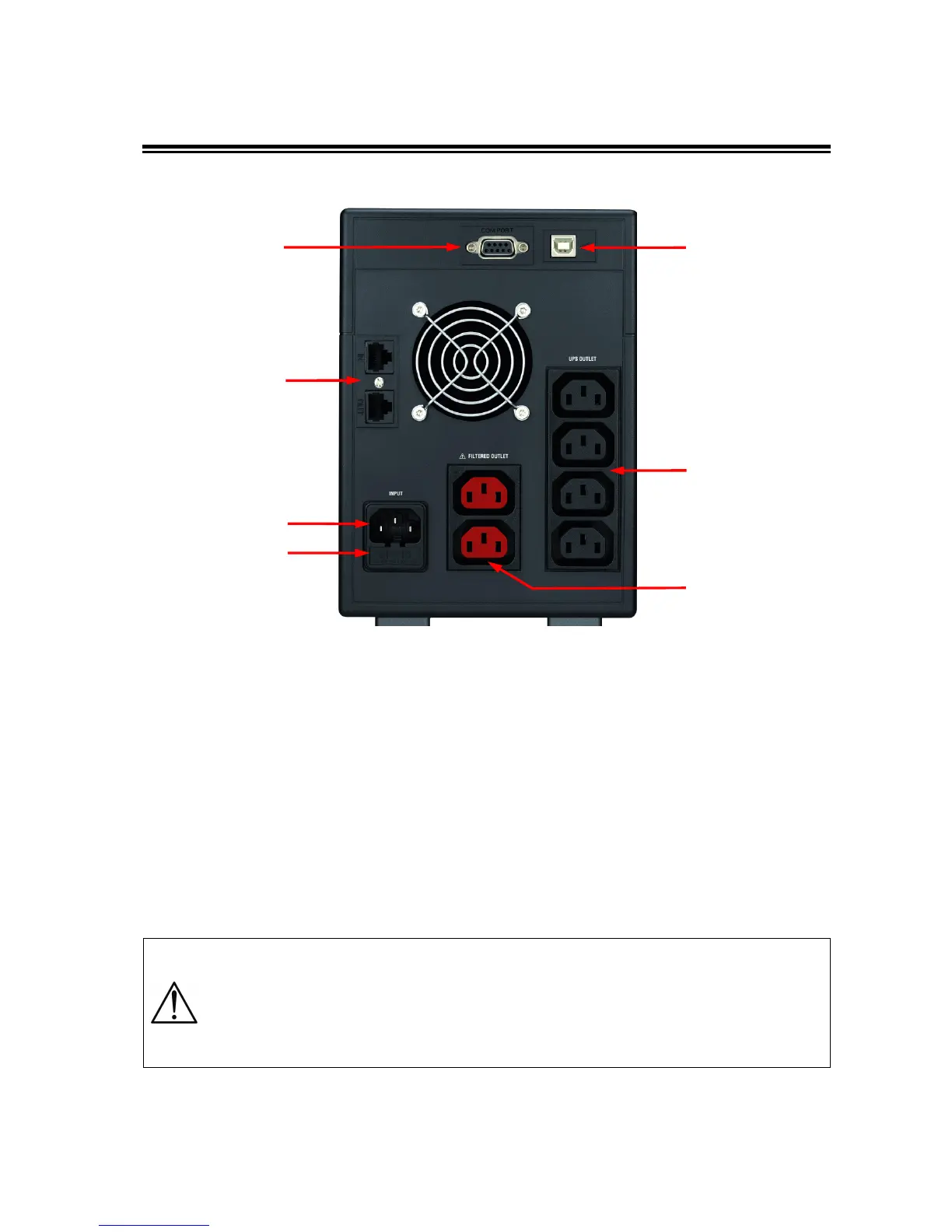
4.2 Rear Side
Figure 2 – Rear Side
1. Grounded AC Input power socket: IEC C14 type; to connect the UPS to the AC utility line.
2. Input fuse: electrical specification: max current 10 A (EXA LCD 1.5 – 2-0) or max current 15 A (EXA LCD 2.6),
voltage 250 V.
3. Grounded UPS Output receptacles: IEC C13 type, black colour, to supply critical loads.
4. Grounded (ONLY FILTERED) Output receptacles: IEC C13 type, red colour, to supply NON-critical loads.
5. Telephone protection (RJ11/RJ45 IN/OUT connectors): to protect and filter a phone line, an ADSL or a LAN
(TNV-3 type connections).
6. Computer Interface (DB9 female connector): it is the communication RS-232 port.
7. Computer Interface (USB connector): it is the communication USB port.
The 2 ONLY FILTERED Output receptacles (red colour, #4), protect only the devices
connected from overvoltages and disturbances of the AC line. Please connect ONLY the
NON-critical devices to the ONLY FILTERED Output receptacles
In case of anomaly to the AC line (black-out), ONLY the UPS Output receptacles (black
colour, #3) continue supplying the correct power to all connected equipment. Please
connect all the non-critical devices to the UPS Output receptacles.
5








 To Next Page