7
Setup Instructions for BoomPilot
®
98-05243 R0
BOOMPILOT CONFIGURATION USING YOUR MATRIX® PRO
The Matrix Pro is used to congure the vehicle and its implements.
To access BoomPilot conguration options:
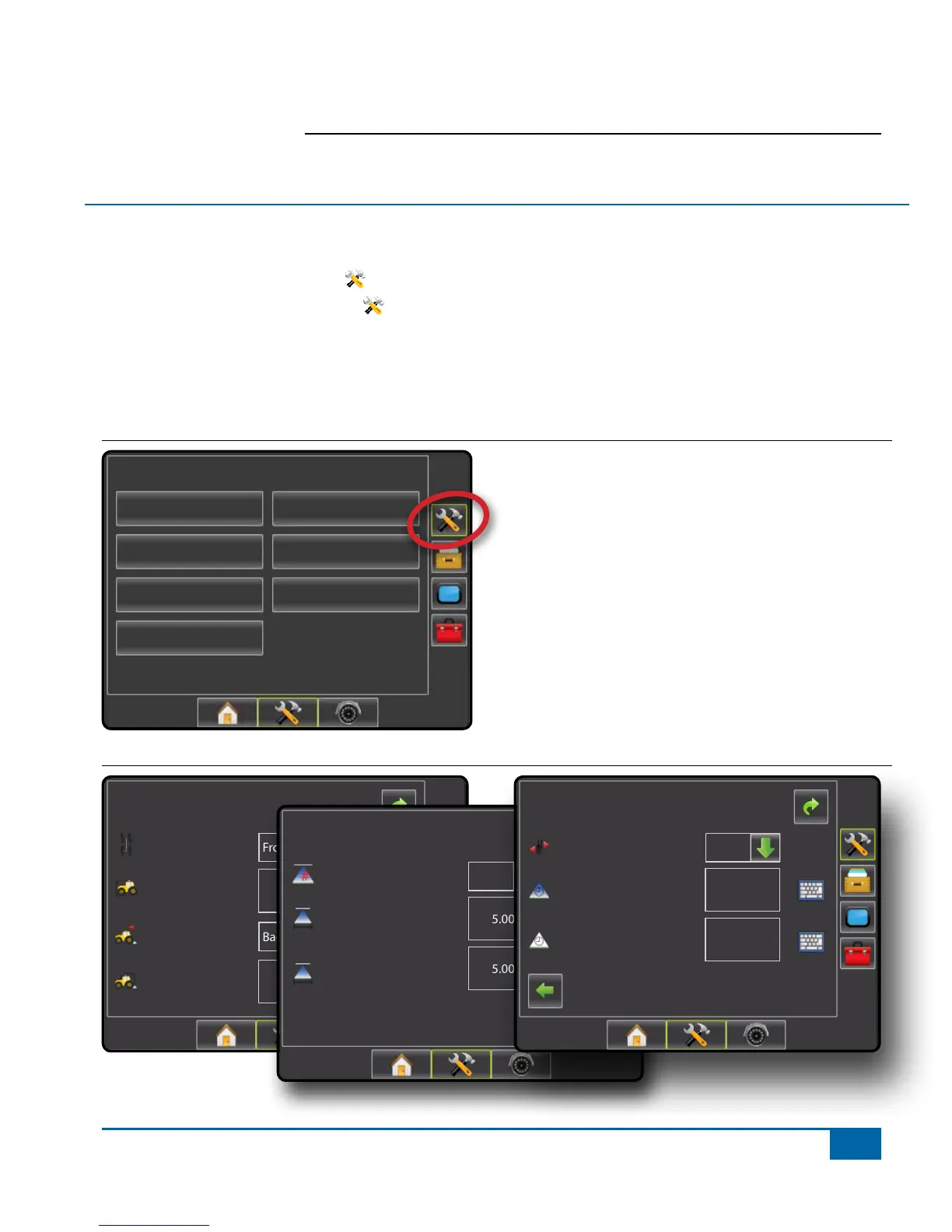
1. Press UNIT SETUP bottom tab .
2. Press CONFIGURATION side tab .
3. Select from:
►Vehicle – used to establish vehicle type, antenna height, direction to boom and distance to boom.
►Implement – used to establish number of boom sections, guidance width, spray width, overlap percentage,
implement delay on time and implement delay off time.
Figure 1-8: Configuration Options
Conguration
Vehicle
Implement
AutoSteer
Tilt
Lightbar
GPS
Video
Figure 1-9: Configure Vehicle and Configure Implement Options
Cong-> Vehicle
12.50 ft
0.00 ft
Front Wheel
Backward
Vehicle Type
Ant Height
Dir to Boom
Dist to Boom
Cong->Implement
Num Sections
Spray Width
Guidance Width
75.00 ft
75.00 ft
15
Cong->Implement (2)
Overlap
Delay O
Delay On
1,00 s
1,00 s
50%


 To Next Page