14
www.teejet.com
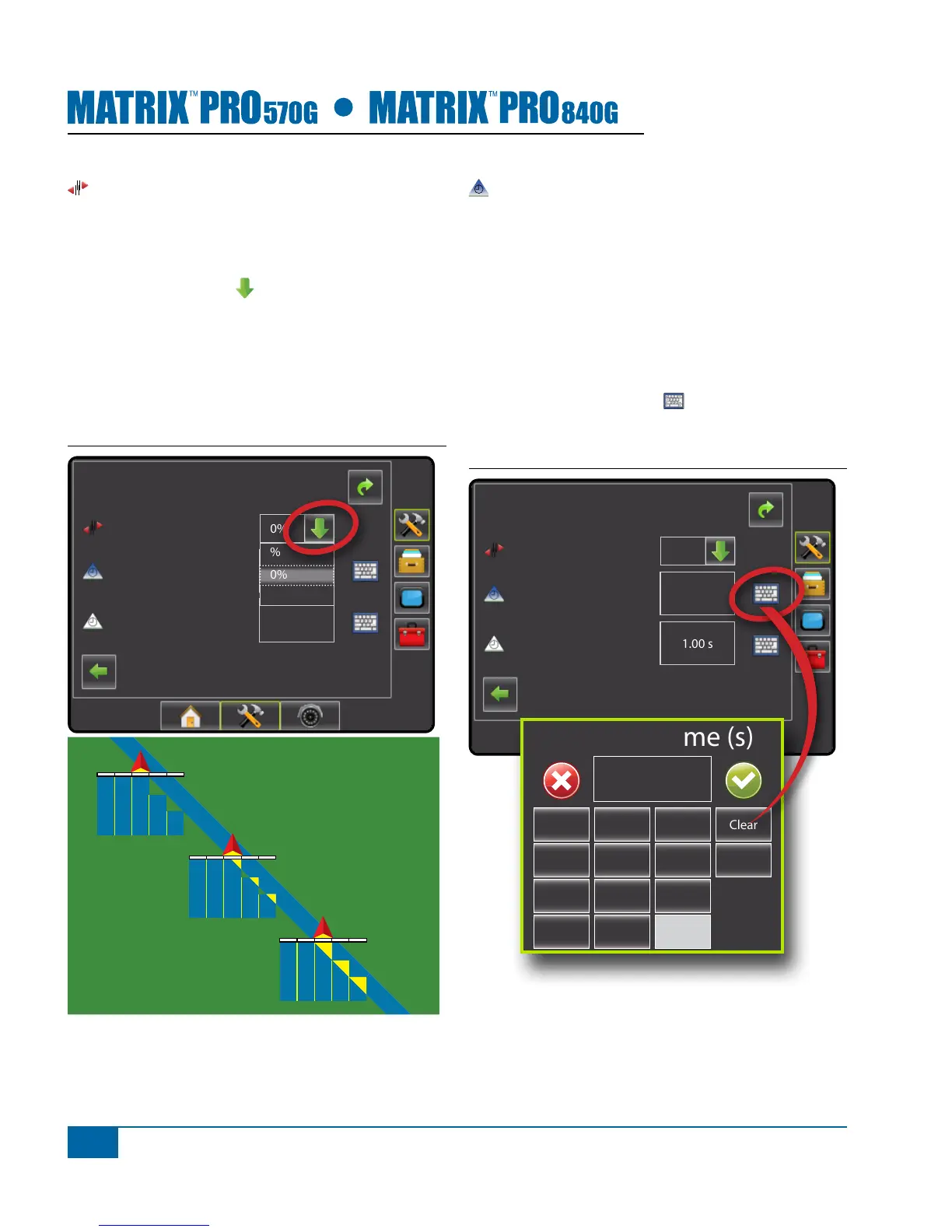
Overlap
Overlap determines the amount of overlap allowed
when the each boom section is turned on and off using
Automatic Boom Section Control. Default is 50%.
1. Press DOWN arrow to access the list of
options.
2. Select:
►0%
►50%
►100%
Figure 1-19: Overlap
Cong->Implement (2)
Overlap
Delay O
Delay On
1.00 s
1.00 s
50%
0%
50%
100%
100%
50%
0%
Delay On
Delay On functions as a “look ahead” for establishing
the timing for the boom section valves to switch on
exactly when entering an area that has not been
applied. If the boom turns on too soon when entering a
non-applied area, decrease the Delay On setting. If the
boom turns on too late when entering a non-applied
area, increase the Delay On setting. Range is 0.0 -
10.0 seconds. Default is 1.00 second.
1. Press the KEYPAD icon .
2. Use the entry screen to establish the delay on time.
Figure 1-20: Delay On
Cong->Implement (2)
Overlap
Delay O
Delay On
1.00 s
1.00 s
50%
Delay On Time (s)
1 2 3
Clear
4 5 6 <--
7 8 9
0 .
+/-


 To Next Page